How to Use Claude AI for Financial Analysis in 2026
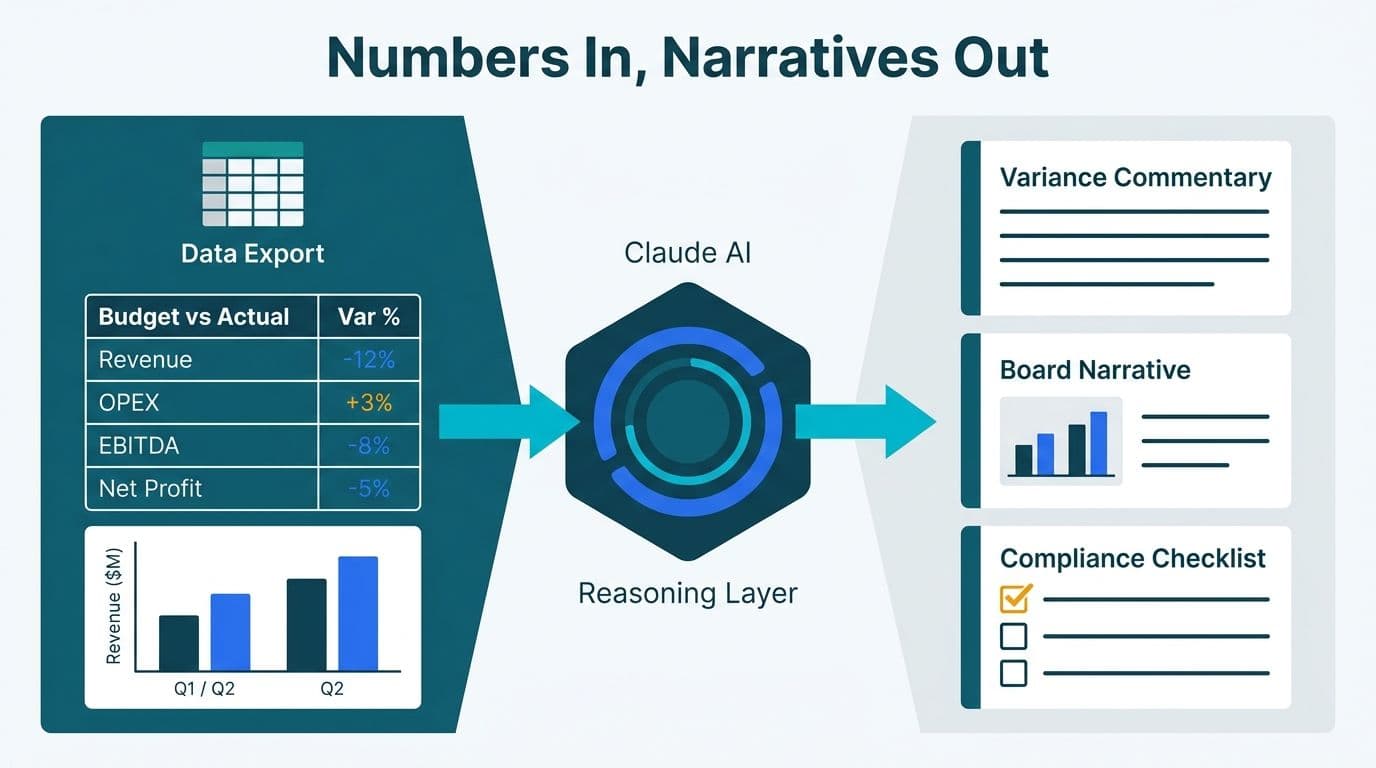
Finance teams use Claude AI for financial analysis by feeding it structured data exports, management account templates, and variance reports, then prompting it through specific workflows: writing variance commentary, drafting board narratives, generating compliance checklists, and stress-testing scenarios. Unlike a dashboard, Claude operates as a reasoning layer that turns raw numbers into decision-ready language and structured analysis. As of 2026, large language models have crossed from pilot experimentation into production use across FP&A, treasury, and compliance teams in regulated industries — with variance commentary and board narrative drafting consistently delivering the fastest time-to-value.
Key Takeaways
Claude AI works best in finance as a prompt-driven workflow tool - not a self-running analytics engine
Variance commentary, board narrative drafting, and compliance checklist generation are the highest-ROI starting workflows
AI governance and human review checkpoints are non-negotiable before any output reaches a board or regulator
Finance teams in the US, UK, and Canada face distinct compliance contexts (SOC 2, GDPR, PIPEDA) that shape how Claude outputs are stored and shared
Structured AI automation consulting helps finance teams scale these workflows with governed prompt libraries and integration blueprints
What Do AI Agents in Finance Actually Do?
AI agents in finance are software processes that receive a task in natural language, use a large language model to reason through it, and return a structured output - a draft, a checklist, a summary, or a transformed dataset. Claude is one such agent runtime, accessed through its web interface for ad-hoc use or via API for automated pipelines.
In practical terms, what these agents actually do depends on how they are wired into existing finance workflows. In a standalone setup, an analyst exports a variance table from their ERP or BI tool, pastes it into a Claude session with a structured prompt, and receives a first-draft commentary in seconds. In a more automated setup - the kind that AI workflow automation examples for business illustrate - Claude sits inside a pipeline that pulls data from cloud sources and returns formatted outputs directly into a document management system.
Most finance teams start with the standalone approach and graduate to automation only after they have validated output quality over several reporting cycles.
Where Does Claude Fit Relative to Other Finance AI Tools?
Teams evaluating AI forecasting tools for finance teams often ask how Claude compares to dedicated forecasting platforms. The honest answer: Claude is not a forecasting engine. It does not run regressions, build financial models natively, or execute statistical predictions. Its strength is language and reasoning - synthesizing numbers into narrative, checking policy documents for compliance gaps, and rewriting dense CFO memos for non-finance board audiences.
For teams already using BI dashboards, Claude is additive rather than substitutive. It converts dashboard outputs into language. Teams building the upstream data layer should consult the FP&A Dashboard in Power BI guide for how structured data preparation feeds cleaner Claude outputs.
How to Use Claude AI for Financial Analysis: Variance Commentary
Variance commentary is where most FP&A teams get their first real return from Claude AI. The workflow is repeatable and low-risk as a starting point.
Prepare your input data. Export your actual vs. budget variance table from your ERP, accounting platform, or BI tool. A clean, labelled table in CSV or plain text works best. Remove any personally identifiable data before pasting.
Write a structured system prompt. Tell Claude your company's sector and size, the reporting period, the audience (CFO, board, audit committee, or external auditors), the required tone (factual, concise, no speculative language), and any known drivers you want emphasized.
Request driver-based commentary. Ask Claude to write a brief commentary for each major variance - one to two sentences per line item - leading with the business driver, not the percentage.
Review and refine. The output is a first draft. A reviewer with knowledge of the business should check driver accuracy, remove any speculative language, and adjust figures Claude may have described imprecisely. Teams running this workflow consistently report reducing first-draft variance commentary time from two to three hours to under fifteen minutes per reporting cycle — the review step, not the draft, now determines the total time.
A sample prompt for a US SaaS company might read: "You are an FP&A analyst preparing October management accounts for an audit committee. Revenue is 12% below budget due to a delayed enterprise contract. Operating expenses are 4% below budget due to a Q3 hiring freeze. Write factual, driver-based commentary. No speculation about future performance."
For UK fintech firms reporting under FCA guidelines, this same workflow applies - with an additional instruction to flag any variance touching regulatory capital or liquidity thresholds so the reviewer knows where extra scrutiny is required. GDPR applies to any customer-level data in the variance pack; aggregate or redact before pasting into Claude.
How Do Finance Teams Use Claude for Board Narrative Drafting?
Board narratives require more than summarization - they require synthesis. A board pack introduction needs to tell a coherent story: where the business stands, what changed, what management is doing about it, and what the board needs to decide. This structured reasoning task is where Claude delivers consistent value.
Gather your inputs before opening a Claude session: finalized variance commentary, the three to five strategic priorities management has communicated for the quarter, and the prior board narrative for tone reference.
Prompt Claude to draft a 400-600 word CFO or CEO introduction that weaves together financial performance, strategic context, and any material risks or opportunities.
Flag every forward-looking statement for legal review before the pack goes to the board. This checkpoint is non-negotiable in any market - particularly critical for US public companies under SEC disclosure rules and UK listed firms under FCA guidance.
A Canadian manufacturing company's finance team might use this workflow to prepare quarterly board materials, instructing Claude explicitly to exclude any individual-level supplier or customer data in compliance with PIPEDA data minimization requirements.
The most common error teams make at this stage is distributing Claude's draft without a named senior reviewer. Claude only knows what is pasted into the prompt - if the input data contains an error, the narrative will reflect it. Human review is a control, not an option.
How Do You Generate Compliance Checklists with Claude AI?
Compliance checklist generation is one of the cleanest Claude use cases in finance because the output is a structured list rather than a prose narrative, and the quality bar is verification rather than creativity.
Identify the regulatory framework you need to check against - SOX Section 302/404, IFRS 9, GDPR Article 30, PIPEDA Schedule 1, or an internal risk and controls matrix. Paste the relevant policy section into Claude and describe the specific scenario (for example: a month-end close for a US healthcare finance team subject to HIPAA and SOC 2 Type II). Ask Claude to generate an itemized checklist of required disclosures, controls, and sign-off steps. Have a compliance officer or external auditor review and approve before the checklist enters your formal control library.
This workflow does not replace a compliance officer. What it does is reduce the time spent drafting the initial checklist, freeing compliance professionals to focus on judgment calls rather than document production. For teams managing SaaS financial reporting with GDPR obligations, the GDPR compliant financial reporting checklist covers the specific fields that a Claude-generated checklist should include.
| Use Case | Input to Claude | Expected Output | Human Review Step |
|---|---|---|---|
| Variance commentary | Actuals vs. budget table | Draft commentary by line item | FP&A analyst verifies drivers |
| Board narrative | KPIs + strategic priorities + prior narrative | 400-600 word CFO introduction | CFO or legal reviews forward-looking statements |
| Compliance checklist | Regulatory text or policy doc | Itemized control checklist | Compliance officer or auditor signs off |
| Scenario analysis | Three sets of assumption inputs | Narrative summary per scenario | Finance director validates assumptions |
| Month-end close | Close calendar + ERP process list | Step-by-step task checklist with owners | Controller reviews for completeness |
How Do FP&A Teams Run Scenario Analysis with Claude?
AI forecasting for finance teams is frequently misunderstood in the context of Claude. Claude does not build financial models or run statistical forecasts. What it does well is translate scenario assumptions into readable narrative, surface logical inconsistencies across scenarios, and draft the scenario analysis section of a board or investor memo.
Build your three scenarios (base, upside, downside) in your FP&A tool or spreadsheet. Export the key assumption sets and resulting P&L outcomes as a clean summary table. Paste all three scenarios into Claude alongside a one-sentence description of the key business decision the scenarios are designed to inform. Ask Claude to write a plain-language summary of each scenario, identify any assumption conflicts between scenarios, and draft the scenario analysis section of your board memo.
Use Claude's narrative as the language layer of your scenario pack, sitting alongside the quantitative model your team built. A US healthcare finance team running this workflow for an annual budget resubmission might instruct Claude to flag any scenarios where projected headcount growth conflicts with HIPAA-compliant staffing ratios - achievable by pasting the relevant staffing policy into the same prompt session.
The pattern that consistently produces the best results is treating Claude as a reasoning layer over structured data you provide, rather than as a search engine for financial facts.
How Do You Automate Month-End Financial Close with AI?
Automating the month-end financial close with AI does not mean Claude closes your books - your ERP handles that. What Claude can automate is the language and coordination work surrounding the close: drafting the close calendar, generating task checklists, writing commentary for the trial balance, and summarizing open items for the controller's daily review.
At the start of each close cycle, prompt Claude with your standard close steps (bank reconciliation, accruals posting, intercompany eliminations, variance commentary, board pack draft) and the close date. Claude returns a day-by-day schedule with suggested task owners and dependencies. Each morning during close week, paste the open items log into Claude and ask for a prioritized summary with suggested resolution notes - this pre-sorts what needs escalation versus what is routine, making daily standups more focused. Once actuals are finalized, the variance commentary workflow above generates the management accounts narrative.
For teams evaluating whether these Claude-based workflows can integrate with a broader data and analytics architecture, the AI workflow automation pre-launch checklist identifies the failure modes that cause finance teams to abandon integration projects after initial pilots.
What Is an AI Governance Framework for Finance Teams Using Claude?
An AI governance framework for finance teams using Claude needs to address four questions before any workflow goes live in a regulated environment.
What data can enter Claude sessions? Define a clear written policy: no customer personally identifiable information, no material non-public information ahead of public disclosure, no employee-level compensation data. US SOX-scoped teams and UK FCA-regulated firms need this documented and approved by legal or compliance before any analyst uses Claude for reporting work.
Who reviews before distribution? Every Claude output reaching a board, regulator, audit committee, or external party must have a named human reviewer who has signed off on factual accuracy. This is the minimum control separating governed AI use from ungoverned experimentation.
How are prompts and outputs logged? Finance teams subject to SOC 2, GDPR, or PIPEDA need an audit trail. For ad-hoc use, a prompt log in a shared document — capturing at minimum the date, analyst name, data inputs used, Claude's output, and the reviewer's name and sign-off date — is a workable starting point that satisfies most internal audit requirements without additional tooling. For API-based automated pipelines, log every prompt-response pair with a timestamp, user identity, and reviewer sign-off.
How are errors escalated? Define the path from an identified inaccuracy to documented corrective action. In regulated finance environments, a material error in board reporting needs a remediation process that satisfies both internal audit and the applicable regulator.
The governance question is also where cost conversations typically arise. Teams frequently ask how much AI consulting for finance costs when they move from ad-hoc Claude experiments to governed, enterprise-grade workflows. Scope depends on integration complexity, compliance requirements, and whether custom prompt libraries and review workflows need to be built. The AI automation consulting service page outlines how these engagements are typically structured and scoped.
Teams that invest in governance design upfront consistently achieve higher return on investment because they avoid the rework, compliance risk, and trust erosion that follow ungoverned AI use in a regulated environment.
---
About Lets Viz: Lets Viz is a data analytics and AI automation consultancy serving US healthcare organizations, UK fintech firms, Canadian manufacturers, and global SaaS businesses since 2020. Engagements span FP&A workflow automation, compliance-aligned reporting architecture, and enterprise AI strategy. Rated 5.0 on Clutch, the firm's consultants combine hands-on ERP and BI implementation experience with applied AI workflow design across regulated industries.
Ready to move beyond ad-hoc Claude experiments and build a governed, repeatable AI workflow for your finance team? Explore how AI automation consulting from Lets Viz can accelerate your FP&A transformation with structured prompt libraries, integration blueprints, and compliance-aligned governance design.