A CFO's 6-question AI risk checklist for Power BI (before your auditors ask first)
Ninety-two percent of finance functions are implementing or planning to implement AI-enabled solutions by 2026, according to Gartner. Forty-seven percent of enterprise AI users made at least one major decision based on hallucinated content in 2024, according to Deloitte. Both of those numbers are true at the same time, and that gap — between adoption speed and governance maturity — is exactly where CFO risk lives.
A 2025 EY survey of 975 C-suite leaders found that only 33% of companies have strong controls across responsible AI frameworks. Deloitte's survey of 3,235 leaders found that only 21% have a mature governance model for autonomous AI agents. Confidence in data governance among finance leaders declined from 55% rating it "mature" in 2024 to 46% in 2025 — falling as adoption accelerates.
This is the environment in which Copilot for Power BI is being deployed to generate board narratives, variance explanations, and KPI summaries. Your external auditors are developing questions about AI in financial reporting right now. The Financial Reporting Council published landmark guidance on AI use in audit in June 2025. The question is not whether this will come up in your next audit cycle — it is whether you will have good answers when it does.
Here are the six questions that matter, with what we know from Microsoft's own documentation, published research, and the regulatory record.
Question 1: Where do our prompts and data go — and who sees them?
This is the question most finance leaders think they know the answer to, and most do not have it right.
When a user submits a prompt to Copilot for Power BI, the prompt, the semantic model metadata, and potentially sample data rows are sent to Azure OpenAI Service — Microsoft's hosted version of the OpenAI models, operated within Microsoft's infrastructure, not OpenAI's public API. Data stays within your capacity's geographic region by default: EU Data Boundary is supported for European tenants, US residency is available for US tenants.
Microsoft eliminated the 30-day retention period for prompt data in 2025, and confirms that your data is not used to train Microsoft's foundation models. Audit logs are written to your organizational tenant via Microsoft Purview — but audit logging is disabled by default and must be explicitly enabled. Standard retention is 180 days; extended to 10 years with Purview Audit Premium.
The risk that is less discussed: Copilot sees all semantic model metadata — every table name, column name, and measure definition — for the model it is querying, regardless of row-level security. A user restricted from seeing individual rows can still prompt Copilot in ways that reveal schema structure. This is documented in Microsoft's own security guidance and is worth a specific conversation with your data governance team before broad deployment.
Question 2: Is Copilot respecting our row-level security?
Row-level security (RLS) in Power BI restricts which rows of data a given user can see. In a finance context, this typically means regional controllers see their region, territory managers see their territory, and consolidated views are restricted to authorized users. This is a core configuration concern for any managed Power BI deployment handling sensitive financial data.
"Copilot-generated DAX may inadvertently use ALL() or ALLEXCEPT() functions that expose protected data." — Microsoft Copilot for Power BI security documentation, 2026.
Microsoft's documentation on Copilot security is explicit that preview Copilot experiences can bypass RLS restrictions, and that Copilot-generated DAX cannot be tested using the standard "Test as Role" feature in Power BI Desktop. This means your normal process for validating RLS compliance does not work for AI-generated measures.
The operational consequence: any AI-generated measure that uses ALL(), ALLEXCEPT(), REMOVEFILTERS(), or similar functions needs explicit RLS validation before it is promoted to production, using a test account with restricted permissions rather than a Power BI Desktop role test.
What to do: Restrict Copilot access to sensitive RLS-protected datasets via security groups until you have a validated testing process. This is not a permanent restriction — it is a sequencing decision until governance is in place.
Question 3: Can we reproduce and audit what Copilot told us?
SOX compliance requires that financial reporting processes be repeatable, documented, and auditable. AI introduces a structural tension with all three of those requirements.
Copilot for Power BI is non-deterministic — the same prompt submitted twice will produce different outputs. This is not a bug; it is how large language models work. But it means that "the AI generated this number" is not a statement an auditor can verify, because they cannot rerun the AI and get the same answer.
The seven SOX risks with AI, as documented by accounting and compliance research, cluster around this non-determinism: incomplete accuracy verification, lack of human judgment documentation, segregation of duties questions when the same person prompts and approves, version management gaps when model updates change outputs, and data retention requirements that may conflict with Microsoft's prompt data handling.
What auditors are asking now: How does the AI reach its conclusions? What audit trail proves the output was reviewed and approved by a qualified human? Are prompts, drafts, and reviewer changes preserved as part of workpapers? Is there notation in the document that it was AI-assisted and reviewed by a named person?
None of these requirements are impossible to meet — but they require deliberate process design. "AI-assisted draft, reviewed by [name and date]" is becoming a standard notation requirement in AI-touched financial documents.
Question 4: What happens when Copilot fills in a data gap?
Microsoft's own documentation on Copilot for Power BI contains a sentence that should be in every AI governance policy for finance teams:
"Inaccuracy can occur because semantic models have missing values, and since AI is generating the summary, it can try to fill the holes and fabricate data."
This is data fabrication — not in a malicious sense, but in the sense that the AI will produce a plausible-looking number rather than reporting that it does not have sufficient data. Across AI systems generally, models are 34% more likely to use confident language ("definitely," "certainly," "without doubt") when generating incorrect information, according to MIT research published in January 2025. The fabrications that are hardest to catch are the ones that sound most authoritative.
The global cost of AI hallucinations in 2024 was estimated at $67.4 billion, with per-employee mitigation costs averaging $14,200 per year (Forrester). EY's survey found 99% of organizations experienced financial losses from AI risks, with 64% suffering losses exceeding $1 million.
The mitigation: Remove rows with missing values from datasets before they are exposed to Copilot. Define explicit handling for null values at the semantic model level. Do not rely on Copilot's output in areas where the underlying data has known gaps without first resolving those gaps.
Question 5: Who is responsible when the number is wrong?
This is a governance question, not a technical one, and it is the question most organizations have not answered before deploying AI in financial reporting.
AI systems can miscalculate profits, overlook critical details, or generate statements that look real but are incorrect, as documented in the U.S. GAO's 2025 report on AI use in financial services. In 2024, a robo-advisor hallucination affected 2,847 client portfolios and cost $3.2 million in remediation. The average time to discover an AI-generated error in a business context was 3.7 weeks, by which point the decision informed by that error has typically already been made.
The regulatory position is developing rapidly. The SEC fined investment advisers for overstating AI capabilities in 2024–2025. Global AML fines increased 417% in H1 2025 versus H1 2024, with financial institutions facing average fines of $5–10 million for AI governance failures. The EU AI Act classifies financial audit systems as high-risk applications requiring rigorous validation, documentation, and human oversight.
The governance answer: Accountability for AI-assisted financial outputs must rest with a named human, not with the AI tool or its vendor. The organization is responsible for the number, regardless of what generated it. This needs to be explicit in your AI use policy, your SOX documentation, and your staff training.
Question 6: Is our semantic model ready for Copilot — or are we amplifying confusion?
The final question is the most operational, and it is the one that determines whether Copilot helps or misleads. Microsoft's documentation is direct: "Without proper data prep, Copilot can struggle to interpret data correctly — leading to generic, inaccurate, or even misleading outputs." This is an area where a well-governed managed Power BI setup pays dividends directly in AI accuracy.
The accuracy variance from model hygiene alone is substantial. Microsoft's research shows a 15–20 percentage point variance in Copilot output accuracy based solely on whether column names are human-readable or abbreviated. Fields named "Amt," "Qty," "Cust_ID" produce meaningfully worse results than "Amount," "Quantity," "Customer ID."
Three semantic model configurations produce the highest AI risk in finance contexts:
1. Numeric fields set to "Summarize automatically"
Year, CustomerNumber, and similar numeric identifiers will be summed or averaged by Copilot if not explicitly set to "Don't Summarize" — producing nonsensical aggregations that may not be immediately obvious.
2. Missing sensitivity labels
A single file or dataset without proper classification can expose enterprise-wide data through Copilot queries. Copilot outputs do not consistently inherit security labels from source data.
3. Undocumented measures and no linguistic schema
Copilot uses the linguistic schema — synonyms, descriptions, relationships — to understand what objects mean. An undocumented model with no synonyms produces the lowest accuracy and the highest fabrication risk.
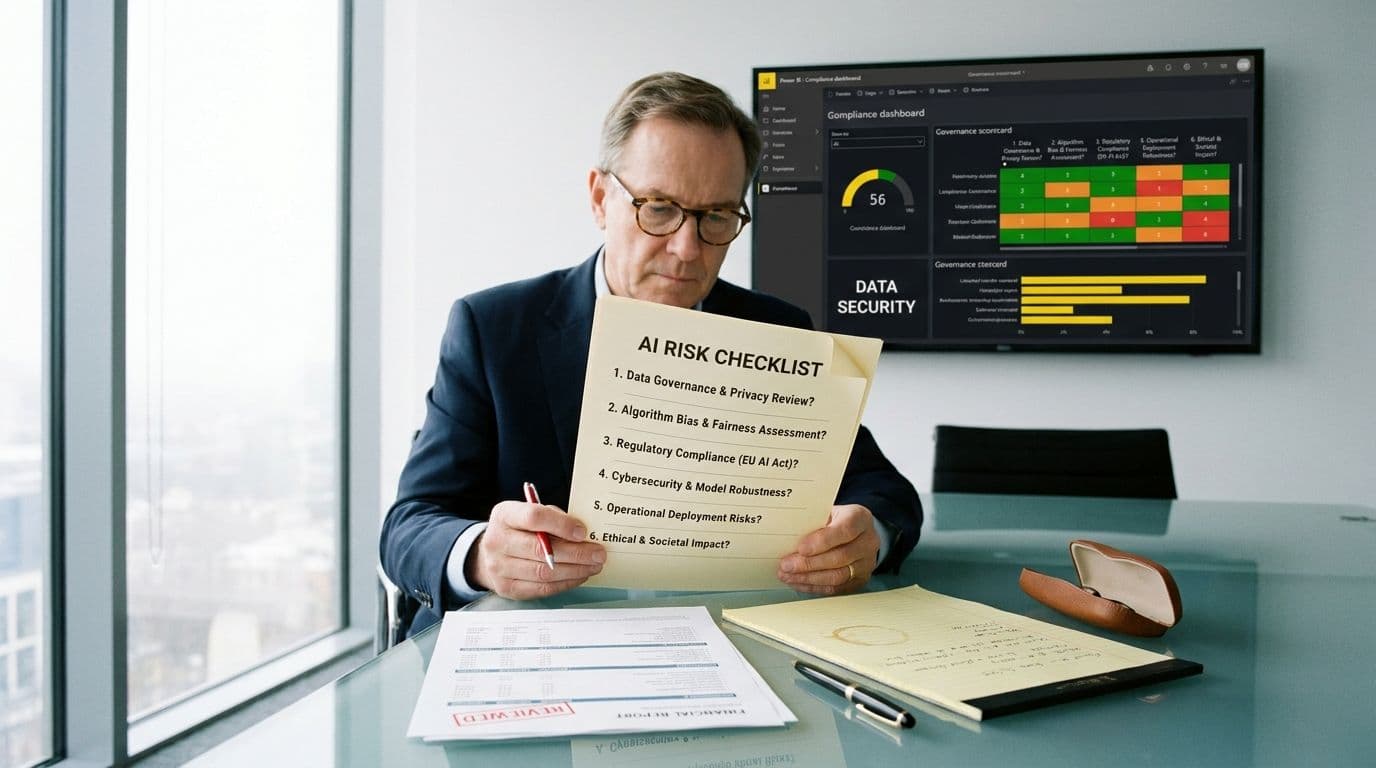
The checklist, condensed
- Prompt data routing and residency: verified and documented for your jurisdiction.
- RLS validation process for AI-generated DAX: separate from standard role testing, using restricted test accounts.
- Audit trail for AI-assisted outputs: prompts, drafts, and reviewer sign-off preserved in workpapers.
- Missing value policy: gaps resolved at the semantic model level before Copilot exposure.
- AI accountability: named human responsible for every AI-assisted financial output, documented in SOX narrative.
- Semantic model readiness: descriptive naming, sensitivity labels, linguistic schema, numeric field classifications reviewed before Copilot deployment.
None of these are reasons not to deploy AI in your Power BI environment. They are reasons to deploy it with the same rigor you bring to any control that touches a board-ready number. The organizations that will benefit most from AI in finance are the ones that govern it well — not the ones that move fastest.
If you want a structured review of your Power BI semantic model's Copilot readiness, or help building the governance framework around it, talk to our team. We work with finance teams who need AI to be reliable, not just fast.