Google Looker vs Looker Studio: The Difference Explained
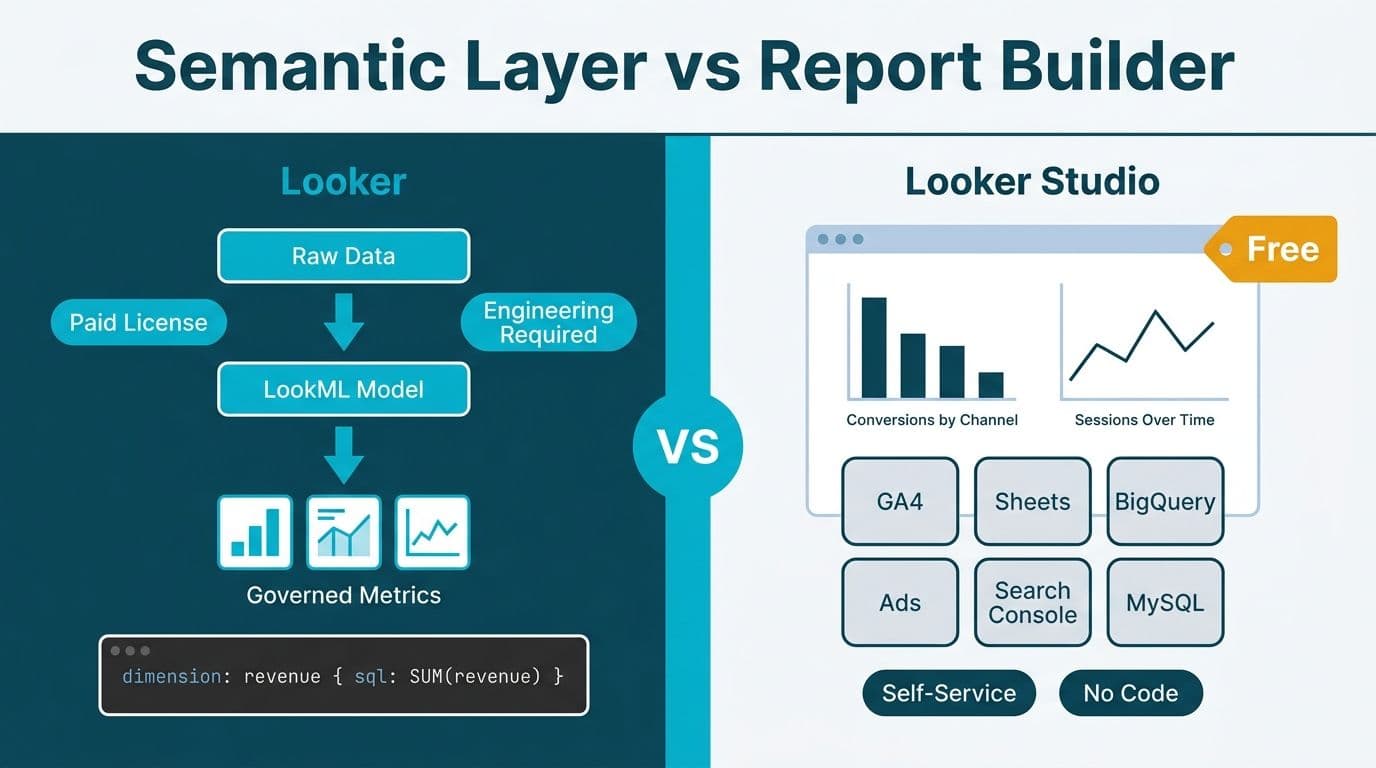
Google Looker and Looker Studio share a name and a parent company but serve entirely different markets. Looker is an enterprise, LookML-governed semantic-layer platform requiring paid licences and dedicated engineering resource. Looker Studio is a free browser-based report builder - the successor to Google Data Studio - designed for teams who need dashboards without IT involvement. Choosing between them hinges on one question: does your organisation need governed, centralised metric definitions, or fast, self-service visualisation?
Key Takeaways
- Enterprise Looker uses a LookML semantic layer to enforce consistent metric definitions across every report and every team.
- Looker Studio is free, requires no coding, and is best suited for marketing, ops, and small analytics teams working with Google data sources.
- The two products share a brand but not an architecture - they are not tiers of the same platform and there is no upgrade path between them.
- Power BI fills a distinct lane: Microsoft-stack organisations and regulated industries often choose it for mature row-level security and HIPAA/GDPR compliance controls.
- Before you brief a vendor or request quotes, use the Instant project cost calculator to model your budget across tools and team size.
What Is the Difference Between Google Looker and Looker Studio?
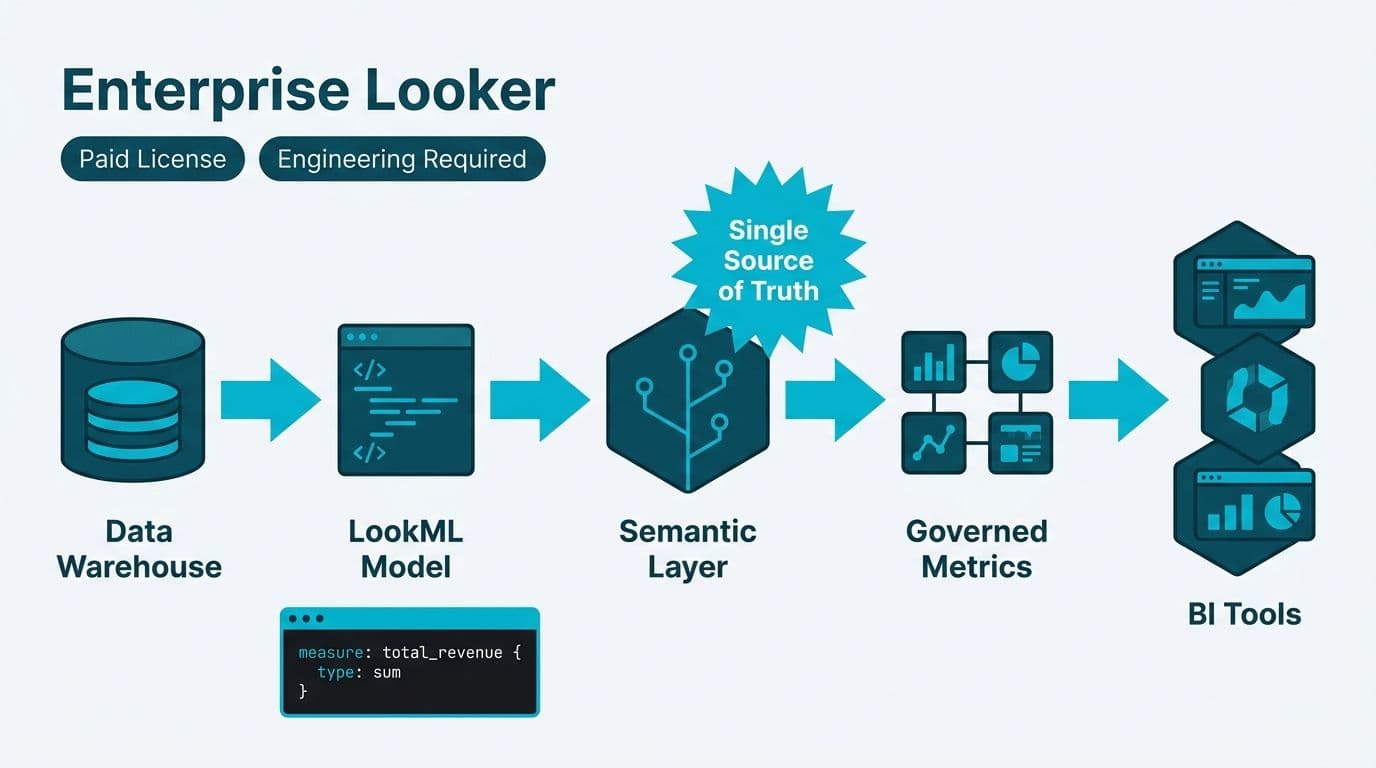
The fundamental difference is governance versus accessibility. Enterprise Looker is built around a semantic layer: metrics, dimensions, and joins are defined once in LookML and enforced across every downstream report. A "monthly recurring revenue" figure means the same thing to a CFO and a junior analyst because both are querying the same governed model. Looker Studio has no semantic layer - each report connects directly to a data source and defines its own measures, which means two analysts can publish contradictory numbers from identical underlying data.
Google acquired Looker in 2019. In 2022, it rebranded Google Data Studio as Looker Studio, creating the naming collision that still generates significant buyer confusion in 2026. Despite the shared brand, the products share no underlying technology, no licencing tier, and no upgrade path between them.
A common and costly misconception: Looker Studio is not a "free version" of enterprise Looker. It is a separate product with a different architecture, different use cases, and a different buyer profile. Treating it as a trial tier of enterprise Looker leads organisations to either overspend on governance they do not need, or under-invest in governance they do.
What Is Enterprise Looker and Who Is It For?
Enterprise Looker is a cloud-native BI and analytics platform governed by the LookML modelling language. Data and analytics engineers write LookML to define tables, joins, measures, calculated fields, and row-level access rules in a central Git repository. Business users then explore data through Looker's point-and-click interface without writing SQL - but every query is generated from the trusted, audited model.
Core capabilities of enterprise Looker:
- Semantic layer: one definition of every KPI, enforced company-wide, eliminating the "which number is right?" dispute that plagues organisations with fragmented reporting
- Git-based version control: LookML files live in a repository, enabling code review, branching, automated testing, and rollback - a standard software engineering workflow applied to data modelling
- Row-level data access control: a LookML `access_filter` restricts what each user or user group can query, without requiring separate datasets or duplicating data
- Embedded analytics: the Looker Embed API issues signed tokens that govern what an embedded viewer can query, enabling governed customer-facing analytics products
- BigQuery integration: Looker is optimised for BigQuery push-down queries and integrates with Vertex AI for exploratory analytics, making it the natural semantic layer for organisations already on Google Cloud (Google Cloud documentation, 2026)
Who it is for: data engineering teams, analytics engineering organisations, and enterprises that need a single source of truth across divisions. A US SaaS company with separate Finance, Product, and Marketing teams - each previously maintaining their own spreadsheet definitions of "churn rate" - is a textbook enterprise Looker buyer.
For regulated industries, enterprise Looker on Google Cloud supports HIPAA Business Associate Agreement (BAA) eligibility, making it a credible option in power bi hipaa compliance for healthcare analytics evaluations where the data team is already on Google Cloud infrastructure (Google Cloud documentation, 2026). UK and EU organisations should confirm their selected Google Cloud region satisfies GDPR data residency requirements before finalising a deployment architecture.
What Is Looker Studio and Who Is It For?
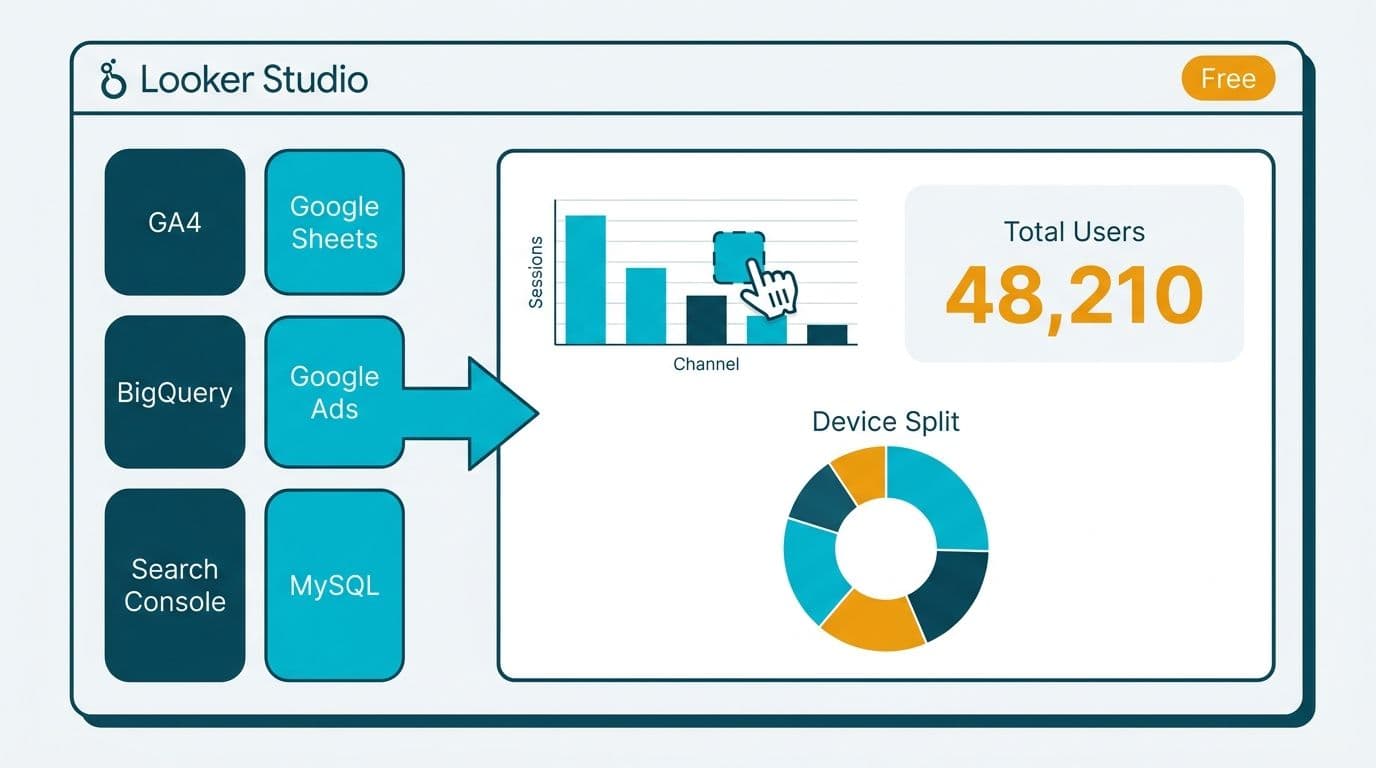
Looker Studio (formerly Google Data Studio) is a free, browser-native visualisation tool. It connects to over 800 data sources through partner connectors - including Google Analytics 4, Google Ads, BigQuery, YouTube Analytics, Google Sheets, and hundreds of third-party sources via the Partner Connector library.
Core characteristics of Looker Studio:
- Free to use: no per-user licence for core functionality; Looker Studio Pro adds team workspaces and scheduled email delivery for a per-user monthly fee (Google pricing page, 2026)
- No semantic layer: metric definitions live inside individual reports with no platform-wide enforcement mechanism
- Drag-and-drop report building: no SQL or LookML required; report creation takes hours, not sprints
- Sharing via Google account: reports share like Google Docs, with no IT provisioning or user management overhead
- Limited row-level security: access is governed at the data source or connector level, not inside the tool
Who it is for: marketing teams, agencies, small analytics teams, and individual contributors who need to turn Google data into shareable dashboards quickly. A UK digital agency building monthly performance reports from Google Ads and GA4 data for ten clients will find Looker Studio covers all its requirements at zero tool cost.
What Looker Studio is not suited for: healthcare analytics platform evaluation checklist requirements, PHI-scoped data, multi-team metric governance, or any context where row-level data access control is a compliance obligation. For those scenarios, the correct Google-stack product is enterprise Looker - not Looker Studio.
Where Does Power BI Fit in the Looker vs Looker Studio Decision?
Power BI is a Microsoft product and competes with enterprise Looker, not with Looker Studio. The comparison surfaces most often in regulated industry evaluations - particularly in tableau vs power bi healthcare cost discussions and power bi ehr integration healthcare analytics assessments - where organisations need both a semantic layer and HIPAA or GDPR compliance controls.
Here is how the three tools map across common evaluation dimensions:
| Dimension | Enterprise Looker | Looker Studio | Power BI |
|---|---|---|---|
| Price model | Per seat (developer + viewer) | Free; Pro tier per user/month | Per user/month or Fabric capacity |
| Semantic layer | LookML (centralised, Git-governed) | None | Power BI semantic model (dataset) |
| Row-level security | LookML access filters | Limited (connector-level only) | Native RLS; relevant to HIPAA PHI |
| Version control | Native Git integration | Not applicable | Limited (XMLA / Tabular Editor) |
| Primary ecosystem | Google Cloud / BigQuery | Google products + connectors | Microsoft 365 / Azure / EHR DirectQuery |
| Embedded analytics | Looker Embed API (token-signed) | iFrame (basic) | Power BI Embedded (Azure) |
| HIPAA BAA coverage | Google Cloud BAA (Looker) | Not covered | Microsoft BAA (Azure) |
| GDPR data residency | Google Cloud regions | Google-managed | Azure regions (EU data boundary available) |
| PIPEDA (Canada) | Google Cloud Canadian regions | Dependent on source | Azure Canada regions |
For a US hospital system evaluating power bi row level security hipaa phi data protection, Power BI's native RLS and Microsoft's HIPAA BAA on Azure create a well-documented compliance path. The same hospital system already running on Google Cloud with BigQuery as its data warehouse may find enterprise Looker's centralised LookML access filters equally viable. The choice here is not Looker Studio versus Power BI - it is enterprise Looker versus Power BI.
Our Looker vs Power BI vs Tableau: Enterprise Decision Framework covers that three-way comparison in detail, including cost modelling considerations for mid-market deployments.
What Should Data Analysts Know When Evaluating These Tools?
For data analysts comparing BI platforms - whether for career development or to support a client recommendation - the Looker versus Looker Studio distinction has practical consequences. Enterprise Looker requires LookML proficiency, which is a distinct, marketable skill separate from SQL or Python. Analysts familiar with tableau vs power bi interview questions for data analysts will encounter semantic layer and row-level security questions that apply equally to Looker evaluations.
On the tableau vs power bi for data analyst career question: Looker sits in a similar bracket to Tableau and Power BI for Google Cloud-aligned organisations. Analytics engineering roles in Google Cloud environments frequently list LookML as a required or preferred skill. Looker Studio experience, by contrast, signals rapid prototyping and marketing analytics capability rather than governed data modelling - a useful but different signal to employers.
For the Looker vs Looker Studio: Which Google BI Tool Fits Your Team? question at the organisational level, the skills your current team holds are a legitimate input: an organisation with strong SQL and Git capability can adopt enterprise Looker's LookML workflow with less friction than one where most analysts work exclusively in spreadsheets.
When Should You Choose Enterprise Looker Over Looker Studio?
Choose enterprise Looker when any of the following conditions apply:
1. Multiple teams need one metric definition. If "gross margin" means different things across Finance, Sales, and Operations, Looker's semantic layer enforces the definition at query time across every dashboard and scheduled report.
2. Data access must be governed at the row level. LookML access filters restrict users to their authorised data slice without requiring separate datasets - a core requirement for HIPAA, GDPR, and PIPEDA regulated environments.
3. You are building an embedded analytics product. Looker Embed API token signing restricts each external viewer to their own governed data view, with no risk of privilege escalation at the report layer.
4. Your data team works in Git. LookML benefits from pull requests, peer review, and CI/CD testing pipelines that catch broken metric definitions before they reach production dashboards.
5. You are scaling on Google Cloud or BigQuery. Looker's native BigQuery integration and Vertex AI connectivity create a unified analytical platform that maximises your existing Google Cloud investment (Google Cloud documentation, 2026).
Choose Looker Studio when:
- You need a working dashboard from Google Analytics or Google Ads data within hours, not sprints
- Your team has no data engineering resource or bandwidth for LookML development
- You want free sharing with no IT provisioning or access management overhead
- Internal stakeholders are comfortable with report-level metric definitions
- Regulatory data access controls are not a compliance requirement for the data in question
A Canadian manufacturing company tracking operational KPIs from a Google Sheets source and sharing dashboards with plant managers will meet all its needs in Looker Studio. The same company's enterprise data team defining governed cost metrics for PIPEDA-regulated supplier contracts belongs on enterprise Looker.
How Do Licensing Costs Compare Between Looker and Looker Studio?
Looker Studio is free for individual use. Looker Studio Pro adds team workspaces, scheduled email delivery, and SLA-backed support at a per-user monthly fee published on Google's pricing page (2026). For small teams working primarily with Google data sources, the total tool cost can remain effectively zero.
Enterprise Looker carries a materially higher cost of ownership. Google prices Looker by developer seats (users who write LookML) and viewer seats (users who explore data). Enterprise contracts typically include a platform fee plus per-seat charges negotiated through Google Cloud sales. Total cost of ownership also includes LookML engineering time - which is non-trivial, particularly in the initial model-build phase - plus change management and, for regulated environments, security review and compliance audit overhead.
For organisations running a healthcare analytics platform evaluation checklist, these cost components extend well beyond licence fees. Suppose a 30-seat healthcare analytics team migrates from spreadsheets to enterprise Looker: the licence cost is only one line item alongside LookML development, data model validation, staff training, and ongoing governance. Before requesting vendor quotes, model your full scope with the Instant project cost calculator.
Power BI's licence model - Microsoft 365 bundle, Fabric capacity, or standalone per-user - is covered separately in our Power BI Copilot Licensing Requirements guide.
Which Tool Fits Regulated Industries Best?
Regulated organisations - US healthcare systems subject to HIPAA, UK fintech firms under FCA oversight and GDPR, Canadian financial institutions under OSFI and PIPEDA - should assess four criteria before selecting a BI platform:
1. Data residency: Enterprise Looker on Google Cloud supports regional selection for GDPR and PIPEDA compliance. Looker Studio's data residency is governed by the connected source, not the tool itself - an important distinction when the data source sits outside a compliant region.
2. Row-level access control: LookML access filters in enterprise Looker enforce data scoping at the semantic layer, ensuring a regional sales manager cannot query records outside their territory. Looker Studio has no equivalent; access is connector-level only.
3. Audit logging: Enterprise Looker logs every query through Google Cloud Audit Logs, enabling compliance reporting and incident investigation. Looker Studio provides limited audit capability by comparison.
4. HIPAA BAA coverage: Google Cloud signs a HIPAA BAA covering enterprise Looker on Google Cloud. Looker Studio is not covered by Google's HIPAA BAA (Google Cloud documentation, 2026).
For a UK fintech firm handling customer financial data under GDPR, deploying enterprise Looker in a Google Cloud EU region with LookML access filters restricting analyst access to pseudonymised datasets is a defensible architecture. Deploying Looker Studio connected to a BigQuery table containing raw customer PII is not.
For US healthcare organisations, our HIPAA Compliant BI Tools for Hospital Data Visualization guide covers the full evaluation checklist, including vendor BAA status and audit logging requirements across the major platforms.
The naming confusion between Looker and Looker Studio is a genuine procurement risk. Organisations have procured Looker Studio expecting enterprise governance, and others have dismissed enterprise Looker as too expensive when Looker Studio would have met their needs at zero cost. Getting the distinction right before vendor conversations begin saves significant time and budget on both sides.
Use the Instant project cost calculator to get a tailored budget estimate for your platform selection and implementation scope before your first vendor call.
---
About Lets Viz: Lets Viz has partnered with analytics teams since 2020, delivering governed BI implementations for US healthcare providers, UK fintech firms, Canadian manufacturing companies, and global SaaS organisations. Rated 5.0 on Clutch, our team helps technical decision-makers navigate platform selection, semantic layer architecture, and regulatory compliance across Looker, Power BI, Tableau, and the broader Google Cloud analytics ecosystem.