Dax Function: DIVIDE
 Reviewed by Neetu Singla — Founder, Lets Viz Technologies — AI & Data Consultant. Last reviewed June 25, 2026.
Category: Mathematical and Trigonometric Functions
The DIVIDE function in Power BI is a DAX (Data Analysis Expressions) function designed for division operations while handling potential division-by-zero errors gracefully. It provides a robust way to perform division by substituting a default result if the denominator is zero.
Purpose
The DIVIDE function is used to:
- Perform division operations safely without runtime errors caused by zero denominators.
- Provide a default or fallback value when a division is not possible.
- Simplify complex calculations involving conditional error handling.
Type of Calculations
The DIVIDE function calculates the result of dividing one number (numerator) by another (denominator) and returns the fallback value if the denominator is zero or undefined.
Practical Use Cases
- Financial Ratios: Calculate ratios such as profit margins, where the denominator (e.g., revenue) might sometimes be zero.
- Performance Metrics: Evaluate KPIs that involve division, like cost per unit, avoiding errors when the divisor is zero.
- Custom Calculations: Use in measures or calculated columns to ensure data integrity in dynamic dashboards.
DIVIDE(<numerator>, <denominator>, [<alternativeresult>])</alternativeresult></denominator></numerator>
| Parameter | Type | Description |
|---|---|---|
<numerator> | Scalar | The dividend or the number to be divided. |
<denominator> | Scalar | The divisor or the number by which the numerator is divided. |
[<alternativeResult>] | Scalar (Optional) | The value to return if the denominator is zero. Defaults to BLANK() if not provided. |
How Does DIVIDE Dax Function Works?
The DIVIDE function evaluates the numerator and denominator:
- If the denominator is not zero, it performs the division:
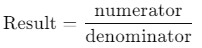
- If the denominator is zero or undefined:
- Returns the
alternativeResultif provided. - Returns
BLANK()by default.
- Returns the
Example Formula
For a numerator of 10 and denominator of 0 with an alternative result of -1:
DIVIDE(10, 0, -1)
Output: -1 (fallback value)
What Does It Return?
The function returns a numeric value:
- The quotient when the division is valid.
- The
alternativeResultif the denominator is zero. BLANK()if the denominator is zero and no alternative result is specified.
When Should We Use It?
- To avoid errors caused by division-by-zero scenarios.
- In dynamic calculations where denominators may vary and sometimes equal zero.
- For creating error-tolerant measures and calculated columns in Power BI reports.
Examples
Basic Usage
Divide two scalar values:
DIVIDE(10, 2)
Output: 5
Column Usage
Divide values in the TotalSales column by values in the TotalUnits column:
DIVIDE([TotalSales], [TotalUnits])
Output: A new column with the calculated results.
Advanced Usage
Combine DIVIDE with other DAX functions:
DIVIDE(SUM([Profit]), SUM([Revenue]), 0)
Output: Calculates the profit margin, returning 0 if the revenue is zero.
Tips and Tricks
- Default Fallback: Use
BLANK()as the default fallback to maintain clean visualizations. - Use with Aggregates: Combine DIVIDE with functions like
SUMorAVERAGEfor summarized calculations. - Column Calculations: Avoid using DIVIDE excessively in calculated columns for performance reasons.
Potential Pitfalls
- Unintended Blanks: If no
alternativeResultis provided, a zero denominator will result inBLANK(), which might not align with expectations. - Performance Considerations: When applied to large datasets, ensure the numerator and denominator are pre-aggregated for optimal performance.
- Default Fallback: Use
Performance Impact of DIVIDE DAX Function:
- The DIVIDE function is optimized for DAX and typically performs better than using conditional checks (
IF) for zero denominators. - Avoid using it in row-by-row operations for large datasets; instead, use it in measures for aggregated calculations.
Related Functions You Might Need
- / Operator: Performs basic division but doesn’t handle zero denominators.
- IF: Use with conditions for custom error handling.
- ISBLANK: Check for blank values in the numerator or denominator.
Want to Learn More?
For more information, check out the official Microsoft documentation for DIVIDE. You can also experiment with this function in your Power BI reports to explore its capabilities.
The DIVIDE function performs division while handling zero denominators by returning a specified fallback value or BLANK().
Yes, if no fallback value is provided, the function returns BLANK() for zero denominators.
The DIVIDE function includes error handling for zero denominators, while the / operator does not.
Yes, but it’s more efficient in measures rather than calculated columns for large datasets.
Yes, it is commonly used with functions like SUM or AVERAGE for calculating ratios and percentages.
Need a Power BI consultant for your team?
We've built Power BI dashboards and data automation for 100+ clients across finance, sales, operations, and executive reporting. Fixed-fee MVPs, first production dashboard in 3–4 weeks.
- Finance BI — P&L, balance sheet, budget vs actual, cash forecast
- Sales BI — CRM data cleaned, pipeline and forecast dashboards leadership trusts
- Operations BI — real-time KPIs with validation and alerting built in
- Embedded Power BI inside SaaS products with row-level security
See the Fortivis case study for a real example: an Athens-based financial advisory firm that replaced their multi-day manual reporting cycle with a validated Power BI pipeline.
Common Mistakes When Using DIVIDE
The most common mistake is using the standard division operator (/) instead of DIVIDE when the denominator could be zero or blank. The / operator returns an error on division by zero, which surfaces as a red exclamation mark in Power BI visuals. DIVIDE handles this gracefully by returning BLANK -- or a custom alternate result -- without breaking the visual.
A second error is not specifying the alternate result parameter and assuming the function returns zero on division by zero. By default, DIVIDE returns BLANK, not zero. If your calculations or visuals treat BLANK and zero differently -- for example, in a percentage chart -- explicitly pass 0 as the third argument: DIVIDE(Numerator, Denominator, 0).
Nesting DIVIDE inside IFERROR is redundant. Since DIVIDE already handles the divide-by-zero case, wrapping it in IFERROR adds no protection and slightly increases formula complexity. Reserve IFERROR for expressions where errors can originate from sources other than division.
Finally, avoid using DIVIDE with non-numeric arguments expecting it to coerce types. Both the numerator and denominator must be numeric. Passing a text column or a string measure will cause a type-mismatch error. Use VALUE() or INT() to convert strings to numbers before passing them to DIVIDE.
DIVIDE vs / operator vs IF + ISBLANK
| DIVIDE | / operator | IF + ISBLANK | |
|---|---|---|---|
| Handles zero denominator | ✓ returns BLANK or your fallback | ✗ raises a divide-by-zero error | ✓ but verbose |
| Custom fallback value | ✓ third argument | ✗ no fallback | ✓ via IF branch |
| Performance in measures | Fast | Fast | Slightly slower (extra branch) |
| Performance in calculated columnsOn 10M+ row fact tables, profile before optimising — the gap is usually noise. | Fast — but watch row count | Marginally faster | Slowest |
| Readable at a glance | High | High | Medium |
| When to reach for it | Default for ratios, margins, conversion rates | Quick scratch math where zero is impossible | When you need branching beyond the zero case |
Need Power BI help in a real engagement?
Our team writes DAX like this every day for SaaS finance and ops teams. Refresh monitoring, change requests with a 2-business-day SLA, and a named analyst on retainer — or scoped hourly help if you just need a fix.
Named analyst2-day SLAFrom $5K/mo
