Cognos to Power BI Migration: HIPAA, GDPR & PIPEDA Guide
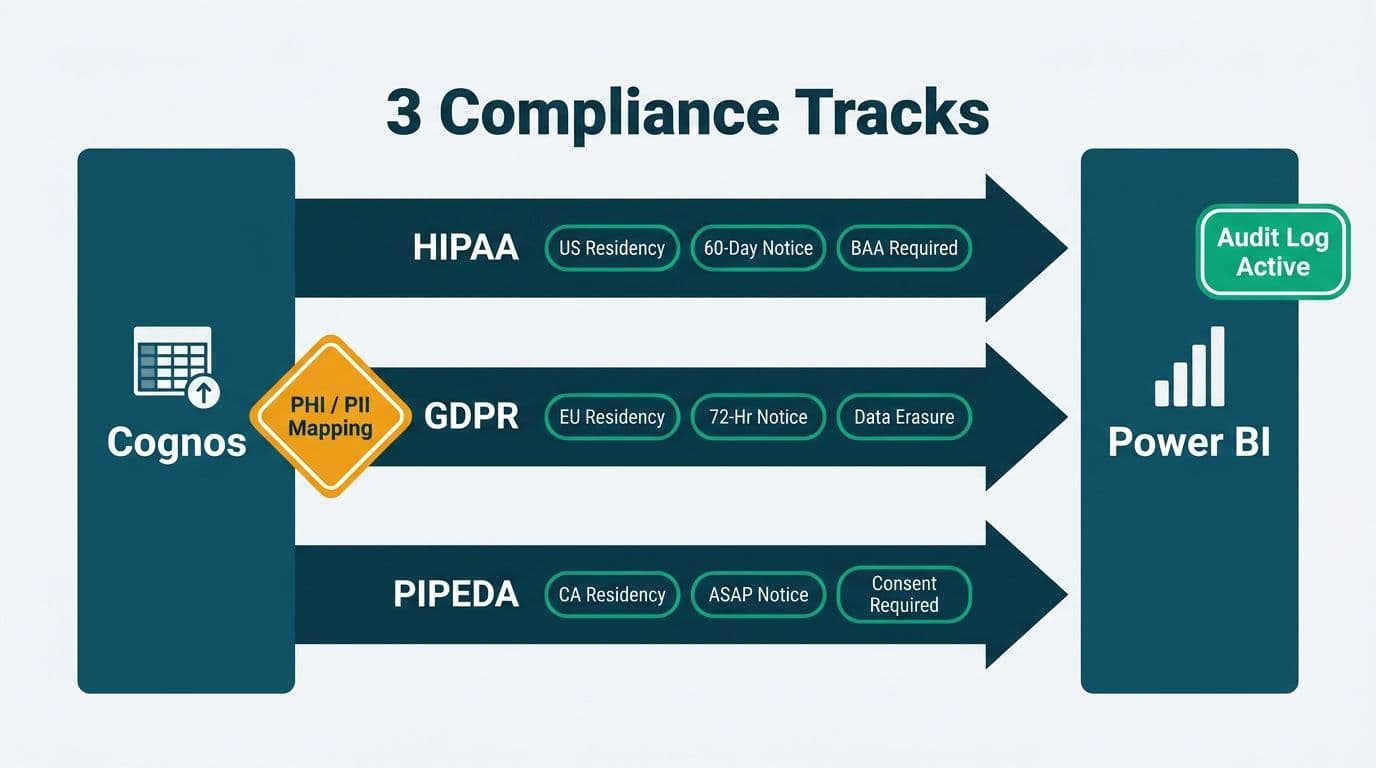
A Cognos to Power BI migration in healthcare and finance requires three parallel compliance workstreams: mapping every PHI and PII field before rebuilding reports, configuring Power BI Service tenant settings to match each regulator's data-residency rules, and activating the Microsoft 365 Unified Audit Log before go-live. HIPAA, GDPR, and PIPEDA each impose different breach timelines, masking obligations, and geographic residency constraints - knowing the differences prevents costly remediation after cutover.
Key Takeaways
- HIPAA requires a signed Business Associate Agreement (BAA) with Microsoft before any PHI touches Power BI Service; the BAA is available to Microsoft 365 E3, E5, and Power BI Premium customers (Microsoft Product Terms, 2025).
- GDPR mandates a Data Processing Agreement and EU or UK data residency; verify the Power BI tenant home region before ingesting any personal data.
- PIPEDA requires comparable-protection safeguards for cross-border transfers and Canadian-region Power BI capacity if data residency has been contractually promised.
- PHI masking in Power BI is layered across row-level security, Microsoft Purview sensitivity labels, and export controls - no single control satisfies any of the three regulations alone.
- The Microsoft 365 Unified Audit Log must be explicitly enabled; it does not activate by default, and its absence creates a compliance gap from day one.
Why Compliance Must Lead a Cognos to Power BI Migration in Healthcare
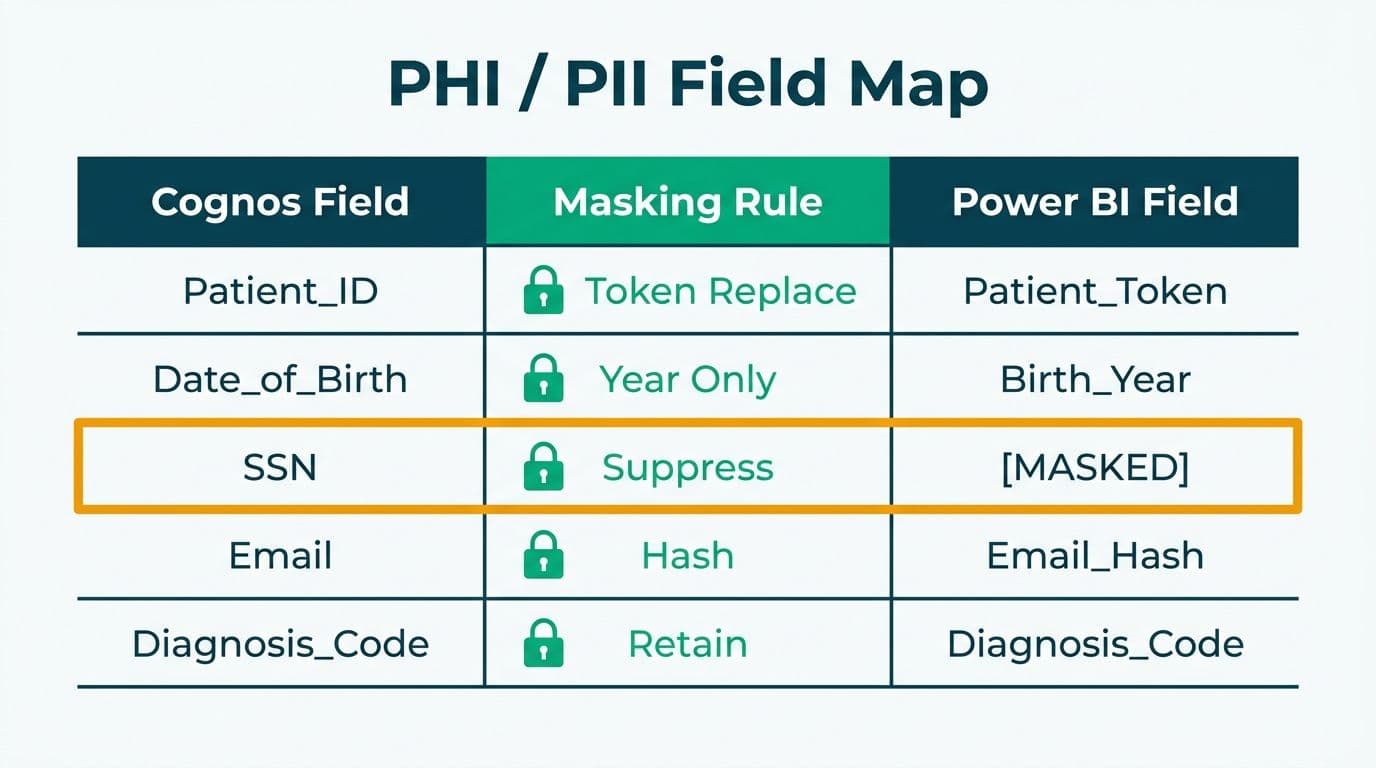
For covered entities under HIPAA, data controllers under GDPR, or organizations subject to PIPEDA, each Cognos report carrying patient demographics, claim data, or financial PII becomes a regulated asset the moment it is rebuilt in Power BI. The compliance risk is not in the migration itself - it sits in the gap between Cognos decommission and the point when Power BI's security, residency, and audit controls are verified as complete.
The phased compliance model used in our Tableau to Power BI migration services - legal agreements first, tenant configuration second, security model rebuild third, validation last - applies equally to Cognos migrations. Before the first semantic model is deployed, the team must confirm: which Cognos data elements are regulated; whether the BAA or DPA is signed; whether the tenant region is compliant; and whether the Unified Audit Log is active.
What Does HIPAA Require During a Cognos to Power BI Migration?
HIPAA requires any cloud vendor that receives, processes, or stores PHI on behalf of a covered entity to sign a Business Associate Agreement (BAA). Microsoft offers a BAA covering Power BI Service to customers on Microsoft 365 E3, E5, and Power BI Premium SKUs (Microsoft Product Terms, 2025). Without a signed BAA, no PHI may enter the Power BI Service tenant - all Cognos data containing patient identifiers, diagnosis codes, claim amounts, or provider records must be de-identified first, or the BAA executed before any data flows.
HIPAA's Security Rule (45 CFR § 164.312) then imposes three technical safeguard requirements:
- Access controls: only workforce members with documented need-to-know may view PHI reports. In Power BI this maps to workspace roles combined with row-level security (RLS) on the semantic model. A US hospital finance team migrating Cognos billing reports must translate every Framework Manager object-level security rule to a Power BI RLS DAX filter before any report is published to production.
- Audit controls: all access and export events must be logged. The Microsoft 365 Unified Audit Log captures ViewReport, ExportArtifact, and ShareDashboard events. HIPAA does not specify a log retention period, but HHS guidance aligns with the regulation's six-year documentation standard; Microsoft retains audit logs for 180 days under E3 and up to one year under E5 (Microsoft Purview documentation, 2025). Export logs to Azure Monitor or a SIEM for long-term retention.
- Transmission security: Power BI Service enforces TLS 1.2 or higher by default. Verify that on-premises data gateway connections to any residual Cognos data sources also enforce TLS, and include the gateway host in the HIPAA technical safeguard inventory.
For a field-by-field translation of Cognos object-level security to Power BI RLS, see Cognos Security Model vs Power BI RLS: Side-by-Side Mapping.
How Does GDPR Apply to UK and EU Organizations Migrating from Cognos?
GDPR designates Power BI Service as a data processor and the migrating organization as the data controller. Article 28 requires a written Data Processing Agreement (DPA) with Microsoft before any personal data is processed. Microsoft's DPA is embedded in the Products and Services Data Protection Addendum (updated 2025) and accepted through the Microsoft 365 Admin Center at no added cost.
Data residency is the most common GDPR gap in a BI migration. A Power BI tenant is provisioned in the region tied to the Azure Active Directory tenant location - which may default to the United States if the tenant was originally created by a US-based IT team managing a UK or EU subsidiary. UK and EU organizations must verify and, where necessary, change the tenant home region before ingesting personal data.
To configure data residency:
1. In the Power BI Admin Portal, go to Tenant Settings > Data residency to confirm the current region.
2. To change the region, engage Microsoft support; plan this before deploying any production data gateway.
3. For multi-country EU operations, Multi-Geo (Power BI Premium P1 or Microsoft Fabric capacity) assigns individual workspaces to specific member-state regions - French patient data in France Central, German financial records in Germany West Central.
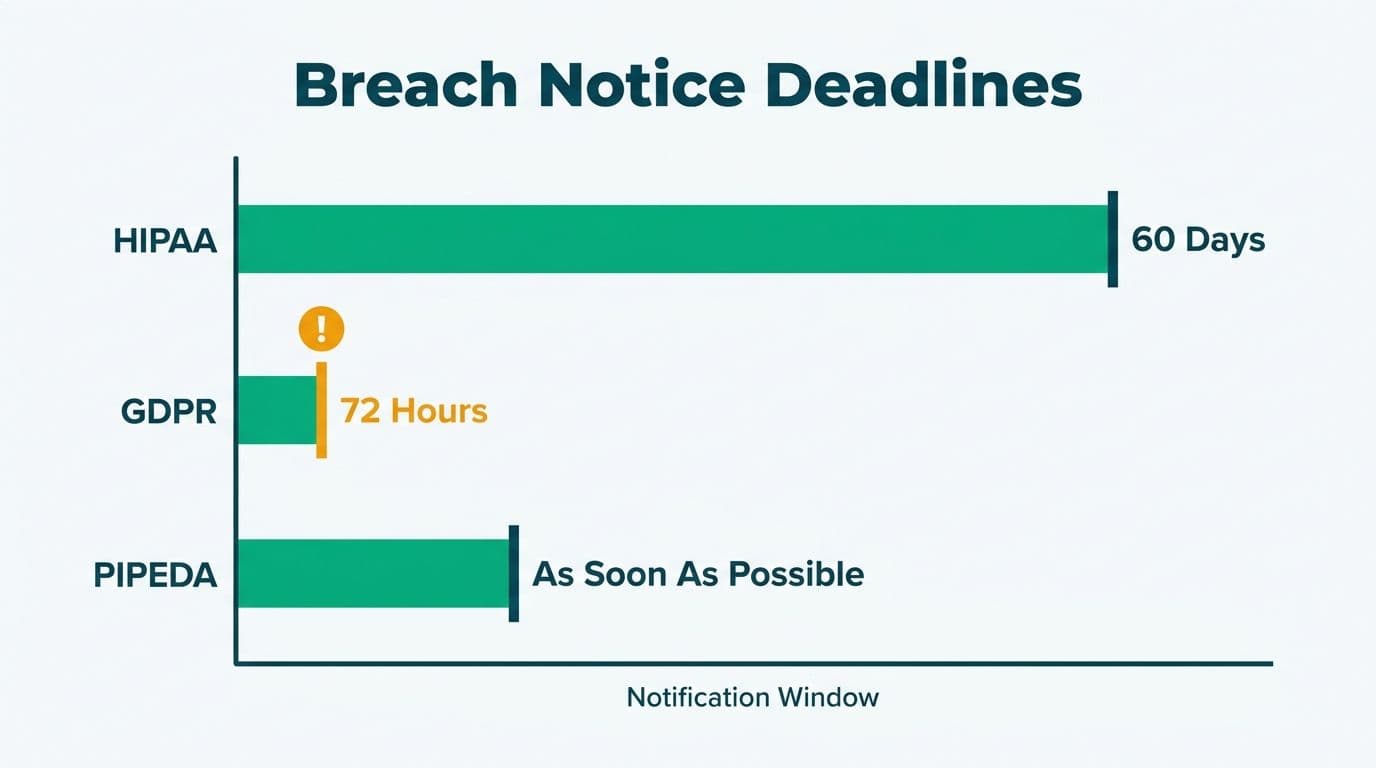
GDPR Article 33 requires breach notification to the supervisory authority within 72 hours. A UK fintech firm migrating Cognos dashboards to Power BI would configure Microsoft Defender for Cloud Apps alerts on bulk-export events from personal-data workspaces - providing the detection surface needed to start the 72-hour clock.
For a GDPR reporting checklist for finance teams, see GDPR compliant SaaS financial reporting: the BI checklist.
What Does PIPEDA Require for Canadian Healthcare and Finance Organizations?
PIPEDA and its provincial equivalents (PHIPA in Ontario, PIPA in Alberta and British Columbia) require meaningful consent before collecting personal information, a designated privacy officer, and OPC notification as soon as feasible after a breach that creates a real risk of significant harm.
Two specific technical requirements shape a Cognos to Power BI migration under PIPEDA:
Data residency: PIPEDA does not prohibit cross-border transfers outright but requires comparable protection when personal information leaves Canada. Where an organization has contractually promised Canadian data residency - common in healthcare SaaS and provincial government contracts - Power BI capacity must be provisioned in the Canada Central (Toronto) or Canada East (Quebec City) Azure region. Both are available as dedicated regions in Power BI Premium and Microsoft Fabric.
Accountability documentation: PIPEDA Principle 1 requires documented privacy management practices. This means producing a data-flow diagram showing where Cognos source data originates, how it transits through the on-premises data gateway, and where it rests in the Power BI Service tenant. A Canadian healthcare organization migrating Cognos clinical dashboards would map each Framework Manager subject area to a Power BI semantic model, tag columns containing SIN, date of birth, or diagnosis codes with sensitivity labels, and obtain privacy-officer sign-off before activating the production workspace.
How Do You Mask PHI and PII in Power BI Reports After Migrating from Cognos?
PHI masking in Power BI operates across three layers - no single layer satisfies HIPAA, GDPR, or PIPEDA alone:
Layer 1: Row-Level Security (RLS)
RLS DAX filters restrict users to the rows they are authorized to see. Every object-level security rule from Framework Manager or Cognos Connection must be translated to an RLS role in the Power BI semantic model before go-live. An incomplete translation creates a security regression: users previously blocked from competitor-region patient records in Cognos may access them in Power BI without RLS in place.
Layer 2: Sensitivity Labels and Export Controls
Microsoft Purview sensitivity labels applied to datasets and reports enforce PDF-only export (blocking raw CSV downloads that expose PHI rows), prevent external sharing, and watermark exported PDFs with the user's identity and timestamp for forensic traceability. Labels are configured in the Purview compliance portal and applied at workspace, dataset, or report level.
Layer 3: Column Masking in the Source
Power BI does not natively mask individual cell values at the visual layer. For partial display - showing only the last four digits of a national health identifier - masking logic must live upstream: in SQL Server dynamic data masking, Azure SQL, or a Power Query dataflow transformation before data reaches the semantic model.
For a taxonomy of HIPAA's 18 de-identification identifiers mapped to Power BI controls, see HIPAA compliant BI tools for hospital data visualization.
What Data-Residency and Audit-Log Settings Does Power BI Service Require?
Data-Residency Configuration
| Setting | Where to Configure | HIPAA (US) | GDPR (EU/UK) | PIPEDA (Canada) |
|---|---|---|---|---|
| Tenant home region | Power BI Admin Portal > Tenant Settings | US geography | EU or UK geography | Canada Central or East |
| Multi-Geo workspace | Capacity settings > Workspace assignment | Optional | Required if multi-country EU | Required if provinces differ |
| Data-at-rest encryption | Enabled by default (Microsoft-managed) | Sufficient with BAA | Sufficient with DPA | Sufficient with DPA equivalent |
| Customer-managed keys (CMK) | Azure Key Vault + Admin Portal | Optional (higher assurance) | Optional (higher assurance) | Optional (higher assurance) |
| Dedicated capacity isolation | Power BI Premium or Fabric F64+ | Recommended for PHI | Recommended for personal data | Recommended for sensitive data |
Audit-Log Configuration
The Microsoft 365 Unified Audit Log must be explicitly activated in the Purview compliance portal under Audit > Start recording user and admin activity. Power BI events captured include ViewReport, CreateReport, EditReport, DeleteReport, ExportArtifact, ShareDashboard, and SetScheduledRefresh.
Retention guidance by jurisdiction:
- HIPAA: six years recommended by HHS; export to Azure Monitor Logs or Microsoft Sentinel beyond Microsoft's 180-day (E3) or one-year (E5) default.
- GDPR: no statutory minimum; UK ICO guidance treats 12 months as sufficient to reconstruct most breach timelines.
- PIPEDA: no statutory minimum; OPC investigations typically request 12-24 months of access history.
For organizations running Microsoft Fabric alongside Power BI, the Fabric workspace monitoring dataset provides additional query-level telemetry that supplements the Unified Audit Log for granular activity reporting.
Regulatory Comparison: HIPAA, GDPR, and PIPEDA for Cognos to Power BI Migrations
| Requirement | HIPAA (US) | GDPR (EU/UK) | PIPEDA (Canada) |
|---|---|---|---|
| Vendor agreement | Business Associate Agreement (BAA) | Data Processing Agreement (Art. 28) | Comparable-protection contract clause |
| Data residency mandate | No country mandate; BAA covers global Azure | EU or UK geography required | Canadian region if contractually promised |
| PHI/PII masking obligation | Yes - 18 Safe Harbor identifiers | Yes - pseudonymization under Art. 25 | Yes - proportionality principle |
| Breach notification timeline | 60 days to HHS; prompt for high-risk individuals | 72 hours to supervisory authority (Art. 33) | As soon as feasible to OPC |
| Recommended audit log retention | 6 years (HHS guidance) | 12 months (UK ICO guidance) | 12-24 months (OPC investigation standard) |
| Right to data deletion | De-identification used instead | Article 17 right to erasure | PIPEDA Principle 4.3.8 |
| Export controls | Required for PHI workspaces | Required for personal data workspaces | Required where sensitivity warrants |
| Applicable Microsoft agreement | BAA (E3/E5/Premium) | DPA (all tenants) | DPA + Data Boundary commitments |
A Compliant Migration Sequence for HIPAA, GDPR, and PIPEDA Environments
A regulated Cognos to Power BI migration healthcare HIPAA GDPR PIPEDA program follows this sequence regardless of jurisdiction:
1. Pre-migration data inventory: classify every Cognos data element as PHI, PII, sensitive financial, or non-sensitive; flag cross-border data flows.
2. Legal agreements: execute the BAA (US), DPA (EU/UK), and comparable-protection clauses (Canada) with Microsoft before any data enters Power BI Service.
3. Tenant configuration: set the Power BI tenant region; enable Multi-Geo if required; provision dedicated capacity for regulated workspaces.
4. Unified Audit Log activation: enable in the Purview compliance portal; export logs to Azure Monitor or SIEM; configure Defender for Cloud Apps alerts on anomalous export events.
5. Security model rebuild: translate all Cognos object-level security to Power BI RLS roles; apply Purview sensitivity labels; configure PDF-only export on PHI workspaces.
6. Testing and validation: run parallel reports in Cognos and Power BI against the same data slice; verify row counts, totals, and RLS enforcement with test accounts mapped to each security role.
7. Cutover and decommission: document the final data-flow diagram; obtain privacy-officer sign-off; decommission Cognos connection strings that carried PHI or PII.
For a phase-by-phase checklist covering both technical and compliance gates, see the Cognos to Power BI migration checklist: 7-phase guide.
---
About Lets Viz: Lets Viz has delivered BI migration and analytics engagements for US healthcare systems, UK fintech firms, Canadian manufacturing organizations, and global SaaS companies since 2020, holding a 5.0 rating on Clutch. Our regulated-sector migration practice covers HIPAA BAA execution, GDPR DPA configuration, PIPEDA accountability documentation, and Power BI RLS policy builds as integrated project deliverables.
Move your Cognos environment to Power BI while satisfying HIPAA, GDPR, or PIPEDA requirements from day one - explore our Tableau to Power BI migration services for a compliance-first migration approach.