Cognos to Power BI Data Validation: UAT Framework for Finance
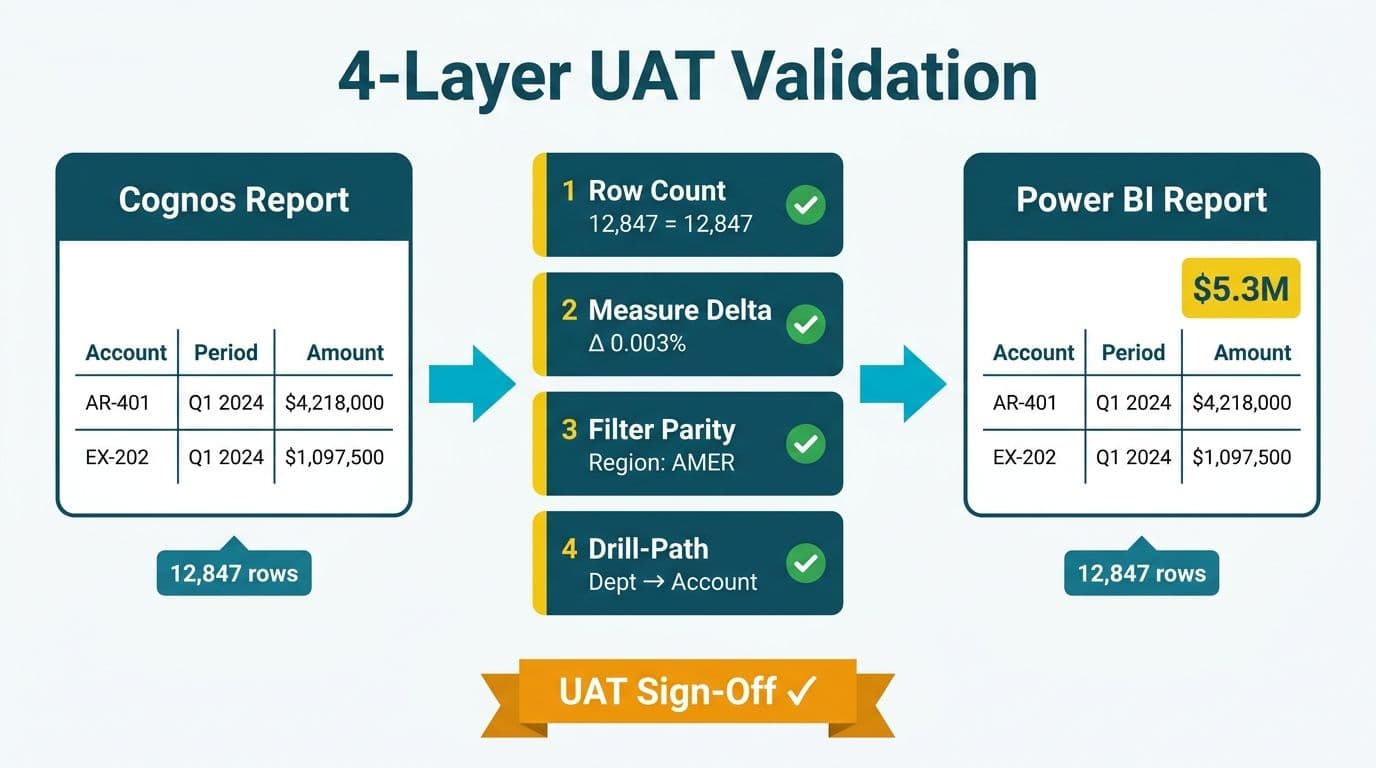
A Cognos to Power BI data validation UAT framework gives finance and operations teams a structured method to confirm that every report output in the new Power BI environment matches its Cognos predecessor before cutover sign-off. The framework runs across four test layers - row counts, measure deltas, filter parity, and drill-path fidelity - and concludes with a reusable sign-off template that satisfies internal audit requirements under US GAAP, IFRS, and North American regulatory standards.
Key Takeaways
- Run row-count checks at transaction grain before any measure comparison: a grain mismatch invalidates every aggregate downstream.
- Define tolerance thresholds in writing before UAT begins - retroactively widening them after a failure is a SOX audit red flag.
- Filter parity testing catches the largest share of post-go-live discrepancies in Cognos cutovers because Cognos prompt defaults rarely translate directly into DAX context filters.
- The sign-off template must name specific approvers, capture exception dispositions, and carry timestamps to serve as a durable audit artifact.
- Teams migrating SSRS paginated reports alongside Cognos should run expression-to-DAX translation verification as a separate, parallel workstream.
What Is a Cognos to Power BI Data Validation UAT Framework?
A UAT framework for Cognos to Power BI data validation testing is a sequenced set of test cases, tolerance definitions, and formal approval gates that a data team executes between the Cognos environment freeze date and the Power BI go-live date. Its objective is to produce documented, reproducible evidence that the new environment generates materially identical outputs to the source system for every report in scope.
The framework is necessary because Cognos and Power BI resolve queries through fundamentally different mechanisms. Cognos uses a relational query engine that translates report prompts and filters into SQL against a Cognos Framework Manager model. Power BI evaluates DAX measures against an in-memory columnar VertiPaq engine. The same business question - "what was net revenue for Q3?" - can yield different results if joins, null handling, fiscal calendar definitions, or aggregation order are not replicated exactly in the Power BI data model.
For organizations that also run SSRS paginated reports alongside Cognos, the migration adds a translation layer: SSRS expressions must be converted to DAX before validation can begin, and the behavioral differences between SSRS paginated reports and Power BI paginated reports mean expression parity must be treated as its own workstream. Our Tableau to Power BI migration services team applies the same four-layer validation methodology for Cognos cutovers as for any legacy BI platform retirement.
How Do You Run Cognos to Power BI Data Validation Testing: Row Counts and Measure Deltas?
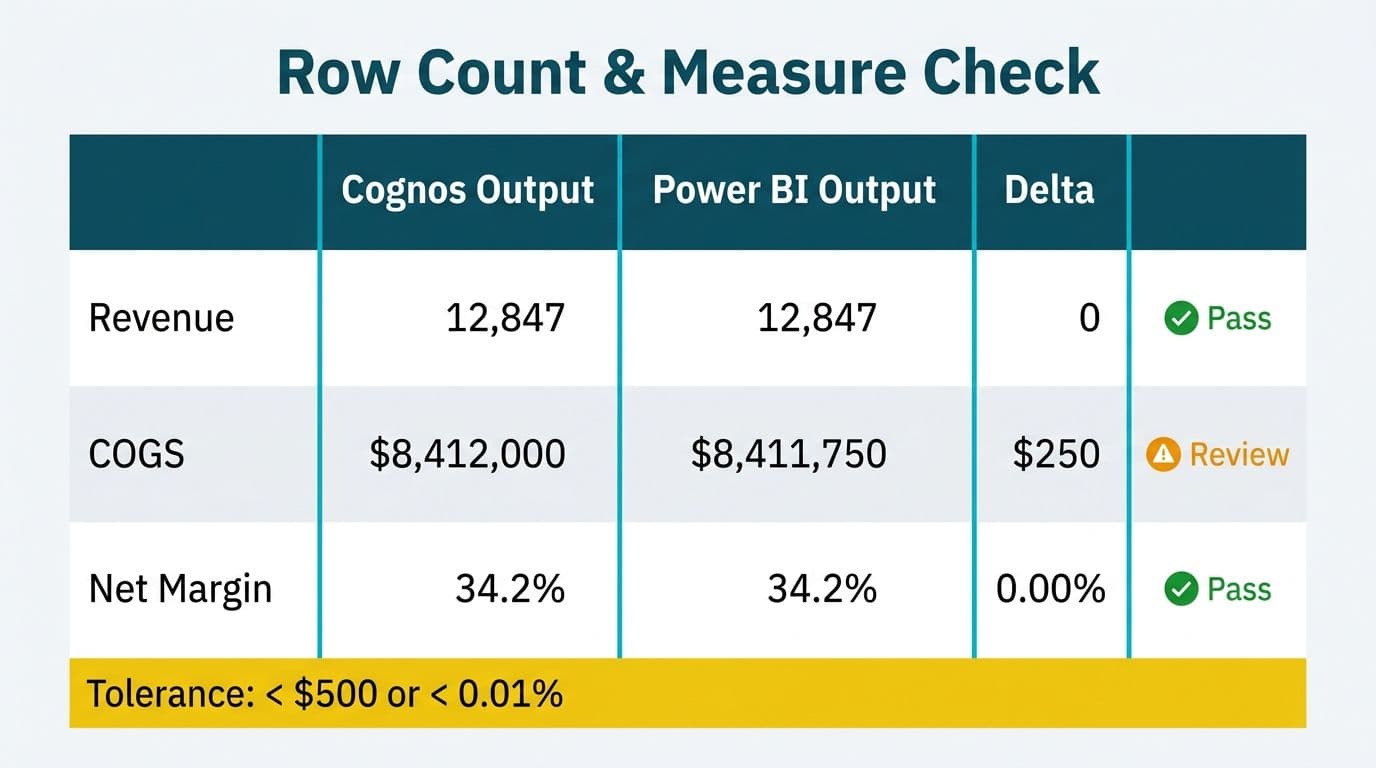
Row-count and measure delta checks form the quantitative core of any Cognos to Power BI data validation testing effort. They must run in sequence - grain first, then simple aggregates, then derived measures - because an error at the grain level compounds through every subsequent calculation.
Step 1 - Freeze and snapshot. On the agreed cutover freeze date, export each Cognos report to CSV. Lock the source tables. Document the export timestamp and the data-as-of date for each file. This produces the immutable baseline against which Power BI outputs will be compared.
Step 2 - Match grain row counts. Query the Power BI dataset at the lowest available grain: transaction ID, claim line, invoice number, or patient encounter ID depending on the domain. Compare the row count against the Cognos export. Any gap - even a single row - stops the test. Common causes include an undocumented implicit filter in the Cognos package, a relationship in the Power BI model set to single-direction that should be bidirectional, or a date range applied in the Cognos report that was not reproduced in the Power BI filter.
Step 3 - Compare aggregate measures. For each KPI in scope, sum the Cognos export and compare to the equivalent Power BI DAX measure. Record the absolute delta and the percentage delta. The tolerance matrix below defines acceptable thresholds by metric type.
Step 4 - Validate derived measures. Ratios, margins, rolling averages, and period-over-period comparisons carry the highest risk because they compound upstream errors. A 0.002% row-count gap can produce a 3% margin discrepancy when the denominator segment is small - a scenario common in healthcare cost-per-member reporting and financial services fee-per-account metrics.
| Check Type | Comparison | Finance Tolerance | Ops Tolerance | Escalation Trigger |
|---|---|---|---|---|
| Row count | Cognos export vs Power BI table | 0 rows | 0 rows | Any gap |
| Revenue / billings sum | Cognos total vs DAX SUM | 0.01% | 0.1% | Above threshold |
| Unit / volume sum | Cognos total vs DAX SUM | 0.01% | 0.1% | Above threshold |
| Gross margin % | Cognos % vs DAX DIVIDE | 0.05 pp | 0.2 pp | Above threshold |
| Rolling 12M average | Cognos trailing avg vs DAX time-intelligence | 0.1% | 0.5% | Above threshold |
| Null / blank count | Cognos blank cells vs Power BI blank | 0 | 0 | Any gap |
| YTD vs prior-year YTD | Cognos YTD vs DAX DATESYTD | 0.01% | 0.1% | Above threshold |
Finance tolerances align with typical internal audit materiality thresholds for monthly close reporting. Operations tolerances are wider because operational metrics carry inherent sampling variance. Organizations filing under SOX, IFRS, ASPE, or the UK Companies Act should align tolerances with their existing materiality policy document before UAT begins, not after.
How Do You Test Filter Parity Between Cognos and Power BI Reports?
Filter parity testing verifies that applying equivalent filter selections in Power BI produces the same data slice as the corresponding Cognos prompts. It is the test most often skipped under schedule pressure - and the root cause of the majority of discrepancies discovered by finance teams in the weeks following go-live.
Why Cognos filters do not translate directly. Cognos prompt pages construct SQL WHERE clauses at query time. A "current fiscal year" prompt typically references a Cognos Framework Manager date dimension that carries the organization's fiscal calendar. In Power BI, the equivalent filter is a DAX CALCULATE expression or a slicer connected to the model's calendar table. If the calendar table uses a different fiscal year definition - or if the fiscal year start month was hardcoded in Cognos but configured differently in Power BI - the filtered result sets will not match, even though both reports display the same period label.
Filter parity test procedure:
1. Extract all Cognos prompt definitions for every report in scope, including default values and cascading prompt dependencies.
2. Map each prompt to its Power BI equivalent: slicer, filter pane selection, or page-level filter.
3. Apply identical selections in both systems against the frozen dataset.
4. Run the row-count and measure delta checks from the previous section on the filtered result set.
5. Document each prompt name, its Cognos default, its Power BI equivalent, and the delta. Flag any prompt for which no direct Power BI equivalent exists.
Geographic compliance considerations. A US healthcare system running HIPAA-covered population health dashboards must confirm that a "current plan year" member filter in Power BI returns the same member count as the Cognos equivalent - an undercount would affect quality-of-care metrics submitted to CMS under HEDIS or Star Ratings programs. A UK fintech firm operating under GDPR must verify that the Power BI RLS implementation replicates the Cognos object-level security that previously restricted certain cohort data to EU-domiciled staff only. Our Cognos Security Model vs Power BI RLS mapping guide details that security translation. A Canadian financial institution subject to PIPEDA must confirm that province-level data partitioning on personal information behaves identically in both systems before Cognos access is decommissioned for affected user groups.
What Causes Measure Discrepancies in Cognos to Power BI Migration?
Three root causes account for the majority of measure discrepancies during Cognos to Power BI data validation testing: filter context propagation differences, join type mismatches, and date type handling errors.
Filter context propagation. DAX evaluates every measure inside a filter context that flows through model relationships. A Cognos metric computed in a correlated subquery (COUNT DISTINCT WHERE EXISTS) may need a DAX CALCULATE with DISTINCTCOUNT and KEEPFILTERS to reproduce correctly. Without KEEPFILTERS, the outer filter context is silently replaced and the measure overstates.
Join type mismatches. Cognos defaults to inner joins at the query layer unless the report author explicitly enables outer joins in Framework Manager. Power BI model relationships may behave as left outer joins, including records with no matching dimension key. A single unmatched fact row inflates a sum measure while the Cognos equivalent is unaffected.
Date type handling. Cognos date prompts frequently compare against VARCHAR-formatted date columns in the source database. DAX time-intelligence functions - DATESBETWEEN, DATESYTD, SAMEPERIODLASTYEAR - operate against a true Date column in the calendar table. A format mismatch causes time-intelligence measures to return blank without raising an error, producing a 100% delta on any period comparison.
For organizations also migrating SSRS financial reports to Power BI alongside the Cognos cutover, SSRS expressions (IIF, Switch, RunningValue) have no automatic DAX equivalent and each must be manually translated and individually validated before the measure delta check can begin. Teams planning the overall SSRS to Power BI migration cost and timeline should budget separately for this expression-to-DAX translation work, as it runs in parallel with Cognos validation and both tracks must clear before a single go-live date can be committed. The Cognos to Power BI migration anti-pattern guide documents the ten most common calculation translation errors and their DAX remediation patterns.
What Should the Cognos to Power BI UAT Sign-Off Template Include?
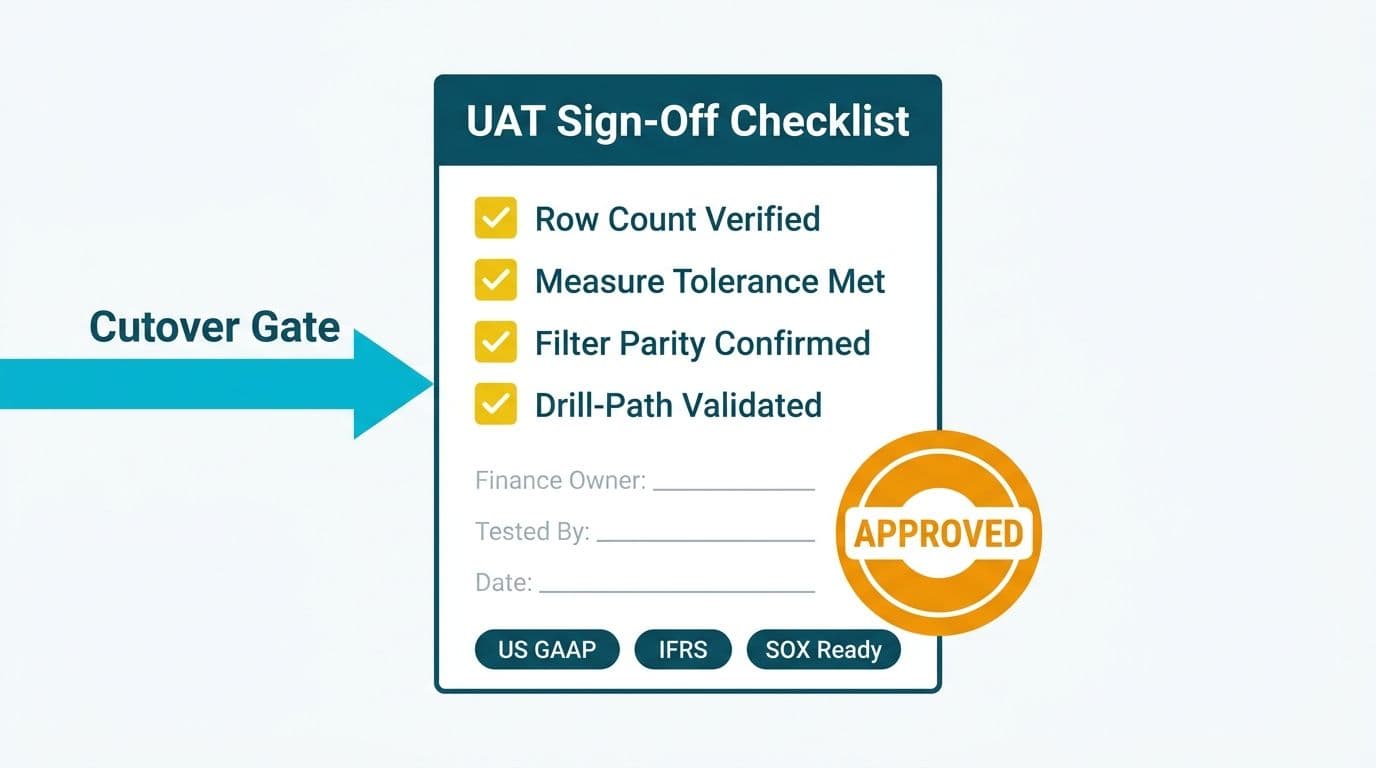
A reusable UAT sign-off template for Cognos to Power BI cutover serves two simultaneous purposes: a structured checklist for the project team and a durable audit artifact for the compliance function. Both require the same six sections.
Section 1 - Scope declaration. Report name, report ID, Cognos package or module, business owner, data-as-of date tested, Cognos freeze timestamp, and Power BI dataset refresh schedule. One row per report in scope.
Section 2 - Pre-agreed tolerance matrix. Adapted from the delta check table above, reviewed and signed by Finance leadership before UAT begins. Thresholds must not be changed after test results are known.
Section 3 - Test results log. For each report and each check type: Cognos value, Power BI value, absolute delta, percentage delta, pass or fail designation, tester name, and test timestamp. Blank cells are not acceptable in a signed audit artifact.
Section 4 - Exception log. Each failed check receives a row: report name, check type, delta, root cause, remediation action, re-test date, and re-test result. No report proceeds to go-live while any exception row remains open.
Section 5 - Sign-off block.
| Role | Name | Signature | Date Signed |
|---|---|---|---|
| Finance Director or CFO | |||
| Data Engineering Lead | |||
| Business Intelligence Lead | |||
| IT Security / Compliance Officer | |||
| Executive Sponsor (CIO or VP Analytics) | |||
| SSRS Subscription Owner (if applicable) |
The IT Security / Compliance row is mandatory rather than optional. US healthcare organizations must document data integrity verification for covered information to satisfy HIPAA Security Rule requirements under 45 CFR 164.312(c). UK and EU entities must demonstrate accuracy under GDPR Article 5(1)(d). Canadian organizations must satisfy PIPEDA Schedule 1, Principle 6. The SSRS Subscription Owner row applies when the migration also retires SSRS report subscriptions: that individual must confirm the Power BI subscription or Power Automate equivalent delivers the same data on the same cadence before the SSRS server is decommissioned.
Section 6 - Go-live decision gate. A single binary checkbox: all exceptions resolved, all approvers signed, go-live authorized. Document who checked it and the timestamp. This field cannot be populated while any exception log row remains open.
When Should You Escalate a Cognos to Power BI Validation Failure Before Go-Live?
Escalate immediately - before any fix attempt - when any of the following conditions are true: a row-count gap exceeds zero at any grain level, a finance measure delta exceeds the pre-agreed tolerance, an RLS or security filter produces a different population than the equivalent Cognos security rule, or any compliance-relevant report fails a check regardless of delta magnitude.
The escalation chain must be defined before UAT begins, not after a failure occurs. A practical mid-market chain: the tester escalates to the BI lead on the same business day; the BI lead escalates to the Finance Director within 24 hours if root cause is unresolved; the Finance Director escalates to the CIO if the go-live date is at risk. Each escalation should carry the exception log row, the root-cause hypothesis, and the estimated remediation time.
Do not retroactively widen tolerance thresholds after a failure to achieve a passing result. For US public companies, retroactive threshold changes conflict with SOX Section 302 sign-off obligations. For Canadian public companies, they conflict with National Instrument 52-109. For organizations in any jurisdiction, they destroy the evidentiary value of the sign-off document as an audit artifact.
For teams also running the SSRS to Power BI migration checklist in parallel with the Cognos cutover, keep SSRS validation failures and Cognos validation failures in separate exception logs. Merging them obscures ownership and slows remediation on both tracks. The Hospital Readmission Rate Analytics Dashboard in Power BI guide illustrates how healthcare teams enforce data accuracy gates for clinical metrics - the same escalation discipline applies equally to financial report validation.
---
About Lets Viz: Lets Viz has designed and delivered BI modernization and data migration engagements since 2020, serving US healthcare systems, UK fintech firms, Canadian manufacturing companies, and global SaaS organizations. The firm holds a 5.0 Clutch rating and specializes in high-stakes Cognos, SSRS, and legacy BI to Power BI cutovers where financial data integrity and compliance audit trails are non-negotiable requirements.
Ready to run your Cognos cutover with a proven data validation framework already built in? Explore our Tableau to Power BI migration services to see how we scope, validate, and hand off migrations for finance and operations teams across North America and the UK.