Logistics KPI Dashboard in Power BI: 10 Core Shipping Metrics
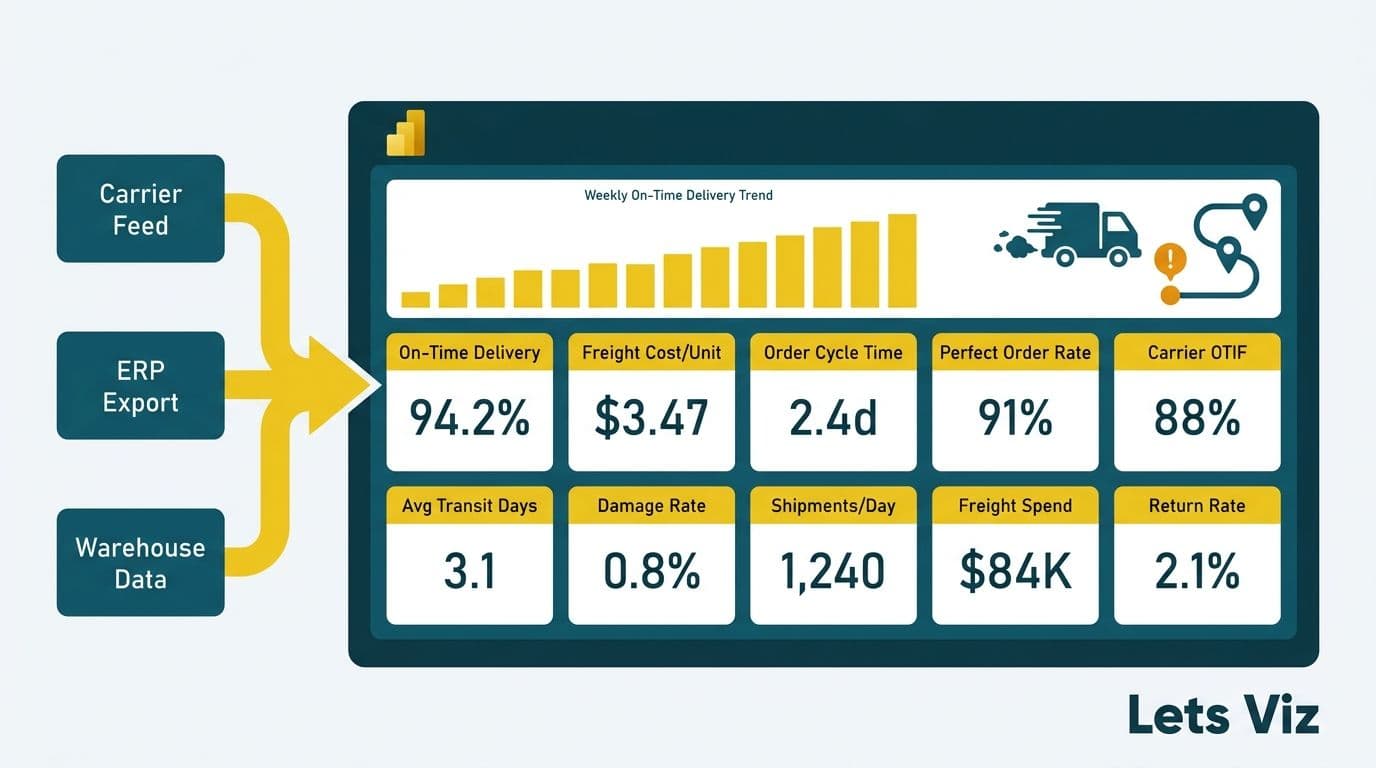
A logistics KPI dashboard in Power BI gives operations managers and supply chain analysts a single, governed view of shipping performance - consolidating carrier feeds, ERP exports, and warehouse data into metrics like on-time delivery rate, freight cost per unit, and order cycle time. Built on a star-schema data model with purpose-built DAX measures, it replaces fragmented spreadsheets with a refreshable report that surfaces problems before they become chargebacks or SLA penalties. Teams searching for a Power BI logistics shipping dashboard blueprint - one that covers multi-currency operations, AI anomaly alert configuration, and AI-assisted authoring alongside the core KPI layer - will find that architecture below.
Key Takeaways
A logistics KPI dashboard in Power BI should track at least 10 core shipping metrics spanning cost, speed, and quality dimensions.
The star schema - with a central `Fact_Shipments` table linked to carrier, route, customer, product, and date dimensions - is the correct data model foundation for drill-through and cross-filtering.
DAX measures for on-time delivery, freight cost per unit, and perfect order rate require role-playing date dimensions and careful use of `USERELATIONSHIP` or `CROSSFILTER`.
Compliance obligations (GDPR for UK and EU readers, PIPEDA for Canadian organisations) affect what customer-level data can be loaded into Power BI datasets.
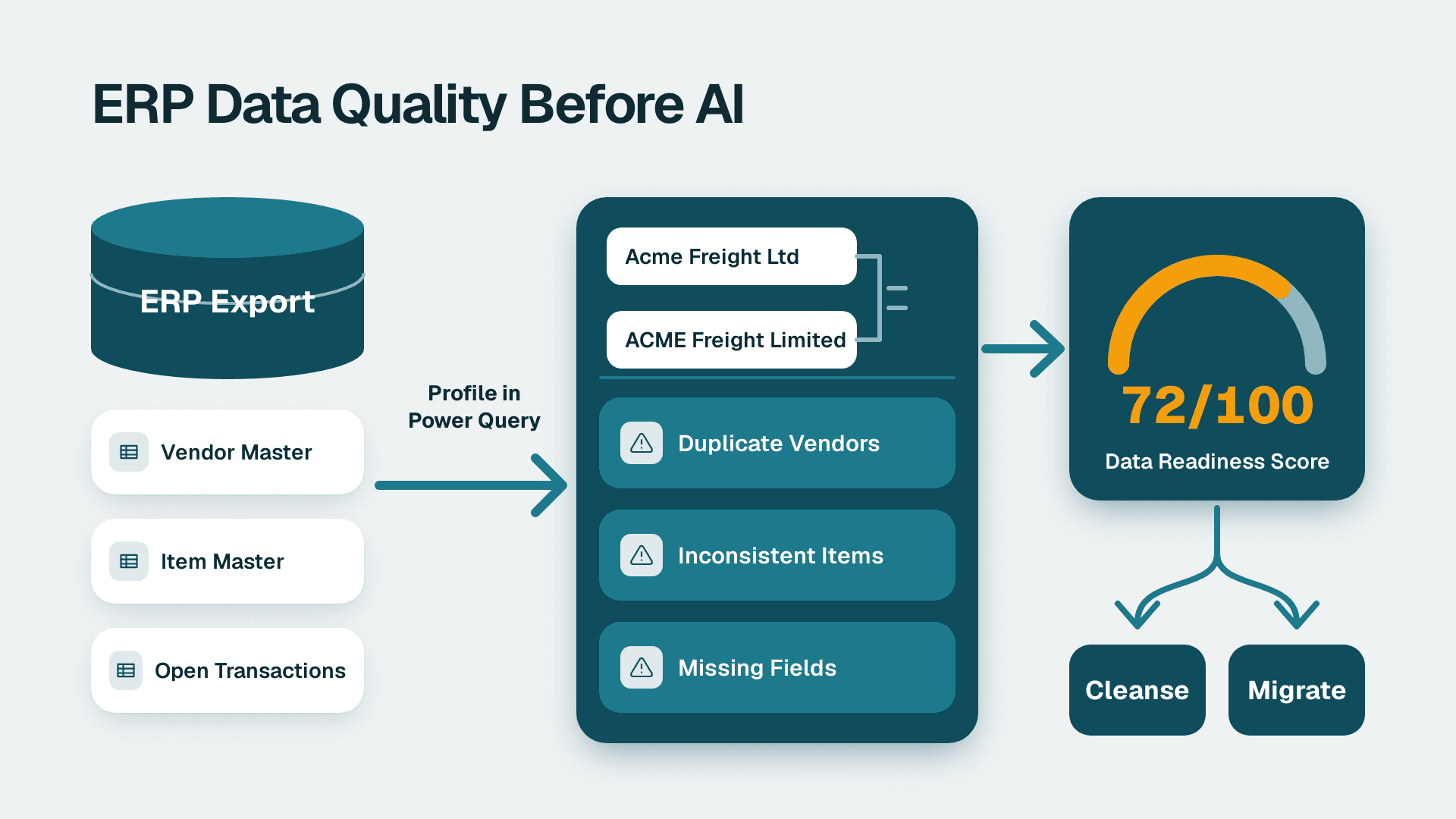
Before building, an AI data maturity assessment of your ERP exports often reveals data quality gaps that must be fixed before any dashboard can produce reliable KPIs.
What Is a Logistics KPI Dashboard in Power BI?
A logistics KPI dashboard in Power BI is a report layer that connects structured shipment, carrier, and inventory data to visual scorecards, trend charts, and drill-through tables - giving supply chain teams the context to diagnose delays, cost overruns, and fulfilment failures without exporting to a spreadsheet.
At its core, the dashboard answers three operational questions simultaneously: Are we delivering on time? Are we controlling freight spend? Are we hitting perfect-order targets? For a US distribution company shipping across multiple 3PL carriers, a UK manufacturer managing cross-border freight under GDPR data-processing obligations, or a Canadian retailer subject to PIPEDA, those three questions map directly to operational risk and regulatory accountability.
The most effective logistics dashboards combine a star-schema data model, at least five focused DAX measures, and Power BI row-level security (RLS) to restrict carrier or regional data to authorised users. Before scoping the build, use the Instant project cost calculator to size the effort against your current data infrastructure - the cost difference between an ERP-connected live model and a flat-file import can be substantial depending on refresh frequency and source system complexity.
What Are the 10 Core Shipping KPIs Every Supply Chain Team Should Track?
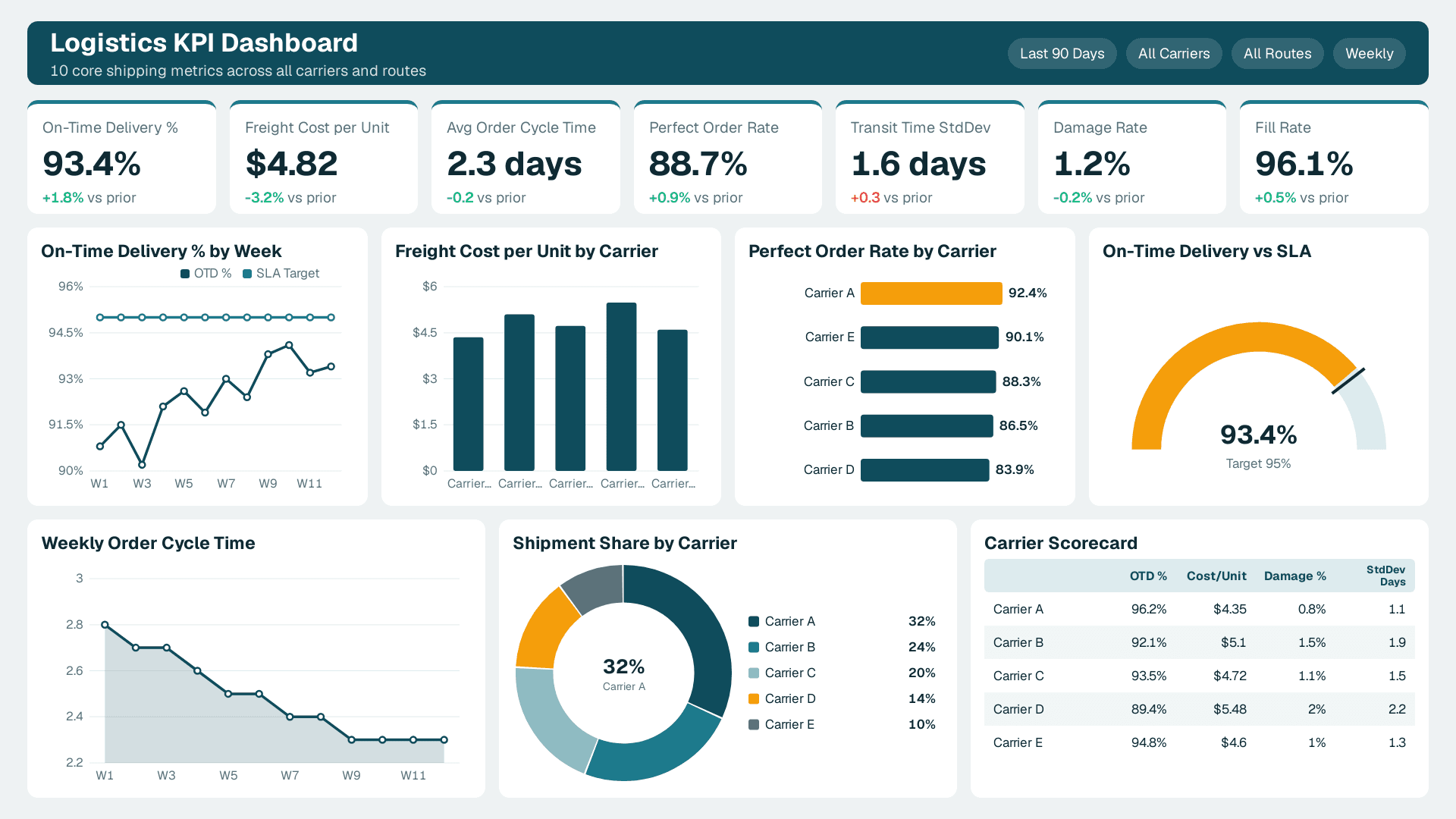
Ten KPIs cover the full cost-quality-speed triangle that operations managers report to the board. According to Future Market Insights (2026), the AI consulting services market is set to grow from USD 11.07 billion in 2025 to USD 90.99 billion by 2035 at a 26.2% CAGR - reflecting the pace at which supply chain teams are automating KPI monitoring that was previously manual and error-prone.
| # | KPI | Formula | Why It Matters |
|---|---|---|---|
| 1 | On-Time Delivery (OTD) Rate | On-time orders / Total orders | Primary carrier SLA metric |
| 2 | Freight Cost per Unit | Total freight spend / Units shipped | Cost control and carrier benchmarking |
| 3 | Order Cycle Time | Ship date - Order date (avg, days) | Customer experience and capacity planning |
| 4 | Perfect Order Rate | Orders with no defect / Total orders | Composite quality signal |
| 5 | Fill Rate | Lines shipped complete / Lines ordered | Inventory and warehouse health |
| 6 | Damage / Claims Rate | Claims filed / Total shipments | Carrier and packaging quality |
| 7 | Transit Time Variability | Std deviation of actual vs planned transit (days) | Reliability signal beyond averages |
| 8 | Dock-to-Stock Time | Receiving complete timestamp - Arrival timestamp (avg hrs) | Inbound efficiency |
| 9 | Carrier On-Time Performance | On-time count per carrier / Total per carrier | Multi-carrier benchmarking |
| 10 | Return Rate by SKU | Returns / Units shipped per SKU | Reverse logistics and product quality |
Each KPI maps to a dedicated DAX measure and at least one slicer dimension - carrier, route, customer segment, or date period - that analysts use in daily stand-ups and weekly board reviews. Tracking all ten gives operations leadership both the headline number (OTD %) and the diagnostic layer (transit time variability by carrier) needed to identify root causes rather than just symptoms. Organisations still exporting these metrics monthly from their TMS into Excel are leaving significant diagnostic capacity on the table: Power BI time-intelligence functions allow period-over-period comparisons in a single calculated measure.
How Do You Model Logistics Data in Power BI? (Star Schema)
The star schema is the standard data model for a logistics KPI dashboard in Power BI. A central `Fact_Shipments` table stores one row per shipment event; dimension tables - `Dim_Carrier`, `Dim_Route`, `Dim_Customer`, `Dim_Product`, and `Dim_Date` - connect to it via single-direction relationships from dimension to fact.
A representative schema:
```
Fact_Shipments
ShipmentID (PK)
OrderDateKey (FK -> Dim_Date)
ShipDateKey (FK -> Dim_Date, inactive)
DeliveryDateKey (FK -> Dim_Date, inactive)
CarrierKey (FK -> Dim_Carrier)
RouteKey (FK -> Dim_Route)
CustomerKey (FK -> Dim_Customer)
ProductKey (FK -> Dim_Product)
Units
FreightCost
PlannedDeliveryDate
ActualDeliveryDate
IsOnTime (bit)
IsDamaged (bit)
IsPerfectOrder (bit)
```
Three date foreign keys (order, ship, delivery) require a role-playing dimension pattern. The simplest approach is to mark the `ShipDateKey` and `DeliveryDateKey` relationships as inactive in the model and activate them per measure using `USERELATIONSHIP`. Alternatively, create separate date views (`Dim_OrderDate`, `Dim_ShipDate`, `Dim_DeliveryDate`) that each reference the same underlying calendar table - this avoids `USERELATIONSHIP` inside every measure but increases the model's table count.
For Canadian manufacturing clients governed by PIPEDA, `Dim_Customer` may constitute personal information if it can identify an individual business contact - such as a sole-trader delivery address. Confirming data classification before loading into Power BI is a governance step that becomes part of any defensible AI data governance framework, regardless of market. The same principle applies under GDPR for UK and EU datasets.
For a deeper look at refresh mode trade-offs for this type of model, the Power BI Import vs DirectQuery: Mid-Market Decision Guide covers the latency and cost implications specific to operational supply chain datasets.
What DAX Measures Power a Logistics KPI Dashboard?
DAX measures translate the raw fact table into the ten KPIs above. Five measures cover the most commonly requested calculations by supply chain analysts and operations managers.
On-Time Delivery %
```dax
OTD % =
DIVIDE(
COUNTROWS(FILTER(Fact_Shipments, Fact_Shipments[IsOnTime] = 1)),
COUNTROWS(Fact_Shipments)
)
```
Freight Cost per Unit
```dax
Freight Cost per Unit =
DIVIDE(SUM(Fact_Shipments[FreightCost]), SUM(Fact_Shipments[Units]))
```
Order Cycle Time (Avg Days)
```dax
Avg Order Cycle Time =
AVERAGEX(
Fact_Shipments,
DATEDIFF(Fact_Shipments[OrderDate], Fact_Shipments[ShipDate], DAY)
)
```
Perfect Order Rate
```dax
Perfect Order Rate =
DIVIDE(
COUNTROWS(FILTER(Fact_Shipments, Fact_Shipments[IsPerfectOrder] = 1)),
COUNTROWS(Fact_Shipments)
)
```
Transit Time Variability
```dax
Transit Time StdDev =
STDEVX.P(
Fact_Shipments,
DATEDIFF(Fact_Shipments[ShipDate], Fact_Shipments[ActualDeliveryDate], DAY)
)
```
Teams migrating from Tableau will find that calculated fields translate directly to DAX measures, but the aggregation context - row context vs filter context - behaves differently and produces silent errors in logistics KPIs if not handled carefully. The Tableau Calculated Fields to Power BI DAX Conversion Guide covers the most common translation pitfalls for supply chain metrics including running totals and conditional aggregations.
How Does the DAX CROSSFILTER Function Work in Logistics Reports?
The DAX CROSSFILTER function controls the direction of a relationship between two tables within a specific measure calculation. In a standard star schema, all relationships are single-direction (dimension to fact). But in logistics dashboards, you often need a carrier slicer to filter both outbound shipments and inbound returns simultaneously - which requires either bidirectional model relationships or scoped `CROSSFILTER` calls inside specific measures.
A concrete example: suppose `Dim_Carrier` links to both `Fact_Shipments` and `Fact_Returns`. Selecting "Carrier A" in a slicer should filter both tables. Without intervention, the single-direction relationship blocks the filter from propagating into `Fact_Returns`. The fix:
```dax
Returns for Selected Carrier =
CALCULATE(
COUNTROWS(Fact_Returns),
CROSSFILTER(Dim_Carrier[CarrierKey], Fact_Returns[CarrierKey], BOTH)
)
```
`CROSSFILTER(column1, column2, direction)` accepts `BOTH`, `ONEWAY`, or `NONE` as its direction argument. Use `BOTH` sparingly - enabling bidirectional filters across the full schema creates ambiguous filter paths and can degrade query performance noticeably in large fact tables with millions of shipment rows. Scope `CROSSFILTER` to the specific measure rather than setting it on the model relationship itself, which gives you surgical control without risking model-wide filter ambiguity.
According to Market Research Future (2026), the global supply chain analytics market is projected to grow at an 8.9% CAGR through 2035, driven by the same complexity challenges that logistics analytics faces: multiple fact tables, role-playing dimensions, and user expectations for sub-second slicer response times across large datasets.
For a complete walkthrough of the shipping analytics build process, see How to Build a Shipping Analytics Dashboard in Power BI.
How Do You Configure AI Anomaly Alerts on a Power BI Logistics Shipping Dashboard?
A well-structured Power BI logistics shipping dashboard uses four core time-series visuals - one each for on-time delivery rate, carrier cost per shipment, fill rate, and days-to-ship - and Power BI's built-in anomaly detection to flag deviations automatically without requiring a manual review of every metric each morning.
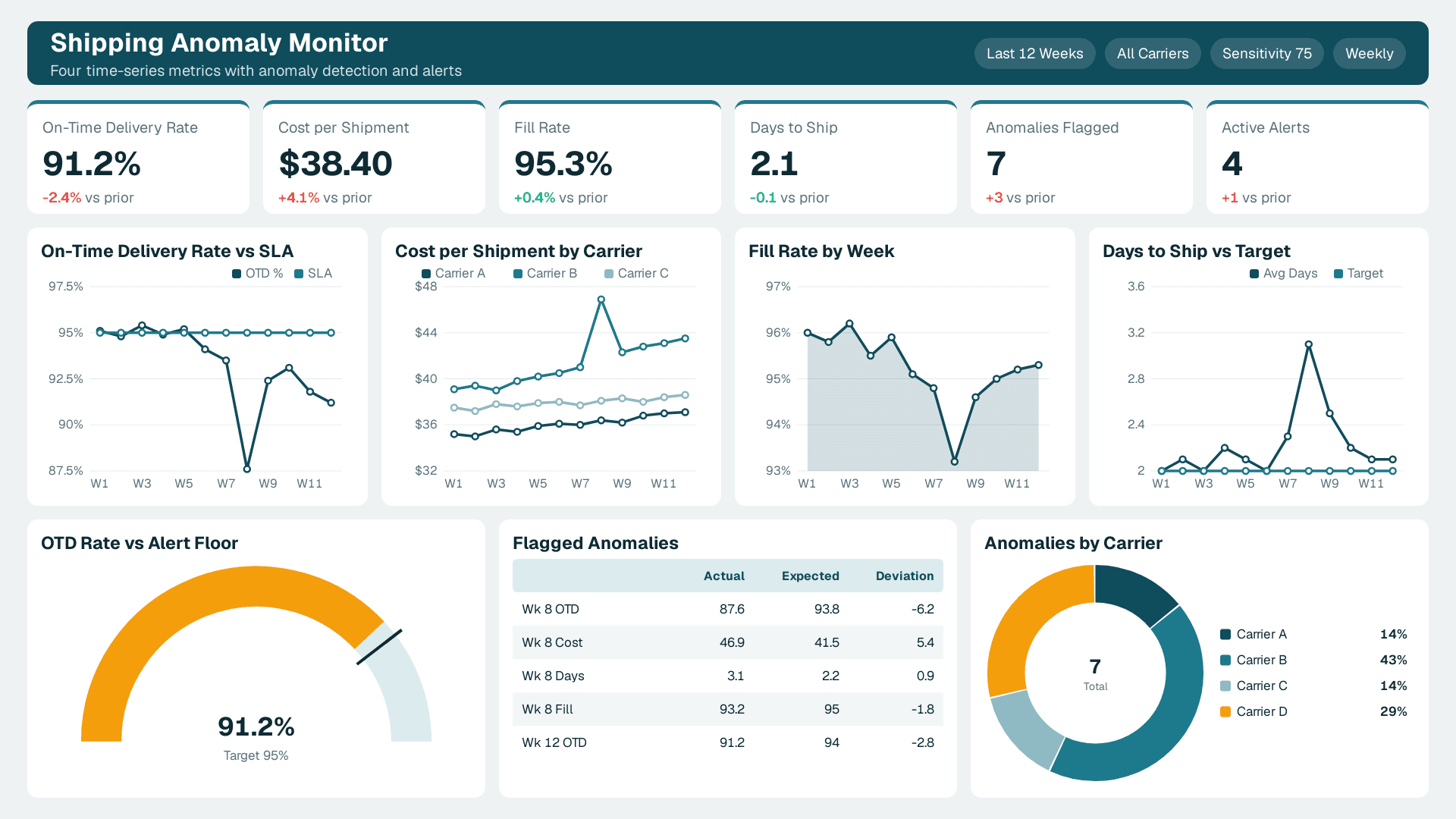
Visual layout for the four key metrics:
Each metric maps to a line chart on a dedicated dashboard page, configured as follows:
- On-time delivery rate - Line chart with `OTD %` on the Y axis and `Dim_Date[WeekStartDate]` on the X axis, with a carrier slicer. Add a constant line in the Analytics pane at the SLA threshold (typically 95%) so shortfalls are immediately visible without reading the axis.
- Carrier cost per shipment - Line chart with `Freight Cost per Unit` on Y, date on X, and carrier as a legend series. Multiple lines on a single visual expose per-carrier cost drift against a shared baseline period.
- Fill rate - Area chart, with the fill below the target making shortfalls visually immediate. A reference line at 95% (or your internal target) renders the pass/fail state at a glance.
- Days-to-ship - Line chart with `Avg Order Cycle Time` on Y and date on X. A reference line at the internal SLA target (for example, 2 days for domestic parcel) provides an at-a-glance read without requiring the viewer to interpret axis scale.
Enabling anomaly detection per visual:
Select any line chart, open the Analytics pane, and toggle Find anomalies on. Power BI fits a model to the historical series and marks statistically unusual points - typically values outside 1.5 standard deviations of the expected range - with a marker on the line. Sensitivity is adjustable from 1 (fewer alerts) to 100 (more alerts); a setting of 70 to 80 works well for weekly OTD and freight cost series that carry natural seasonal variance. Hovering over a flagged point surfaces the expected range and the magnitude of the deviation in a tooltip.
Configuring alert notifications:
Pin any of the four visuals to a Power BI dashboard (the tile-based view, not the report canvas). From the pinned tile, select Manage alerts and set a threshold-based rule - for example, alert when OTD rate falls below 90% or when freight cost per shipment exceeds a defined ceiling. Alerts fire by email and, with a Power Automate connector, can push to Teams channels that operations managers monitor in real time. US logistics teams on Fabric capacity can additionally use Data Activator to trigger automated downstream actions - such as opening a carrier incident ticket in a helpdesk system - when a metric breaches its configured threshold, without manual intervention.
For anomaly explanation, the Copilot pane supplements the built-in detection: an operations manager can ask "why did days-to-ship spike on Tuesday?" and receive a filter-context-aware breakdown identifying whether the spike was concentrated in a specific carrier, route, or customer segment.
How Does Power BI Copilot Enhance a Logistics and Shipping Dashboard?
Power BI Copilot brings natural-language querying and AI-assisted report authoring directly into the canvas - reducing the time between a data model going live and operations managers getting answers from their Power BI logistics and shipping dashboard. For supply chain and shipping use cases, Copilot's most practical contributions fall into three areas: measure generation, narrative summaries, and anomaly explanation.
Measure suggestions: When a supply chain analyst types "show me on-time delivery rate by carrier for the last 90 days" in the Copilot pane, Copilot generates a DAX query and a visual recommendation based on the existing data model. The generated measure still needs review for filter context correctness - especially when role-playing date dimensions are involved - but it accelerates first-draft iteration on new KPI requests significantly, particularly for teams that are strong in logistics domain knowledge but still building DAX fluency.
Narrative summaries: Copilot's smart narrative visual generates plain-English commentary on metric movements - for example, flagging that transit time variability for Carrier B increased 1.4 days week-over-week. For US, UK, and Canadian logistics teams sharing a single report, the narrative layer reduces the need for manual commentary on regional performance slides and makes the dashboard more accessible to non-technical stakeholders reviewing freight cost or inventory KPIs.
Anomaly detection prompts: Copilot can surface statistically unusual observations in OTD or freight cost trends. Operations leads reviewing the shipping dashboard each morning can use the Copilot pane to ask "why did freight cost per unit spike on Thursday?" and receive a filter-context-aware explanation based on the current slicer state - without writing a DAX query or building an additional visual.
Inventory KPI acceleration: Copilot is particularly useful for on-demand inventory analysis. A warehouse manager can ask "which SKUs have a fill rate below 85% this month?" directly in the report canvas. Because the answer draws from the same `Fact_Shipments` and product dimension already powering the dashboard, no additional data wrangling is required.
Governance note: Copilot in Power BI requires a Microsoft Fabric capacity or Premium Per User licence. For UK and Canadian datasets subject to GDPR and PIPEDA respectively, confirm that Copilot is configured to use a tenant region that satisfies data residency requirements before enabling it on datasets containing customer-identifiable shipment records. Quebec's Law 25 adds stricter consent obligations on top of the PIPEDA federal baseline that are particularly relevant when Copilot-generated insights are shared across organisational boundaries.
How Do You Build a Finance KPI Dashboard in Power BI for CFO-Level Reporting?
Operations managers and CFOs consume supply chain data through different lenses. Finance KPI dashboard Power BI examples aimed at the CFO layer pull from the same `Fact_Shipments` and ERP tables used in the logistics view, but surface financial metrics that tie shipping performance directly to the income statement, balance sheet, and cash flow statement - not just carrier SLAs. Extending the logistics star schema into a CFO-facing executive dashboard is one of the highest-leverage investments a supply chain analytics team can make, because it reuses existing data infrastructure while unlocking board-level reporting.
A CFO executive dashboard should surface 15 KPIs organised across three tiers:
Tier 1 - Profitability (income statement link):
| KPI | Formula | CFO Relevance |
|---|---|---|
| EBITDA Margin | EBITDA / Revenue | Operating profitability excluding financing and depreciation |
| Gross Freight Margin | (Revenue - Freight Cost) / Revenue | Shipping cost impact on margin |
| Operating Cash Flow vs Plan | Actual OCF - Budgeted OCF | Liquidity variance from supply chain execution |
| Revenue per Shipment | Total Revenue / Shipment Count | Average transaction value trend |
| Carrier Spend vs Budget | Actual Spend - Budget | Freight overage early warning |
Tier 2 - Working capital (balance sheet link):
| KPI | Formula | CFO Relevance |
|---|---|---|
| Days Sales Outstanding (DSO) | (Accounts Receivable / Revenue) x Period Days | Cash collection speed |
| Days Payable Outstanding (DPO) | (Accounts Payable / COGS) x Period Days | Supplier payment cycle |
| Days Inventory Outstanding (DIO) | (Inventory / COGS) x Period Days | Stock efficiency |
| Cash Conversion Cycle (CCC) | DSO + DIO - DPO | End-to-end working capital efficiency |
| Working Capital Ratio | Current Assets / Current Liabilities | Short-term liquidity health |
Tier 3 - Operational roll-up (logistics-to-finance bridge):
The remaining five slots compress the 10 operational metrics from the table above into headline cards - OTD Rate, Perfect Order Rate, Fill Rate, Return Rate cost impact, and Freight Cost as % of Revenue - so the CFO sees supply chain quality alongside the financial outcomes it drives.
Multi-currency display for US, UK, and Canadian operations
When a single Power BI dataset serves finance teams reporting in USD, GBP, and CAD, currency conversion should live in the display layer rather than the fact table. Store all values in a base currency (typically USD) in `Fact_Shipments` and `Fact_Financials`, then join a `Fact_ExchangeRate` table keyed on date and currency code:
```dax
Freight Cost (Display Currency) =
SUMX(
Fact_Shipments,
Fact_Shipments[FreightCost] *
CALCULATE(
SELECTEDVALUE(Fact_ExchangeRate[Rate]),
Fact_ExchangeRate[CurrencyCode] = SELECTEDVALUE(Dim_Currency[CurrencyCode]),
Fact_ExchangeRate[DateKey] = Fact_Shipments[ShipDateKey]
)
)
```
A `Dim_Currency` slicer set to single-select lets a CFO in London toggle from USD to GBP without requiring duplicate measures or separate report pages. The same pattern applies to all inventory KPIs expressed in monetary terms - landed cost per SKU, safety stock valuation, and write-off reserves - so the currency toggle works consistently across the entire logistics and finance layer. For UK operations, GDPR obligations around financial data at the customer level - including debtor-level DSO detail - apply the same way they do to shipment records: document the lawful basis before loading identifiable financial data into a Power BI dataset. For Canadian entities, Quebec's Law 25 adds stricter consent requirements on top of the PIPEDA federal baseline, which is particularly relevant when cross-border DSO data flows into a Power BI tenant hosted outside Canada.
Extending the logistics model to a full finance KPI dashboard in Power BI adds one ERP financial extract fact table, one `Dim_Currency` dimension, and an exchange rate bridge - a modest incremental build cost that turns a departmental operations tool into a board-level reporting asset covering both supply chain efficiency and financial outcomes.
Build vs Buy: Should You Develop Your Logistics Analytics Capability In-House?
The build vs buy AI data capability decision is one of the first strategic questions a supply chain VP faces when scoping a logistics KPI dashboard. Building in-house provides full control over the data model and DAX logic but requires a Power BI developer who understands logistics data - a specialist skill set that is increasingly difficult to retain in any market.
The alternative - a managed service or specialist partner - accelerates time-to-insight and shifts maintenance responsibility, but requires clear governance hand-offs and a defined change management process. The boutique AI consulting firm vs large consultancy trade-off is relevant here: boutique firms typically embed more deeply in domain-specific schemas (understanding, for instance, that "ship date" means different things in ocean freight vs domestic parcel), while large consultancies apply generic BI frameworks that can miss operational nuance.
According to Future Market Insights (2026), the global AI Consulting and Support Services market is forecast to expand at a CAGR of 31.6% through 2030 - a growth rate that partly reflects the shortage of in-house specialists, which is pushing more organisations toward managed analytics partners.
Key questions that shape the build vs buy decision:
Data maturity: Is your ERP exporting clean, consistently keyed shipment data, or does it require significant transformation before a star schema can be built? An AI data maturity assessment performed upfront surfaces these gaps and prevents the common failure mode of building a well-designed dashboard on unreliable source data.
Refresh frequency: Near-real-time carrier tracking feeds via REST API require DirectQuery or Microsoft Fabric streaming - skills beyond standard Power BI report development. A UK logistics firm connecting to a carrier API every 15 minutes needs a fundamentally different architecture than a US distributor refreshing nightly from an ERP flat-file export.
Maintenance ownership: Who updates the DAX when a carrier changes its shipment status codes? Without a named owner, dashboards degrade silently over months, and OTD % begins understating the true rate because new status values are unhandled.
A Canadian manufacturing company recently completed a data maturity assessment and discovered that 38% of shipment records lacked a consistent carrier key - making carrier-level OTD benchmarking impossible without a data quality remediation pass first. Building a dashboard before fixing the source data would have produced a confident-looking but inaccurate report. An AI data strategy for supply chain that sequences data quality before dashboard build avoids this outcome entirely.
Our Managed Power BI services include an initial data audit as part of every logistics dashboard engagement.
What Compliance and Governance Requirements Apply to Logistics Dashboards?
Logistics data crosses organisational and national boundaries, making governance a non-optional design step rather than a post-launch retrofit. Three regulatory contexts apply to the markets this article covers.
United States: Shipment records tied to healthcare supply chains - pharmaceutical distribution, medical device logistics - may carry HIPAA obligations if records can be linked to patient care events. SOC 2 Type II controls are increasingly required by enterprise customers before they will grant EDI or API feed access to a third-party analytics environment. US operations teams should document data lineage from the ERP to the Power BI dataset as part of their audit trail.
UK and EU: Under GDPR, any customer-level shipment record that can identify a natural person - including business addresses resolving to a sole trader - requires a documented lawful basis for processing and a defined retention schedule. Power BI RLS is the mechanism for enforcing data minimisation at the report layer, ensuring that a regional manager in Germany, for example, sees only their territory's shipment records, not the full dataset.
Canada: PIPEDA (and Quebec's Law 25, which has stricter consent requirements than the federal baseline) applies to commercial activity involving personal information. A Canadian manufacturing firm shipping to retail customers must document what customer data is loaded into Power BI datasets and confirm that cross-border transfer safeguards are in place if the Power BI tenant sits outside Canada.
Embedding these compliance requirements into the data model design phase - rather than retrofitting them after the dashboard is live - is a core principle of any robust AI data governance framework for supply chain operations.
---
About Lets Viz: Lets Viz is a data analytics consultancy, rated 5.0 on Clutch, that has delivered Power BI, Microsoft Fabric, and AI analytics solutions for clients across US healthcare, UK fintech, Canadian manufacturing, and global SaaS since 2020. Our supply chain analytics practice covers star-schema design, DAX optimisation, and compliance-ready logistics dashboard governance.
Ready to scope your logistics KPI dashboard? Use the Instant project cost calculator to get an instant project estimate based on your data sources, refresh cadence, and team size.