How Power BI Copilot Generates DAX from Natural Language
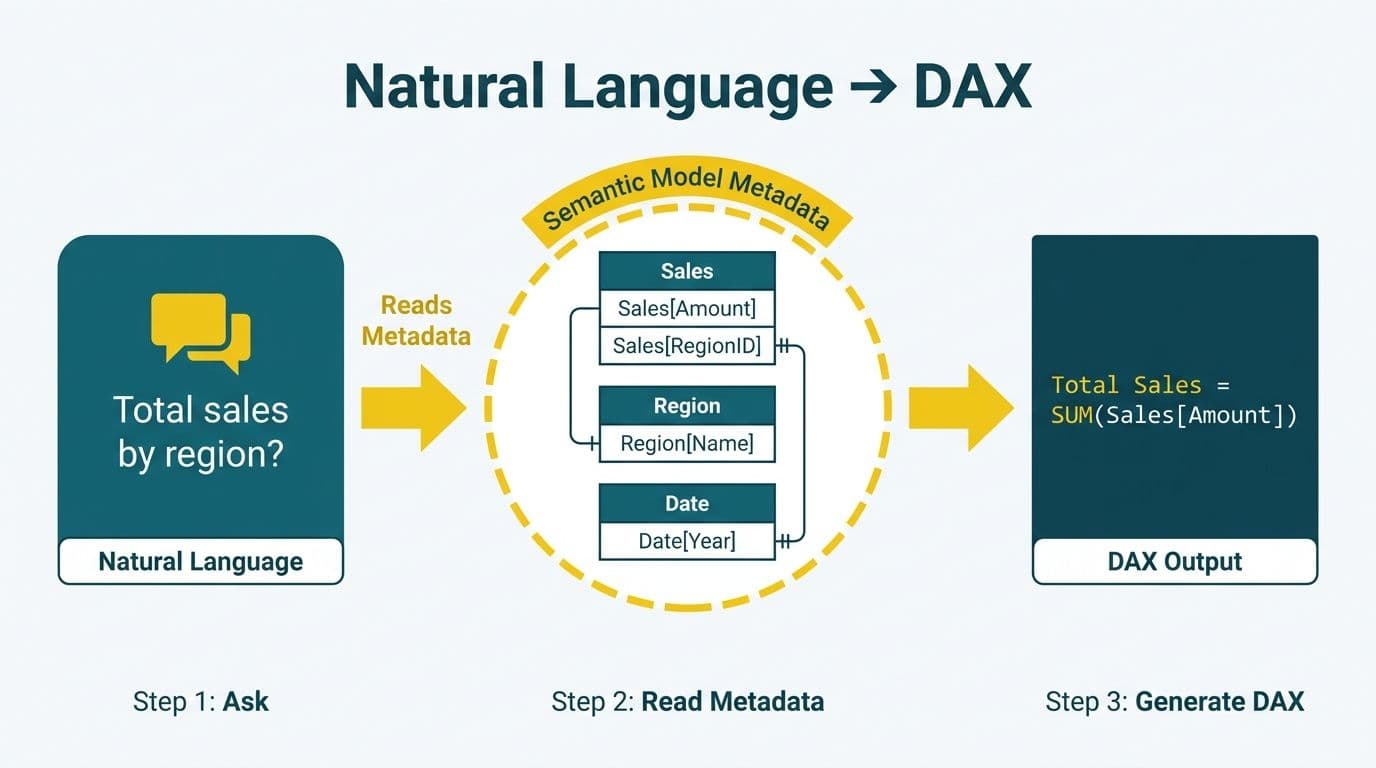
Power BI Copilot generates DAX by reading your semantic model's metadata - table names, column names, relationships, and measure definitions - then using a large language model to translate your natural language question into a valid DAX expression. The accuracy of that translation depends almost entirely on how clearly the semantic model is described and how unambiguously its fields are named. For finance and healthcare teams, where wrong numbers carry compliance consequences, understanding this pipeline is essential.
Key Takeaways
- Copilot reads semantic model metadata, not raw data, to construct DAX expressions.
- Hallucinated measures almost always originate from ambiguous column names or missing field descriptions.
- Adding plain-English descriptions to every measure and column is the highest-leverage action before enabling Copilot.
- The CALCULATE function and SUMX are the two DAX patterns Copilot relies on most - understanding both lets you verify its output quickly.
- A structured adoption checklist reduces deployment risk for mid-market finance and healthcare teams across US, UK, and Canadian markets.
How Does Power BI Copilot Generate DAX from Natural Language?
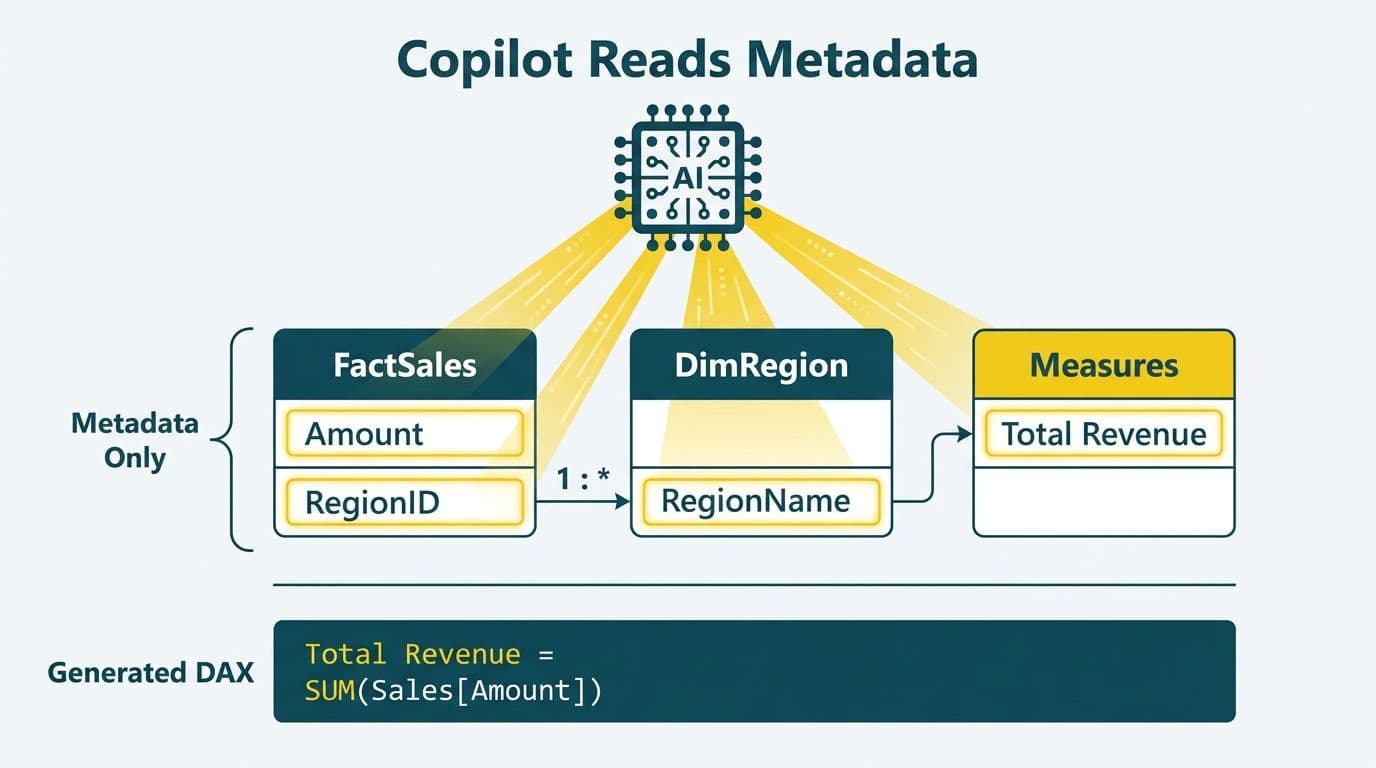
Copilot does not access your underlying database or raw tables. It reads the semantic layer exposed by the Power BI dataset: table names, column names and data types, existing measure definitions, relationship cardinality, and any descriptions added via the model view or Tabular Editor.
When you submit a natural language question - "What was net revenue by region last quarter?" - Copilot constructs a context window containing a relevant subset of that schema and passes it to the underlying language model along with your question. The model returns a DAX expression, which Copilot syntax-validates before surfacing it.
This pipeline is why a well-documented semantic model is not merely best practice - it is the primary input to an AI system. Teams preparing their datasets for Power BI consulting (Copilot-ready) standards should treat the semantic layer as they would any structured knowledge base that an AI will query.
One important constraint: Copilot's schema retrieval is bounded by the context window of the underlying model. In large datasets with hundreds of tables and thousands of columns, Copilot uses embedding-based retrieval to select the most relevant schema fragments. Generically named or undescribed columns are systematically deprioritized - which means the model may never surface them even when they are the correct answer to your question.
How Does the Four-Stage Pipeline Translate a Question into a DAX Expression?
The translation follows four sequential stages: intent parsing, schema grounding, expression generation, and validation.
Intent parsing extracts the measurement type (sum, count, ratio), the filters implied by the question ("last quarter," "by region," "excluding returns"), and the granularity requested.
Schema grounding maps those parsed components to actual model objects. "Net revenue" must resolve to a specific measure or column. "By region" must resolve to a dimension column. "Last quarter" must resolve to a date table with a recognized time-intelligence pattern.
Expression generation produces a DAX string. Simple aggregations typically become a `SUM` or `AVERAGE` wrapped in a `CALCULATE` with filter arguments. Row-level calculations - common in per-unit cost scenarios, weighted averages, and a power bi logistics and shipping dashboard - produce `SUMX` expressions.
Validation checks that referenced tables and columns exist in the model. This catches structural errors but not semantic ones: a measure referencing the wrong column passes validation and returns silently incorrect numbers.
| Stage | What Copilot Does | Where Errors Enter |
|---|---|---|
| Intent parsing | Extracts measure type, filters, granularity | Ambiguous phrasing ("recent," "main," "total") |
| Schema grounding | Maps terms to model objects | Generic column names, missing field synonyms |
| Expression generation | Writes DAX string | Wrong pattern for the filter context |
| Validation | Syntax-checks the expression | Semantic errors pass without warning |
Where Do Hallucinated Measures Come From - and How Do You Stop Them?
Hallucinated measures - DAX expressions that are syntactically valid but semantically wrong - almost always originate in the schema grounding stage. Three causes account for the majority of cases.
Ambiguous column names. A column named `Amount` could be order value, payment amount, refund amount, or tax. When Copilot resolves "total amount," it picks one - not necessarily the correct one. Rename to `Order_Gross_Amount_USD`, `Payment_Amount_CAD`, or equivalent context-specific names.
Missing field descriptions. Every measure and column in a Copilot-ready model should carry a description in plain English. Microsoft's Power BI Desktop documentation (2025) explicitly identifies measure descriptions as a key input to Copilot's grounding. A measure with no description is treated as a black box - Copilot may attempt to re-derive it from scratch rather than use the existing validated definition.
Broken or ambiguous relationships. If the relationship between a fact table and a date dimension is inactive or has multiple paths, time-intelligence expressions will be wrong. A US healthcare finance team tracking claim submission dates versus payment dates needs explicit active and inactive relationships - and table descriptions that specify which path applies in which analytic context.
The practical fix is a model audit before Copilot enablement: every measure described, ambiguous columns renamed, relationship cardinality confirmed, and a dedicated date table marked as such in model properties. For organizations in regulated industries - a Canadian insurer under PIPEDA, a US health system under HIPAA, or a UK financial services firm under GDPR - silently wrong aggregations on patient or financial data carry compliance consequences beyond analytic inconvenience. The HIPAA-compliant BI tools guide covers the governance layer that sits above the DAX generation pipeline for US health systems.
What Is the CALCULATE Function in DAX and How Does Copilot Apply It?
The CALCULATE function is the primary mechanism for modifying filter context in DAX. Its signature is `CALCULATE(expression, filter1, filter2, ...)`. It evaluates `expression` in a filter context modified by the filter arguments, replacing the existing context for any column those arguments address.
Copilot uses power bi calculate function dax patterns for almost every filtered aggregation. A question like "What were sales in Q3 excluding online channel?" typically produces:
```dax
CALCULATE(
SUM(Sales[Gross_Amount_USD]),
Sales[Channel] <> "Online",
DATESBETWEEN('Date'[Date], DATE(2026,7,1), DATE(2026,9,30))
)
```
Understanding calculate function dax power bi filter context behavior is essential for verifying Copilot's output. Because CALCULATE replaces - not adds to - the existing filter context for referenced columns, a Copilot-generated measure may behave unexpectedly when placed on a visual that already has a filter applied.
Common Copilot mistakes with CALCULATE:
- Nesting CALCULATE inside a measure that already modifies filter context, creating context conflicts that are difficult to debug.
- Using `FILTER(ALL(Table), condition)` when a simpler column filter directly inside CALCULATE would be correct and significantly faster.
- Applying a date filter that conflicts with an existing time-intelligence measure, producing double-filtered or empty results.
When you see `FILTER(ALL('Date'), 'Date'[Year] = 2026)` inside a CALCULATE, replacing it with the direct filter `'Date'[Year] = 2026` is almost always both more performant and semantically cleaner. Another pattern to watch: when Copilot wraps a measure that already uses `ALL()` or `REMOVEFILTERS()` internally, the outer CALCULATE may inadvertently restore filters the inner measure was designed to remove. Reading the full expression before accepting it takes two minutes and catches most of these cases.
When Does Copilot Use SUMX - and When Should You Simplify It?
SUMX is the row-iteration version of SUM. Where `SUM(Sales[Amount])` adds up a column, `SUMX(Sales, Sales[Quantity] * Sales[Unit_Price])` iterates row by row, evaluates an expression per row, and sums the results. The SUMX function in power bi is necessary for calculated row-level values that do not exist as a pre-computed column.
Copilot reaches for SUMX whenever it infers a row-level calculation - sometimes correctly, sometimes not.
SUMX function in power bi examples where Copilot's output is usually accurate:
- Weighted average margin: `DIVIDE(SUMX(Sales, Sales[Margin_Amount] * Sales[Weight]), SUMX(Sales, Sales[Weight]))`
- Cost per unit shipped: `DIVIDE(SUMX(Shipments, Shipments[Freight_Cost_USD]), SUMX(Shipments, Shipments[Units_Shipped]))`
- Revenue net of returns: `SUMX(Orders, Orders[Revenue_USD] - Orders[Return_Amount_USD])`
When to correct it: If Copilot generates `SUMX(Sales, Sales[Gross_Amount_USD])` instead of `SUM(Sales[Gross_Amount_USD])`, the numeric result is identical but the row-by-row iterator adds overhead on large fact tables. A UK fintech processing millions of daily transactions will notice this performance difference at scale. Simplify to `SUM` any time the expression inside SUMX is a single column reference with no arithmetic or conditional logic.
Practical rule: SUMX is appropriate when the inner expression cannot be pre-computed as a column. If the expression is a simple column reference, prefer SUM on the column directly.
How Should You Structure Field Descriptions to Maximize DAX Accuracy?
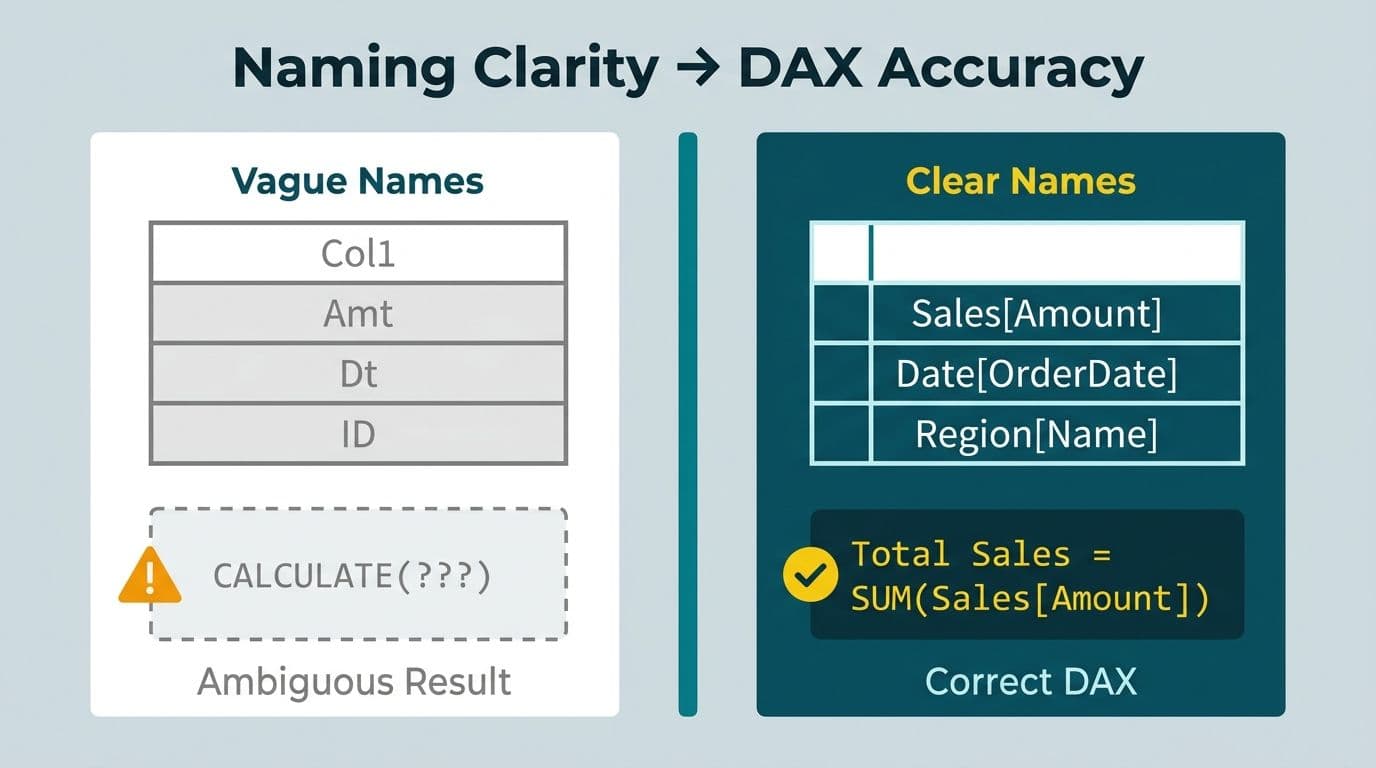
Field descriptions are the primary tuning mechanism for Copilot's schema grounding stage. Microsoft's Power BI documentation (2025) treats them as a first-class feature for Copilot compatibility, and the pattern applies to semantic models in all three markets.
Five principles that improve grounding:
1. State the business definition, not the technical origin. Replace "Mapped from ERP field TXN_AMT_NET" with "Net transaction amount after discounts and returns, in USD. Use for revenue analysis, not cost analysis."
2. State what the field is not. "This column excludes inter-company transfers and is not equivalent to the GL balance." Negative constraints prevent Copilot from substituting a field in contexts where it does not apply.
3. Include units and currency explicitly. A Canadian manufacturing company reporting in both CAD and USD needs descriptions like "Unit cost in CAD at time of purchase order - not converted to USD." Copilot does not infer currency from column names.
4. Cross-reference the preferred measure. In a base column's description: "For aggregated reporting, use the `[Net Revenue]` measure rather than summing this column directly." This steers Copilot toward validated, existing definitions.
5. Describe relationship intent. For tables with multiple relationship paths, add to the table description: "Use the relationship via Order_Date for revenue analysis. Use the relationship via Ship_Date for fulfillment and logistics analysis." This prevents Copilot from choosing the wrong path in time-intelligence expressions.
Each description update is effectively a prompt refinement that persists across every future Copilot session on that model. For a US SaaS finance team running SOC 2-audited reporting, maintaining description quality is also a governance artifact - it documents the intended business logic of every measure in the dataset.
Copilot for Business Intelligence Adoption: A Practical Checklist
A copilot for business intelligence adoption checklist for mid-market organizations should address four dimensions: licensing, model readiness, governance, and user enablement.
Licensing and environment
- Confirm Fabric capacity or Power BI Premium Per User license (the Power BI Copilot licensing guide covers all SKU options in detail)
- Enable Copilot in tenant admin settings for relevant workspaces
- Confirm datasets are hosted on supported capacity tiers
Semantic model readiness
- All measures carry plain-English descriptions
- No columns named generically (Amount, Value, Flag, Type)
- A single certified date table is present and marked as the date table in model properties
- Sensitivity labels applied - required for HIPAA-scoped US health data, GDPR-scoped UK and EU data, and PIPEDA-scoped Canadian data
Governance
- Copilot-generated measures reviewed before promotion to certified shared datasets
- Audit logging enabled to track which questions generated which expressions
- A named model owner responsible for description quality and ongoing accuracy
User enablement
- Finance and data team leads trained on phrasing questions that ground reliably
- An internal phrasing guide published for common business questions ("net revenue excluding intercompany" rather than "actual revenue")
- A clear escalation path when Copilot output appears wrong
A practical escalation flow: the user who spots an unexpected result flags it to the model owner, who checks the relevant field descriptions for grounding issues. If a description is incomplete, it is updated immediately. If the root cause is relationship or column naming, that is escalated to the next model review cycle. This feedback loop - question, expression, audit, description update - continuously improves Copilot accuracy without requiring retraining or vendor involvement.
The ai bi dashboard implementation cost for mid-market teams is driven primarily by model remediation and training effort, not the Copilot license itself. Organizations with well-structured existing models can enable Copilot with limited rework. Those with legacy models built before semantic layer best practices were established typically need a structured audit first. Our pricing calculator provides a rapid scope estimate for your environment.
---
About Lets Viz: Lets Viz has delivered Power BI, Fabric, and AI analytics solutions for mid-market clients since 2020, spanning US healthcare, UK fintech, Canadian manufacturing, and global SaaS organizations. With a 5.0 Clutch rating, the team specializes in Copilot-ready semantic model design, governed dataset architecture, and hands-on enablement for finance and data teams.
To prepare your semantic model for reliable Copilot DAX generation, Power BI consulting (Copilot-ready) covers model audit, description frameworks, and validated DAX governance end to end.