Tableau Cloud: What It Includes, Costs and When to Choose It
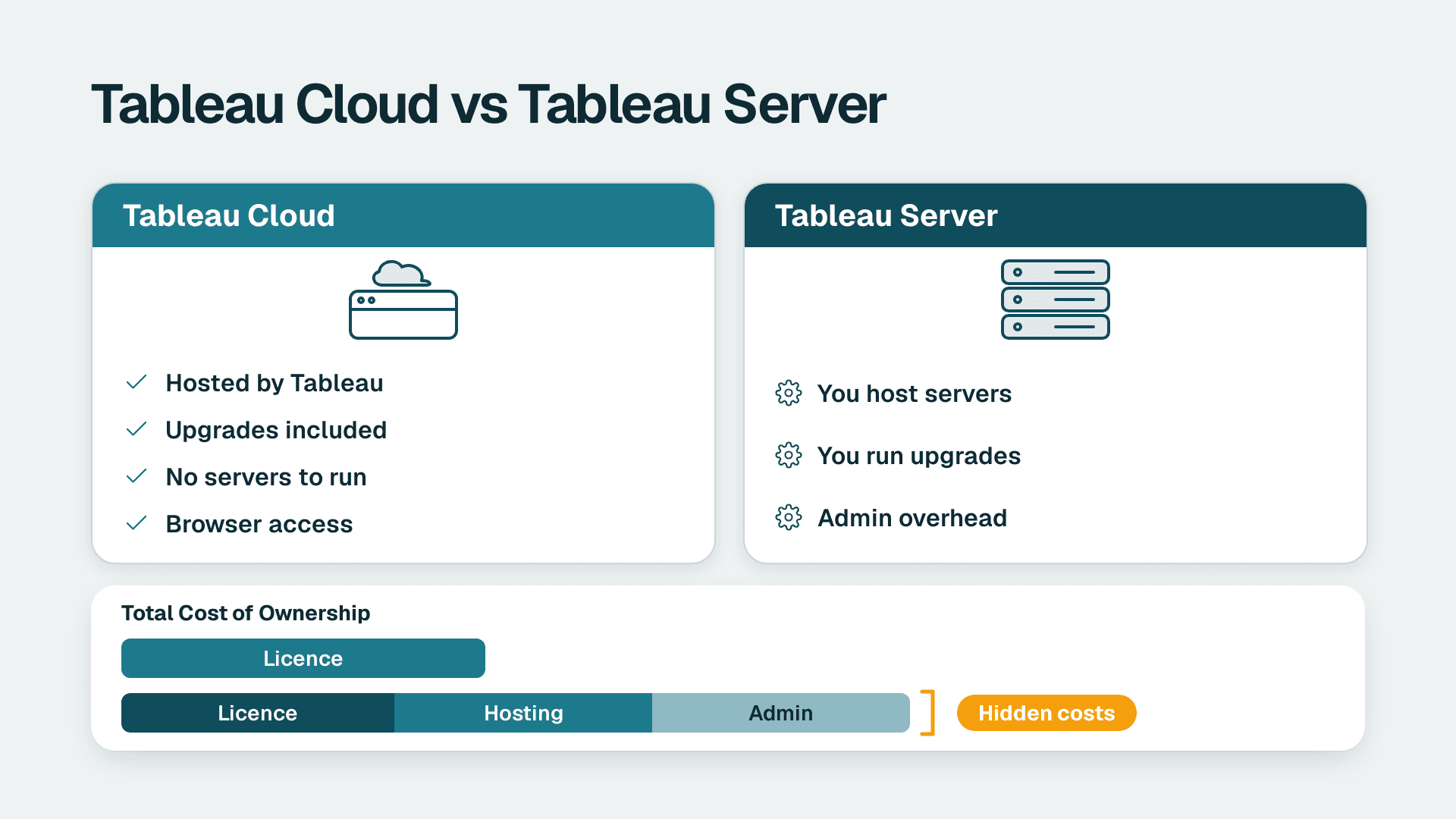
Tableau Cloud (formerly Tableau Online) is the fully hosted, software-as-a-service edition of Tableau Server. Tableau runs the infrastructure, upgrades and maintenance, and your team publishes dashboards from Tableau Desktop and views them in a browser. Mid-market teams usually choose it when they want analytics without running servers.
Key Takeaways
- Tableau Cloud is the hosted version of Tableau Server, previously called Tableau Online, with no servers for you to run.
- Per-seat licences are cheaper on Tableau Server, but Server customers also pay for hosting and administration.
- Cloud is always on the latest version, so you cannot control upgrade timing or roll back.
- Tableau Bridge connects Cloud to many internal systems, but some sources behind a firewall may stay out of reach.
- Choose Cloud when speed, low admin effort and cloud-hosted data matter more than deep infrastructure control.
What is Tableau Cloud (formerly Tableau Online)?
Tableau Cloud is the SaaS version of Tableau Server. It gives you the sharing, scheduling, automation and collaboration features of Server without any internal infrastructure, maintenance or upkeep. If you have heard it called Tableau Online, online Tableau software or Tableau software online, it is the same product under its older and informal names.
In practice, the product splits into two halves. Analysts build workbooks in Tableau Desktop or author them on the web. Everyone else opens the published results in a browser, with no installation needed. Tableau handles hosting, capacity, security patches and version upgrades on its side of the line.
That division matters for small BI teams. A typical mid-market analytics group has a handful of analysts and perhaps one part-time administrator. Running a Server estate means patching operating systems, sizing nodes, planning upgrades and monitoring backups. Cloud removes that work, which is why many teams first look at it as a way to free analysts for actual analysis.
If you are still scoping what you need, Tableau consulting services can help you decide on the deployment model, licensing mix and governance before you commit. For a broader view of the product itself, our Tableau software review of pros and cons covers where it shines and where it frustrates.
Tableau Cloud, Tableau Online and Tableau Server: the naming
The naming is a common source of confusion, so here is the short version:
- Tableau Cloud: the current name for the hosted service.
- Tableau Online: the former name, still widely searched.
- Tableau Server: the self-managed product you install on your own hardware or in your own cloud account.
Phrases such as Tableau in the cloud, Tableau on cloud and cloud Tableau are used loosely. They can mean the hosted Tableau Cloud service, or Tableau Server installed on a virtual machine in a public cloud. Those are very different operating models, and the rest of this article keeps them apart.
How does Tableau Cloud work?
Tableau Cloud works by hosting a Tableau site for your organisation, where you publish data sources and workbooks and manage who can see them. The flow has four steps: connect to data, build in Desktop or on the web, publish, and share with users in a browser.
1. Connect. Analysts connect Tableau Desktop to databases, files or cloud applications.
2. Build. They create visualisations and dashboards. Our guide to creating a dashboard in Tableau with examples walks through the design steps.
3. Publish. Workbooks go to Cloud from Desktop using the Server menu and the Publish Workbook option, according to GeeksforGeeks' overview of Tableau Cloud.
4. Share. Viewers open the dashboards in a browser. Permissions, projects and groups control who sees what.
Behind the scenes, Tableau manages the compute that serves your dashboards and refreshes your extracts. Tableau's own getting started tutorial for Tableau Cloud shows the portal layout, which is worth a look before you roll it out to a wider team.
What about data that sits behind your firewall?
Cloud-hosted software cannot reach into a private network by itself. Tableau Bridge is the client that sits inside your network and lets Tableau Cloud reach many internal systems for refreshes and live queries. The caveat is that some data sources behind the internal firewall may still be inaccessible, so test your critical sources early rather than assuming Bridge covers everything.
A UK fintech firm holding customer records in an on-premises SQL database, for example, should list every source its dashboards need, then confirm each one connects through Bridge before it signs a Cloud contract.
What data sources does Tableau Cloud support?
Tableau Cloud supports both live connections and extracts. It can query cloud databases such as Snowflake and Google BigQuery live, and it can also store data extracts that refresh on a schedule. Which you pick shapes performance, cost and data freshness.
| Approach | How it works | Best for | Watch out for |
|---|---|---|---|
| Live connection | Dashboards query the source on every interaction | Cloud warehouses with fast query engines and a need for current data | Query load and warehouse compute cost on the source side |
| Extract | A snapshot is stored and refreshed on a schedule | Slow or transactional sources, and dashboards that need fast response | Refresh schedules, and staleness between refreshes |
| Bridge-connected source | A client in your network relays queries or refreshes | On-premises databases and files | Some sources behind the firewall may remain unreachable |
For most mid-market deployments, the practical answer is a mix. Live connections suit a well-tuned cloud warehouse. Extracts suit finance and operations data that changes daily and does not need second-by-second accuracy.
Can you schedule Tableau Prep flows on Cloud?
Yes, but plan the capacity. Scheduling Tableau Prep flows on Tableau Cloud may require purchasing additional resource blocks to support concurrent flow runs. If your data preparation relies on many flows running at the same hour, ask about this before you size the deal. It is an easy line item to miss.
Are Tableau and Salesforce connected?
Yes. Tableau is part of Salesforce, and Tableau Cloud has been moving onto Salesforce infrastructure. Tableau's own blog describes Tableau Cloud on Hyperforce, Salesforce's next-generation infrastructure architecture for the public cloud, which lets customers manage where their data is stored more deliberately. If regional data placement matters to you, confirm the exact options with Tableau for your contract and region.
The connection is also practical for users. Teams that already run Salesforce can bring CRM data into Tableau and publish dashboards to the same people who use the CRM daily. You do not need to be a Salesforce customer to use Tableau Cloud, though, and Tableau works with many other sources.
On the feature side, Tableau has been adding assistive and agent-style analytics to Cloud. If you are weighing those capabilities against other vendors' offerings, our comparison of Tableau Pulse and Copilot for finance leaders sets out how they differ in practice.
Tableau Cloud vs Tableau Server: which should you choose?
Choose Tableau Cloud if you want the lowest administrative burden and are comfortable with Tableau controlling upgrades. Choose Tableau Server if you need control over the environment, the version, deep governance reporting or an on-premises deployment. The table below summarises the differences that matter most.
| Factor | Tableau Cloud | Tableau Server |
|---|---|---|
| Hosting | Hosted by Tableau (SaaS) | On-premises or in your own cloud account, on Linux or Windows |
| Infrastructure and upkeep | None on your side | Your team provisions, patches and monitors |
| Per-seat licence cost | Higher than Server | Lower than Cloud, but you also bear hosting costs |
| Upgrades | Always on the latest version; no control over timing and no rollback | You schedule upgrades and can plan testing |
| Repository access | No access to the Postgres repository | Access to the Postgres repository for custom admin and governance views |
| Multiple sites | Managed by Tableau's service model | Multiple sites on a single instance and licence |
| Internal data | Needs Tableau Bridge for many internal sources | Sits inside your network |
The comparison is not about which product is better. It is about which constraints you can live with.
Where Cloud can frustrate teams
Three limits come up most often in mid-market reviews:
- No rollback. Because Cloud is always upgraded to the most recent version, a change in behaviour lands on your users whether or not you are ready.
- Less governance telemetry. Without the Postgres repository, custom administrative views, such as detailed usage and content audits, are harder to build. Our walkthrough on finding duplicate workbooks and unused dashboards shows the kind of housekeeping that is easier when you can query usage data directly.
- Firewall-bound sources. Bridge helps, but it is not a guarantee for every internal system.
Where Server can frustrate teams
Server's pain points are the mirror image. Someone has to own patching, capacity, backups and upgrades, and the true cost of that person's time rarely appears in the licence comparison. Teams that run Server on a thin admin bench often fall behind on versions, which in turn blocks newer features.
What does it cost to run Tableau in the cloud?
The cost of Tableau Cloud is the subscription for each user role plus any add-ons, with no hosting bill or infrastructure team. Tableau's list prices and tiers change, so confirm current figures with Tableau or an authorised partner rather than relying on a blog post. What you can plan around are the cost drivers, which stay stable.
The cost drivers to model
| Cost driver | Tableau Cloud | Tableau Server |
|---|---|---|
| Per-seat licences | Higher per seat | Lower per seat |
| Hosting and infrastructure | Included in the service | Paid by you, on-premises or in your cloud account |
| Administration time | Light | Substantial: patching, upgrades, monitoring |
| Data preparation capacity | May need extra resource blocks for concurrent Prep flows | Depends on the hardware you provision |
| Bridge and connectivity | Some effort to set up and maintain | Mostly native to your network |
| Build and change work | Analyst or partner time | Analyst or partner time |
A useful way to compare is total cost over three years. On Server, the lower seat price is offset by virtual machines or hardware, storage, backups, a part of an administrator's salary and the time spent on upgrade testing. On Cloud, the seat price is higher but the line items are fewer. For a team of a few dozen viewers with a small BI group, Cloud often comes out ahead once admin time is counted honestly. For very large deployments with a mature platform team, Server can win.
If you want a rough project-level estimate for the build and rollout work rather than the licences, the instant project cost calculator gives a starting range.
When should a mid-market team choose Tableau Cloud hosting?
A mid-market team should choose Tableau Cloud when its data already lives in cloud systems, its BI team is small, and it values fast rollout over infrastructure control. It is a weaker fit when strict network isolation, custom governance tooling or controlled upgrade windows are non-negotiable.
Signals that point to Cloud
- Your main data sources are cloud warehouses and SaaS applications.
- You have no dedicated Tableau administrator and do not want to hire one.
- You want new teams or business units onboarded quickly, with only a browser needed.
- You are comfortable with Tableau managing upgrades.
Signals that point to Server
- Policy requires the analytics platform to sit inside your own network or cloud account.
- You need to query the repository for bespoke governance dashboards.
- You must freeze versions during audit periods or validated-system windows.
- You run several independent sites under one licence.
Three hypothetical scenarios
These examples are illustrative, not client results.
A US healthcare analytics group. Suppose a US provider network wants operational dashboards on data that includes protected health information. HIPAA obligations apply, so the team must confirm the hosting arrangement, access controls and any required agreements before loading regulated data. If it cannot satisfy its compliance reviewers on a hosted service, Server inside its own controlled environment is the safer starting point. If it can, Cloud's lower admin load is attractive. SOC 2 reports from the vendor are a standard part of that diligence.
A UK or EU fintech. A UK fintech firm subject to GDPR needs to know where personal data is processed and stored. Before choosing Cloud, it should check which hosting region and data-handling terms apply to its site, and decide whether extracts containing personal data are justified at all. Aggregated, pseudonymised extracts reduce exposure even where Cloud is acceptable.
A Canadian manufacturer. A Canadian manufacturing company with plant data on-premises and finance data in a cloud ERP would likely land on Cloud with Bridge for the plant systems. PIPEDA governs the personal information it handles, but operational data such as machine output is usually lower risk. The test that matters is whether Bridge reliably reaches every plant database, so pilot that first.
Across all three, the lesson is the same: the decision turns on data sensitivity, data location and admin capacity, not on which edition has the longer feature list.
How do you get started with Tableau Cloud?
You get started by running a time-boxed pilot on real data, with a handful of users, before you buy broadly. A structured trial surfaces connectivity and governance problems while they are cheap to fix.
1. List your sources. Note which are cloud-based and which sit behind a firewall.
2. Pick two or three high-value dashboards. Choose ones with an obvious business owner.
3. Decide live or extract for each source. Match the choice to data freshness and source performance.
4. Test Bridge for each internal source you need.
5. Set up projects, groups and permissions before inviting users, not after.
6. Document an upgrade-watch routine. Since Cloud upgrades arrive automatically, assign someone to review release notes and test critical dashboards.
7. Review usage after 60 to 90 days and retire what nobody opens.
Most of the lasting value comes from the strategy behind the dashboards. Our guide on building a business intelligence strategy with Tableau covers metric definitions, ownership and rollout. If you are unsure whether your organisation is ready, the free BI readiness self-assessment is a quick way to find gaps.
Where can you find a Tableau course?
Start with Tableau's own free on-demand tutorials, which include a tour of the Cloud and Server interface and are the most current source. Training from independent course providers and community material can add depth for Desktop authoring. For admins, focus on site roles, permissions and refresh management, since those cause most day-to-day issues on Cloud.
What should you check before you commit?
Before signing, check these points against Tableau's current documentation and your contract, because licence tiers and limits change:
- Which user roles and licence types your team needs, and the current price for each.
- Whether your data residency and compliance requirements are met by the hosting region.
- Which internal sources Bridge can and cannot reach.
- Whether you need extra capacity for Prep flows or large extracts.
- Who owns release monitoring, since you cannot roll back.
Treat the answers as a short written checklist. When a decision rests on a vendor claim, ask for it in writing.
If your team wants an outside view on choosing between Cloud and Server, sizing the rollout and building the first set of production dashboards, see our Tableau consulting services.
---
About Lets Viz: Lets Viz is a data analytics consultancy that has helped teams design, build and govern BI platforms since 2020, serving US healthcare, UK fintech, Canadian manufacturing and global SaaS organisations. We hold a 5.0 Clutch rating from client reviews, and our consultants work hands-on in Tableau, from deployment choices to dashboard builds.
Sources
- Getting Started with Tableau Cloud
- What is Tableau Cloud? (GeeksforGeeks)
- Tableau Cloud product page
- What is Tableau Cloud? (Tableau blog)
- Tableau Cloud blog
Facts and prices checked October 2026.