Zoho Analytics to Power BI Migration
We migrate Zoho Analytics dashboards to Power BI without touching your Zoho CRM. Certified Zoho partner AND Power BI consultants -- the only migration firm that holds both credentials. Direct Query connection, DAX models, live data. Dashboard parity in 30 days.
Trusted by teams across 15+ countries
Migration metrics from real Zoho Analytics to Power BI engagements
Driving measurable success through data. We help our clients achieve improved KPIs, operational efficiency, and tangible business outcomes.
30 days
to dashboard parity
100%
data preserved -- no silent data loss
2 certs
Zoho partner + Power BI consultant
5.0 Star
rating from 15 reviews
What We Cover in a Zoho Analytics to Power BI Migration
What moves to Power BI -- and what stays on Zoho
Migration decision table: Zoho CRM data and contacts stay on Zoho CRM. Zoho Books / finance stay on Zoho Books. Zoho Flow / Blueprint automation stays on Zoho. Zoho One subscription stays active. What moves: Zoho Analytics reports and dashboards are rebuilt in Power BI. User access transitions from Zoho Analytics user seats to Power BI Entra ID licences. This is an augmentation -- Power BI becomes your reporting and analytics layer; Zoho remains your operational stack. Most clients keep a Zoho Analytics subscription for narrow Zoho-native reports (e.g., Zoho Books reconciliation view) and use Power BI for executive, cross-system, and embedded reporting.
Zoho Analytics concepts mapped to Power BI equivalents
The mapping that no one publishes: Zoho Analytics Query Tables map to Power Query steps in Power BI Desktop. Zoho Analytics formula columns map to DAX calculated columns (use sparingly -- prefer measures). Zoho Analytics aggregate formulas (SUM, AVERAGE, PERCENTILE) map to DAX measures (SUM, AVERAGE, PERCENTILX.INC). Zoho Analytics date functions (YEAR, MONTH, DATEDIFF) map to DAX time intelligence functions (YEAR, MONTH, DATEDIFF). Zoho Analytics custom views map to Power BI report pages with slicers. Zoho Analytics shared reports map to Power BI workspace shared reports with row-level security. Zoho Analytics user permission tiers map to Power BI workspace roles (Admin, Member, Contributor, Viewer). We document every field translation in a migration log that becomes part of your Power BI documentation.
Connection options: how Power BI actually connects to Zoho CRM data
There is no native Zoho CRM connector in Power BI's Get Data > Online Services menu. The Zoho connector that appears there is Zoho Creator -- a low-code app builder, not the CRM. The actual paths for getting Zoho CRM data into Power BI are: Option A -- Zoho CRM REST API via Power BI Web connector (recommended for most): Power BI's built-in Web connector can query the Zoho CRM REST API (v2/v3). We write the M (Power Query) query with pagination handling (Zoho paginates at 200 records/page), OAuth authentication, and field selection. This works in Power BI Desktop and in Power BI Service with a data gateway for scheduled refresh. Import mode only -- no DirectQuery via this path. Best for: standard Zoho CRM objects (Leads, Contacts, Accounts, Deals, Activities), teams with under 200K records, and daily or hourly refresh cadence. Setup time: 2-3 days. Option B -- Zoho CRM REST API into Azure Data Factory (for high-volume or near-real-time): For 500K+ records or sub-hourly refresh requirements, we pipeline Zoho CRM data via its REST API into Azure SQL or Azure Synapse using Azure Data Factory. Power BI connects via DirectQuery or Import against the Azure SQL target. Higher setup cost, but the refresh complexity moves to the pipeline rather than the Power BI M query. Best for: large Zoho CRM instances, custom modules with complex relationships, near-real-time dashboard requirements. Setup time: 5-7 days. Option C -- Third-party connector (CData, ZappySys): Paid connectors ($200-500/year) that wrap the Zoho CRM API and expose it as a standard ODBC/OData source for Power BI. Reduces M query complexity. Viable if you want to avoid writing custom M code. We recommend Option A for most clients and Option B only when volume or refresh requirements genuinely require it.
How we handle Zoho CRM custom modules and fields
Standard Zoho CRM objects (Leads, Contacts, Accounts, Deals, Activities) are available in both the native Power BI connector and the REST API. Custom modules and custom fields are available via the REST API (/crm/v7/CustomModule endpoint) but not always visible in the native connector's field picker. Our process: in Phase 1, we enumerate all custom modules and fields via the Zoho CRM API metadata endpoint and confirm which are needed in Power BI. In Phase 2, we map them to columns in the Power BI data model with explicit data type handling (picklists, multi-select fields, lookup relationships). Custom modules with complex lookup relationships require the API pipeline (Option B) rather than the native connector.
Migration cost and break-even analysis
How to think about the Zoho Analytics to Power BI migration cost: Zoho Analytics pricing is per workspace (typically $22-45/user/month depending on plan). Power BI Pro is $10/user/month; Power BI Premium Per User is $20/user/month. For teams of 20+ users, the per-user cost difference is negligible. The real case for migration is capability: Power BI's semantic layer, composite models, DAX, and row-level security at scale. The migration investment ($8,000-$25,000 fixed) typically pays back in analyst time within 6-12 months at mid-market companies -- analysts stop spending hours in Zoho Analytics workarounds and use a model that scales. We provide a break-even analysis in the audit phase before you commit to the full migration.
What you receive at the end of the engagement
Deliverables: Power BI workspace with your top 10-15 migrated reports (verified against Zoho Analytics originals). Data model documentation -- all tables, relationships, DAX measures, and what each measure calculates. Row-level security mirroring your Zoho CRM user roles. Refresh schedule running on your Power BI service (scheduled import or Direct Query, depending on connection choice). 30-day bug-fix window post go-live -- any number discrepancy found after cutover is fixed at no charge. Field translation log -- every Zoho Analytics formula mapped to its Power BI DAX equivalent. Your Zoho CRM and other Zoho subscriptions untouched.
The only migration firm certified in both Zoho and Power BI
Every other Power BI consultant has to learn Zoho during your engagement. Every other Zoho partner doesn't know Power BI. We hold both certifications -- which means the migration is faster, cheaper, and doesn't produce a Power BI model that ignores how your Zoho data is actually structured.
Dual-certified: Zoho partner + Power BI consultant
We're certified Zoho partners who also do Power BI full-time. No other firm in our tier holds both. That means we know what Zoho Analytics exports look like, how Zoho CRM custom fields behave in the API, and how to model that data correctly in Power BI without guesswork.
Keep your Zoho CRM -- only the reporting layer moves
This is an augmentation, not a rip-and-replace. Your Zoho CRM, Zoho Books, and Zoho One subscriptions stay untouched. Power BI connects directly to Zoho CRM via the native connector or REST API. You keep the CRM your team knows and get the reporting layer your CFO needs.
Zero downtime migration -- parallel run included
We run Power BI and Zoho Analytics in parallel for 2 weeks before cutover. Your team uses both, flags discrepancies, and signs off on parity before Zoho Analytics is retired. No surprises on day one of live reporting.
DAX parity for Zoho Analytics calculated fields
Zoho Analytics formula logic (aggregate functions, date calculations, custom metrics) maps to DAX measures in Power BI -- but the mapping is non-obvious. We document every field translation so the Power BI model produces the same numbers your team has been trusting in Zoho Analytics.
Fixed price -- scope locked before any work starts
Audit + 10 reports migrated is $8,000-$12,000 fixed. Full migration (20+ reports + semantic model) is $15,000-$25,000 fixed. You know the number before we start, no open-ended billing, no 'we found something during migration' surprises.
Stay if Zoho Analytics still fits -- we will tell you
If we review your use case and Zoho Analytics is actually the right tool, we will tell you. We run both platforms daily and have no incentive to push a migration that doesn't make business sense. We recommend Power BI when the complexity, volume, or embedding requirements genuinely justify the switch.
What you get from a certified migration firm vs. a DIY migration
Consulting partner (Lets Viz)
- Dual-certified in Zoho and Power BI — no ramp time on either platform
- We know the Zoho CRM field mapping pitfalls before your migration starts
- Every Zoho Analytics formula translated to DAX and documented
- Parallel run included — Power BI verified against Zoho Analytics before cutover
- Record count verification — no silent data loss
- Fixed price — scope locked before Phase 1 begins
Staffing agency / body shop
- Internal developer ramps on Zoho API and Power BI DAX simultaneously — 4–8 weeks
- No documentation of field translations — institutional knowledge stays with the developer
- No parallel run by default — cutover happens on faith that numbers match
- No record count verification standard — data loss discovered weeks after migration
- Open-ended project — no fixed scope, no go-live commitment
- DAX errors surface in production after the developer moves to the next project
How to connect Zoho CRM data to Power BI — three approaches
We choose based on your record volume, refresh requirements, and whether you have custom Zoho CRM modules.
| What matters | RecommendedZoho CRM REST API (Web connector) | Zoho REST API + Azure Data Factory | ETL connector (Skyvia / Coupler) | Third-party connector (CData / ZappySys) |
|---|---|---|---|---|
| Best for | Standard Zoho CRM objects (Leads, Contacts, Deals) | High-volume or custom modules | Single Zoho product to Power BI (quick setup) | Teams wanting minimal M code setup |
| Setup time | 2–3 days (M query + OAuth setup) | 5–7 days | 30 min – 1 day | 30 min – 1 day |
| Refresh frequency | Scheduled (hourly minimum via gateway) | Near-real-time (sub-hourly) | Scheduled (varies by plan) | Scheduled (varies by plan) |
| Record volume | Up to ~200K records | 500K+ records | Low to medium | Low to medium |
| Custom modules | Limited — standard objects only | Yes — any custom module via API | Varies by connector | Varies by connector |
| Real-time capable | No — scheduled import only | Yes — Direct Query on Azure SQL target | No | No — Import only |
| Infrastructure needed | Data gateway required for Power BI Service refresh | Azure subscription (Data Factory + SQL/Synapse) | Connector SaaS subscription ($50–200/mo) | Connector SaaS subscription ($200–500/yr) |
| Recommended when | Most clients — standard objects, daily/hourly reporting | Large Zoho CRM instances or complex custom module pipelines | One-off data extract — not recommended for production BI | Quick setup is priority and connector subscription cost is acceptable |
How to migrate from Zoho Analytics to Power BI -- our 5-phase process
A structured migration that eliminates data loss and ensures Power BI reports match Zoho Analytics numbers before you retire anything.
Phase 1 -- Audit (Week 1)
Inventory every Zoho Analytics dashboard and report. Identify which are actually used vs. inherited. Map all data sources -- which pull from Zoho CRM, Zoho Books, Zoho Inventory, or external databases. Identify Zoho CRM custom modules and fields that need to appear in Power BI. Output: signed-off migration scope, report priority list, and connection architecture decision.
Phase 2 -- Data connection (Week 2)
Establish the Power BI connection to your Zoho data. There is no native Zoho CRM connector in Power BI's connector library -- the actual connection paths are: Option A (most clients): Power BI Web connector hitting the Zoho CRM REST API directly. We write the M query with pagination handling (Zoho paginates at 200 records/page) and configure OAuth authentication. Requires a data gateway for scheduled refresh in Power BI Service. Option B (high-volume or enterprise): Zoho CRM REST API into Azure Data Factory, landing data in Azure SQL or Synapse, then Power BI via DirectQuery or Import. Higher setup cost, lower per-refresh complexity, better at 500K+ records. Option C (third-party connector): CData or ZappySys Zoho CRM connectors for Power BI -- reduces the M/pagination work but adds a $200-500/year subscription per connector.
Phase 3 -- Dashboard parity (Weeks 3-4)
Rebuild your top 10-15 reports in Power BI with DAX measures. Each Zoho Analytics calculated field is translated to an equivalent DAX measure and documented. Row-level security mirrors your Zoho user roles. You review each report against the Zoho Analytics original and sign off before we move to the next.
Phase 4 -- Parallel run (Weeks 5-6)
Power BI and Zoho Analytics run simultaneously. Your team uses both and flags any number discrepancies. We fix DAX measure bugs during this window. No cutover until every report produces matching numbers.
Phase 5 -- Cutover and hand-off (Week 6)
Go-live on Power BI. 30-day bug-fix window post cutover. Documentation of the data model, DAX measures, M query pagination logic, and refresh schedule. Your Zoho CRM subscription untouched.
What does a Zoho Analytics to Power BI migration cost?
Fixed price at every scope. You know the number before Phase 1 starts — no open-ended billing.
Audit only
fixed
Do you actually need to migrate? We review your Zoho Analytics environment and give you a written recommendation before any migration work starts.
- Inventory of all Zoho Analytics dashboards and reports
- Data source mapping (CRM, Books, external)
- Written recommendation: migrate vs. stay vs. run parallel
- Scope and cost estimate for full migration if applicable
- Delivered in 1 week
Audit + 10 reports
fixed scope
Audit plus dashboard parity for your top 10 reports. Parallel run included — Power BI verified against Zoho Analytics before cutover.
- Phase 1–5 methodology (audit through hand-off)
- 10 reports rebuilt in Power BI with DAX parity
- Data connection established (native connector or API pipeline)
- Row-level security mirroring your Zoho user roles
- 2-week parallel run before cutover
- 30-day bug-fix window post go-live
- Full field translation log (Zoho formula → DAX measure)
Full migration
fixed scope
Complete migration of 20+ reports plus a production semantic model your finance and ops teams can extend independently.
- 20+ reports migrated with full DAX parity
- Production semantic model with documented relationships
- API pipeline for high-volume or custom modules
- Row-level security and workspace governance
- Team training: Power BI for Zoho Analytics users (2 sessions)
- 2-week parallel run + 30-day bug-fix window
- Full documentation package
All prices in USD. Audit is fixed regardless of migration decision — you are paying for the recommendation, not the outcome. Full migration price depends on report count, data volume, and whether custom Zoho CRM modules require the API pipeline.
Wondering what this would cost you?
Answer a few questions and see an honest price range on screen — no email, no call needed.
See it in action
Real engagements. Documented outcomes.
Workforce Data Trapped in a Time-Tracking Tool
Eight Hubstaff entities. Automated daily sync. A failing 6-minute trigger fixed to run in 22 seconds. Project delivery, utilisation, and cost dashboards — rebuilt from scratch.
From Four Systems to One Source of Truth
How a regulated US neurovascular device manufacturer turned siloed ERP and third-party market data into dashboards leadership trusts — with every KPI reconciled to source.
From Attribution Chaos to Marketing Clarity
How a wellness retreat discovered its Facebook ROAS was 70% higher than reported — and why a 27% revenue drop had nothing to do with ad creative.
Zoho Analytics to Power BI migration -- frequently asked questions
Find answers to common questions about our services and process.
Further reading
Guides and insights to help you make an informed decision.
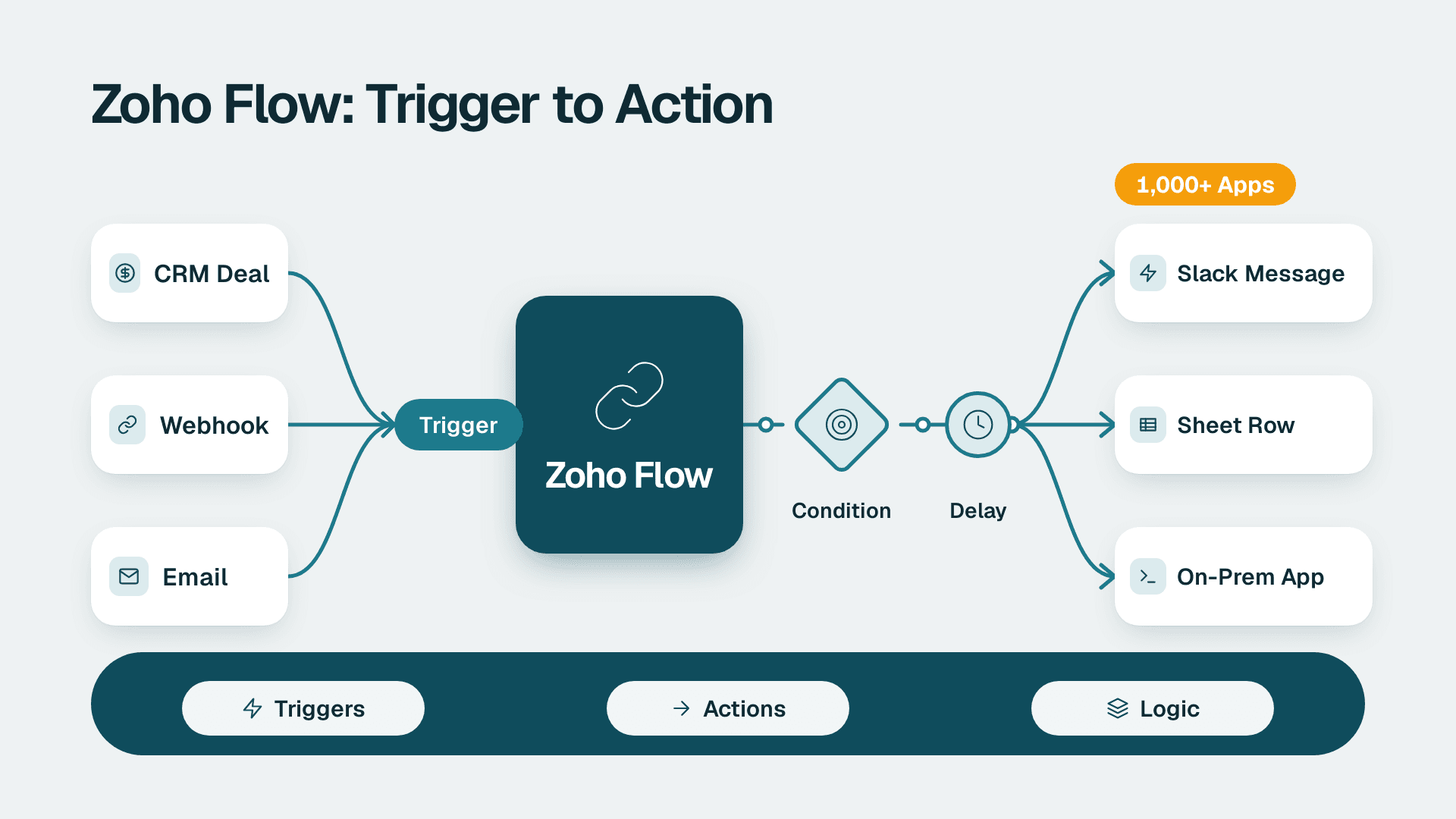
Zoho Flow: How to Automate Work Across Zoho and Other Apps
Zoho Flow connects 1,000+ apps with no-code workflows. Learn what it does, how to build a flow, when Deluge or n8n fits better, and what to check.
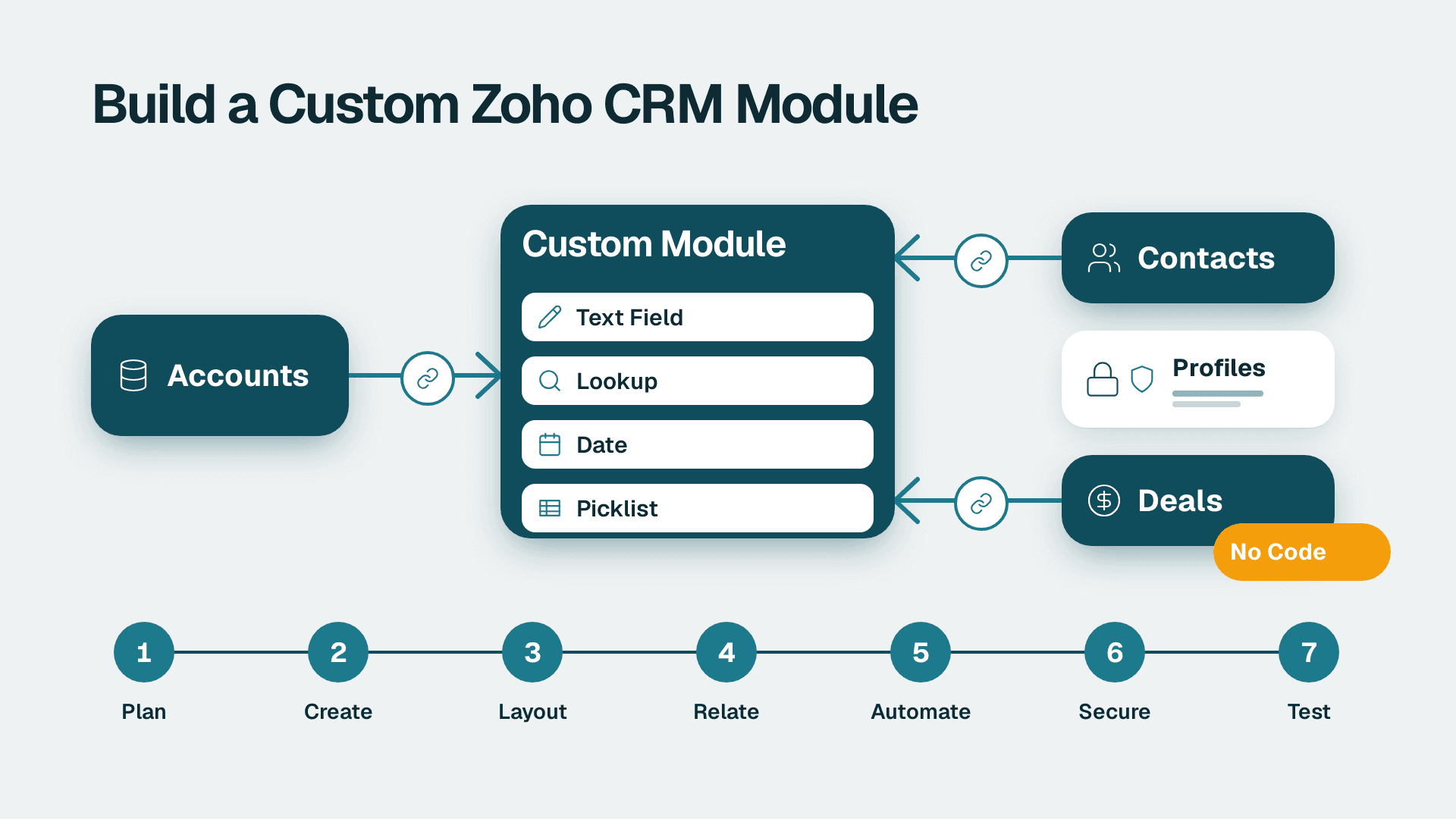
How to Create Custom Modules in Zoho CRM: 7 Steps
Learn how to create custom modules in Zoho CRM, relate them to Accounts and Deals, and lock down access. Allow 2-3 hours for a first module, plus testing time.
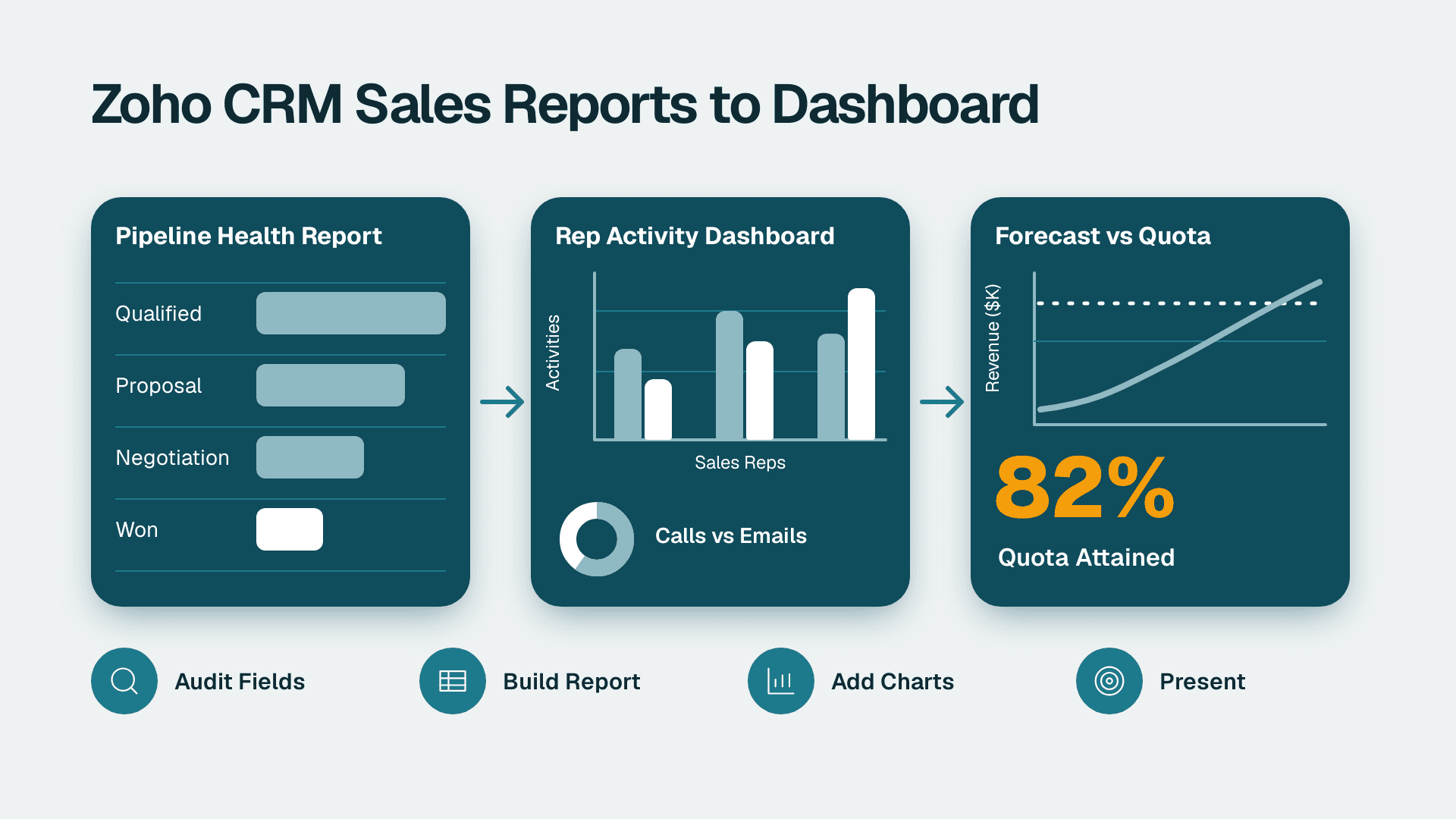
How to Build Zoho CRM Reports and Dashboards for Sales
Follow this Zoho CRM reports and dashboards tutorial to build pipeline, rep activity and forecast views for leadership. Plan on about half a day.