Zoho CRM Implementation Partner — Go-Live in 30 Days
Certified Zoho Authorized Partner. We migrate your data from Salesforce, HubSpot, or Pipedrive, configure your pipeline, train your team, and guarantee go-live in 30 days. Fixed packages with named deliverables -- you know the price before we start. Free scope call.
Trusted by teams across 15+ countries
Implementation results from real Zoho CRM deployments
Driving measurable success through data. We help our clients achieve improved KPIs, operational efficiency, and tangible business outcomes.
30 days
to go-live (standard implementations)
100%
record count verified -- no silent data loss
Fixed
packages -- price locked before we start
5.0 Star
rating from 15 reviews
What a Zoho CRM Implementation Covers
Our three fixed implementation packages
Starter -- $3,500 fixed: Up to 15 users. Data import from spreadsheets only (no CRM migration). Standard Zoho CRM pipeline (no custom modules). 2 integrations (email + calendar). 1 training session. Go-live in 3 weeks. Growth -- $8,500 fixed: Up to 50 users. CRM-to-Zoho migration (Salesforce, HubSpot, or Pipedrive). Custom pipeline stages and up to 5 custom fields. Up to 4 integrations (email, calendar, Zoho Books, one external app via Zoho Flow). 5 Zoho CRM Workflow Rules configured. 2 training sessions (reps + admin). Go-live in 4 weeks. Enterprise -- $16,000 fixed: Up to 150 users. Full CRM migration with custom objects. Unlimited custom fields and modules. Up to 8 integrations. Zoho Blueprint process design for your main pipeline. 10 Zoho CRM Workflow Rules + Zoho Flow multi-step flows. 3 training sessions (reps, managers, admins). 2-week hypercare. Go-live in 6 weeks. All packages: record count verification, documentation, 30-day bug-fix window.
Migration paths we support
Salesforce to Zoho CRM: Full object mapping -- Accounts, Contacts, Opportunities, Activities, Tasks, Events, and custom objects. We preserve closed-won history and opportunity amounts. We know the Salesforce Data Export + Zoho Import path and all the field mismatches (Salesforce 'Stage' vs. Zoho 'Stage Name', date format differences, picklist value mismatches). Deduplication included. HubSpot to Zoho CRM: Contact, Company, Deal, Note, and Email history (where HubSpot exposes it via API). HubSpot lifecycle stages mapped to Zoho deal stages. Timeline of activities preserved. Pipedrive to Zoho CRM: Person, Organization, Deal, Activity, and custom fields. Pipedrive's flexible custom field approach requires manual mapping to Zoho's more structured schema -- we document every mapping. Spreadsheets to Zoho CRM: Deduplication, field normalization, and bulk import. Most SMBs starting on Zoho come from spreadsheets. We clean before we import.
What makes implementations go wrong -- and how we prevent it
Three causes of failed Zoho CRM implementations: 1. Skipped discovery -- going straight to 'configure it' without mapping the sales process means pipeline stages do not match how your team actually works. Reps ignore the CRM within 60 days. Our fix: signed-off pipeline diagram before any configuration starts. 2. Bad data migration -- importing 15,000 contacts without deduplication or field normalization creates a garbage CRM. Reps stop trusting the data. Our fix: dedup report before import, record count verification after import, no go-live until counts match. 3. No training -- showing someone all 400+ Zoho CRM features on go-live day guarantees they use 5% of it. Our fix: role-based training with role-specific quick-reference docs. Sales reps get a 45-minute session on their workflow. Managers get a 30-minute session on pipeline visibility. Admins get a 45-minute session on configuration and maintenance.
Integrations included in each package
Every implementation includes email integration (Gmail or Outlook two-way sync) and calendar integration (Google Calendar or Outlook Calendar). Beyond that: Zoho Books integration (for invoice creation on deal close) is available in Growth and above. Zoho Campaigns (for marketing automation) in Growth and above via Zoho Flow. External app integrations (Slack, Stripe, project management tools) via Zoho Flow in Growth and above. Custom API integrations (connecting Zoho CRM to a proprietary system via REST API) available in Enterprise. We do not charge per integration up to the package limit -- the integration count is specified in the package and the price does not change.
After go-live -- transitioning to ongoing RevOps
A Zoho CRM implementation is the starting point, not the end state. After your team has been live for 30-60 days, new requirements emerge: custom modules your team needs, Zoho Analytics dashboards for leadership, advanced Blueprint processes, additional Zoho products to activate (Zoho Desk, Zoho Projects, Zoho Inventory). Our Zoho CRM Consultant retainer starts from $1,500/month and covers ongoing RevOps work -- custom modules, pipeline optimization, advanced automation, and Zoho One expansion. Many implementation clients transition to the retainer after the 2-week hypercare period ends.
Rescue implementations -- fixing a broken DIY Zoho setup
If your team did a self-implementation and it is not working -- duplicate records, broken workflows, wrong pipeline stages, users who have given up on the CRM -- we can rescue it. Process: 1-day audit (what is configured, what is broken, what needs rebuilding). Written rescue plan with fixed pricing. Rebuild correct configuration. Merge or clean duplicate records. Re-train your team on the corrected setup. Most rescue implementations complete in 3-4 weeks. We have rescued Zoho CRM setups that were configured by previous partners, previous in-house admins, and direct Zoho support teams. The common thread: process was not mapped before configuration, and no one ran a record count after the original import.
Fixed packages. Named deliverables. 30-day go-live guarantee.
Most Zoho implementation partners give you a discovery call and an hourly quote. We publish named packages with fixed deliverables and a go-live commitment. You know exactly what you are getting, what it costs, and when you will be live -- before any contract is signed.
Transparent fixed-package pricing -- no hourly billing surprises
We publish three fixed packages: Starter ($3,500), Growth ($8,500), and Enterprise ($16,000). Each includes named deliverables, a timeline, and a go-live commitment. No discovery-first-pricing-later, no open-ended hourly billing, no 'we found something during migration' surprises that add cost.
Certified Zoho Authorized Partner
We are a certified Zoho Authorized Partner. That means Zoho has verified our implementation competency, our clients, and our support capabilities. Not every 'Zoho consultant' on Upwork or Google holds this certification -- it matters when your CRM configuration, data migration, and user training are business-critical.
Migration from Salesforce, HubSpot, Pipedrive, or spreadsheets
We have run every major CRM-to-Zoho migration path. Salesforce objects (Accounts, Contacts, Opportunities, Activities, custom objects). HubSpot contacts, companies, deals, and email history. Pipedrive people, organizations, and deals with custom field mapping. Deduplication and field normalization included -- you do not inherit a messy CRM.
30-day go-live guarantee
Standard implementations go live in 30 days from kickoff. If we do not deliver a configured, live Zoho CRM with migrated data and trained users in 30 days, we work at no charge until we do. Complex multi-region or custom-module engagements have a 45-day window -- stated in the proposal, not discovered during the engagement.
Record count verification -- no silent data loss
Before and after every data migration, we run a record count verification: source system record count vs. imported Zoho CRM record count, by object. You get a written verification report. Silent data loss -- contacts or deals that disappear during migration -- is the most common migration failure mode. We do not allow it.
Rescue implementations -- we fix botched DIY setups
30-40% of our implementations are rescues: companies that did a self-implementation and ended up with duplicate records, broken workflows, wrong pipeline stages, and zero user adoption. We start with a 1-day audit, deliver a written rescue plan with fixed pricing, and rebuild correctly. Most rescue implementations complete in 3-4 weeks.
What a certified Zoho implementation partner does that you cannot easily do yourself
Consulting partner (Lets Viz)
- Process mapping before configuration — we build the CRM to your sales process, not Zoho's demo default
- CRM-to-Zoho migration with deduplication and field normalization — we clean before we import
- Record count verification — written proof that no contacts or deals were lost in migration
- Role-based training — separate sessions for reps, managers, and admins, not one generic walkthrough
- Blueprint process design — 3–5 days of design work before any CRM configuration starts
- 30-day bug-fix window — any breakage found post-launch is fixed at no charge
Staffing agency / body shop
- Default Zoho configuration uses demo pipeline stages — reps ignore it within 60 days
- DIY migrations skip deduplication — you inherit duplicate contacts from day one
- No record count check — data loss is discovered weeks after migration when someone notices a missing deal
- Zoho's own onboarding is generic product walkthroughs — not process-specific to your sales motion
- Blueprint requires process design expertise — most DIY attempts create unusable stage transitions
- No bug-fix commitment — breakage discovered post-go-live becomes your support ticket
Lets Viz vs. DIY vs. Zoho Professional Services vs. offshore partner
An honest comparison of the four paths to a Zoho CRM implementation.
| What matters | RecommendedLets Viz (fixed package) | DIY (Zoho self-setup) | Zoho Professional Services | Offshore partner |
|---|---|---|---|---|
| Price | $3,500 / $8,500 / $16,000 | $0 (your time cost) | Hourly — $150–250/hr | $25–50/hr (no fixed scope) |
| Go-live timeline | 3–6 weeks (guaranteed) | Unpredictable — 2–12 weeks | Varies by engagement | Unpredictable |
| Fixed price | Yes — locked before kickoff | N/A | No — time and materials | Rarely |
| Data migration included | Yes — all tiers except Starter | You handle it | Depends on scope | Varies — quality inconsistent |
| Record count verification | Yes — written report | No — common data loss | Varies | Rarely |
| Training included | Yes — role-based sessions | Zoho onboarding webinars only | Paid separately | Sometimes |
| 30-day bug-fix | Yes — 30 days post go-live | No | No standard window | Varies |
| Post-live support | Retainer from $1,500/mo | Zoho support (ticket-based) | Zoho support | Hourly support only |
Our 6-step Zoho CRM implementation process
A proven deployment sequence that eliminates the three most common implementation failure modes: skipped discovery, bad data migration, and no training.
Step 1 -- Discovery and process mapping (Week 1)
4-hour discovery session with your sales and ops leads. We map your actual sales process -- not Zoho's demo default. What stages does a deal go through? Who owns each stage? What fields are mandatory at each stage? What integrations are required on day one (email, calendar, Zoho Books, Zoho Projects)? Output: signed-off pipeline diagram and integration architecture before any configuration starts.
Step 2 -- CRM configuration (Week 2)
Build your pipeline stages, custom fields, layouts, modules, and permission profiles in Zoho CRM to match your signed-off process design. We configure role-based views so each team (sales rep, sales manager, ops, finance) sees the data relevant to them. We do not use Zoho's demo pipeline -- everything is built to your process.
Step 3 -- Data migration (Week 3)
Export from your current system (Salesforce, HubSpot, Pipedrive, or spreadsheets). Clean and normalize: deduplicate contacts, normalize field formats, map source fields to Zoho CRM fields. Import and verify: record count check before and after. You get a written verification report. We do not go live until record counts match.
Step 4 -- Integrations and workflow rules (Week 4)
Wire Zoho CRM to your email (Gmail or Outlook), calendar, and any other systems in scope: Zoho Books for invoicing, Zoho Campaigns for marketing, Zoho Projects for project management, or external tools via Zoho Flow. Configure essential Zoho CRM Workflow Rules: lead assignment, stage notifications, task creation on deal events.
Step 5 -- User acceptance testing (Week 4-5)
Your team runs through real use cases in the configured CRM with migrated data. They flag anything that does not match how they actually work. We fix during the UAT window. No go-live until your team signs off.
Step 6 -- Training, go-live, and hypercare (Week 5-6)
2-hour role-based training: separate sessions for sales reps, managers, and admins. Quick-reference documentation for each role. Go-live on day 30. 2-week hypercare period: we fix anything that breaks or does not feel right in the first two weeks at no charge. Post-hypercare: transition to Zoho CRM Consultant retainer for ongoing RevOps and automation work.
What does a Zoho CRM implementation cost?
Three named packages. Fixed deliverables. Fixed price. You know the number before we start — no hourly billing, no discovery-first-pricing-later.
Starter
fixed
Up to 15 users. Spreadsheet data import only (no CRM migration). Standard pipeline. Go-live in 3 weeks.
- Up to 15 Zoho CRM users
- Spreadsheet / CSV data import (deduplication included)
- Standard pipeline stages (up to 7)
- Up to 3 custom fields
- Email + calendar integration (Gmail or Outlook)
- 1 training session (all-team, 90 min)
- Record count verification
- 30-day bug-fix window
- Go-live in 3 weeks
Growth
fixed
Up to 50 users. Full CRM migration (Salesforce, HubSpot, or Pipedrive). Custom fields, Blueprint, and Zoho Flow. Go-live in 4 weeks.
- Up to 50 Zoho CRM users
- CRM-to-Zoho migration (Salesforce, HubSpot, or Pipedrive)
- Custom pipeline stages + up to 10 custom fields
- Up to 4 integrations (email, calendar, Zoho Books, 1 external via Zoho Flow)
- 5 Zoho CRM Workflow Rules configured
- Basic Zoho Blueprint for main pipeline
- 2 training sessions (reps + admin)
- Record count verification report
- 30-day bug-fix window
- Go-live in 4 weeks
Enterprise
fixed
Up to 150 users. Full migration + custom modules + advanced Blueprint. Go-live in 6 weeks.
- Up to 150 Zoho CRM users
- Full CRM migration with custom objects
- Unlimited custom fields and modules
- Up to 8 integrations including Zoho One suite
- 10 Zoho CRM Workflow Rules + Zoho Flow multi-step flows
- Advanced Blueprint design for main pipeline
- 3 training sessions (reps, managers, admins)
- 2-week hypercare period
- Record count verification report
- Full documentation package
- Go-live in 6 weeks
All prices in USD. Rescue implementations (fixing a broken existing Zoho CRM setup) start with a 1-day audit ($500 fixed), then a fixed rescue proposal. Post-implementation RevOps retainer from $1,500/month. Most Zoho partners charge $50–180/hr with no fixed delivery commitment — our fixed packages give you price certainty and a go-live guarantee.
Wondering what this would cost you?
Answer a few questions and see an honest price range on screen — no email, no call needed.
See it in action
Real engagements. Documented outcomes.
Workforce Data Trapped in a Time-Tracking Tool
Eight Hubstaff entities. Automated daily sync. A failing 6-minute trigger fixed to run in 22 seconds. Project delivery, utilisation, and cost dashboards — rebuilt from scratch.
A CRM That Stored Data but Ran No Process
Lead scoring. Blueprint enforcement. Multi-region nurture. Full-funnel attribution. All wired inside one Zoho ecosystem — for a B2B SaaS security platform operating across 4 countries.
Two CRMs. One Master View. Zero Middleware.
A Google Apps Script pipeline that unified Housecall Pro and GoHighLevel into a single Looker Studio dashboard — 15,149 records synced on first run, 0 SaaS fees added.
Zoho CRM implementation -- frequently asked questions
Find answers to common questions about our services and process.
Further reading
Guides and insights to help you make an informed decision.
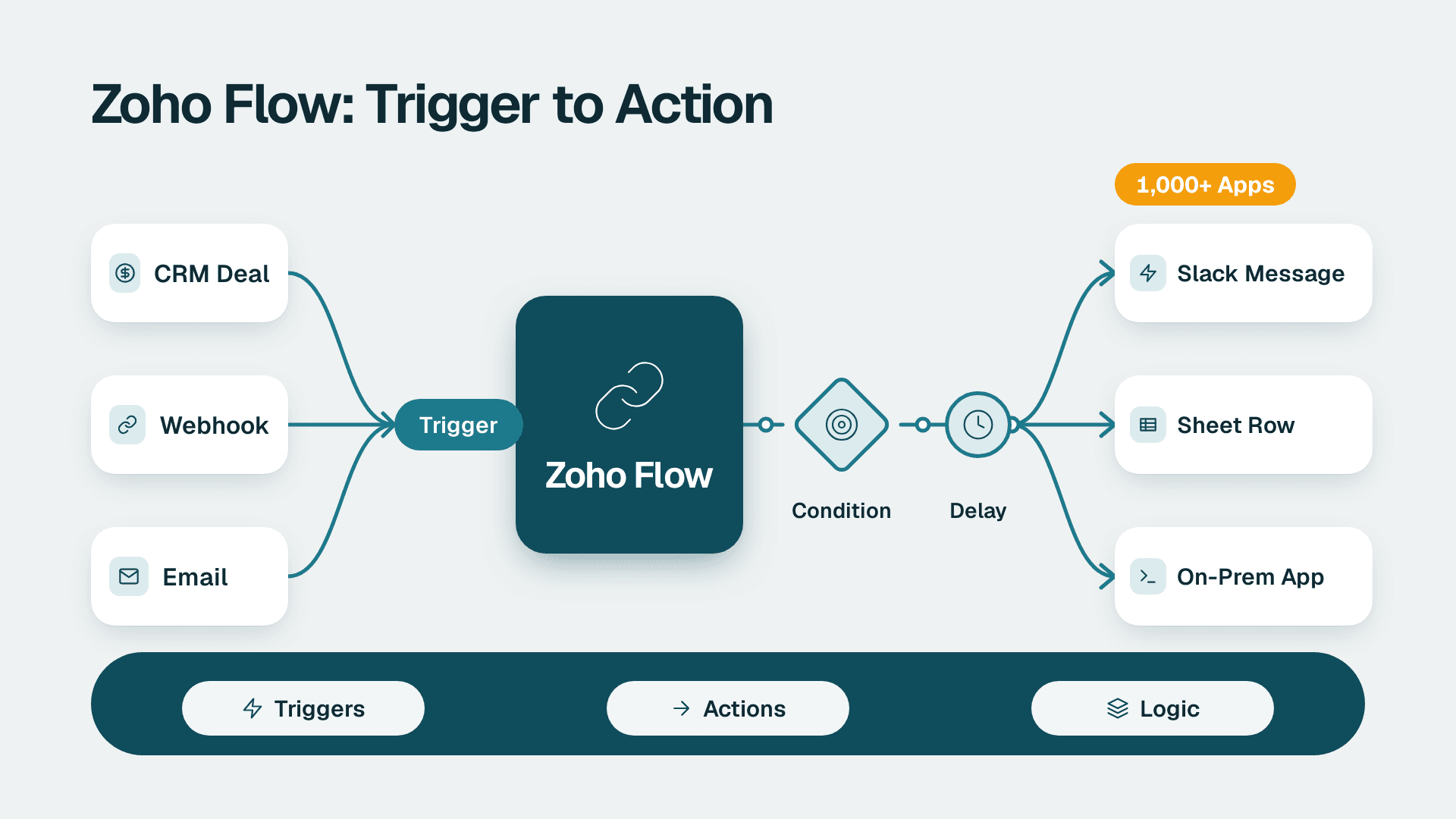
Zoho Flow: How to Automate Work Across Zoho and Other Apps
Zoho Flow connects 1,000+ apps with no-code workflows. Learn what it does, how to build a flow, when Deluge or n8n fits better, and what to check.
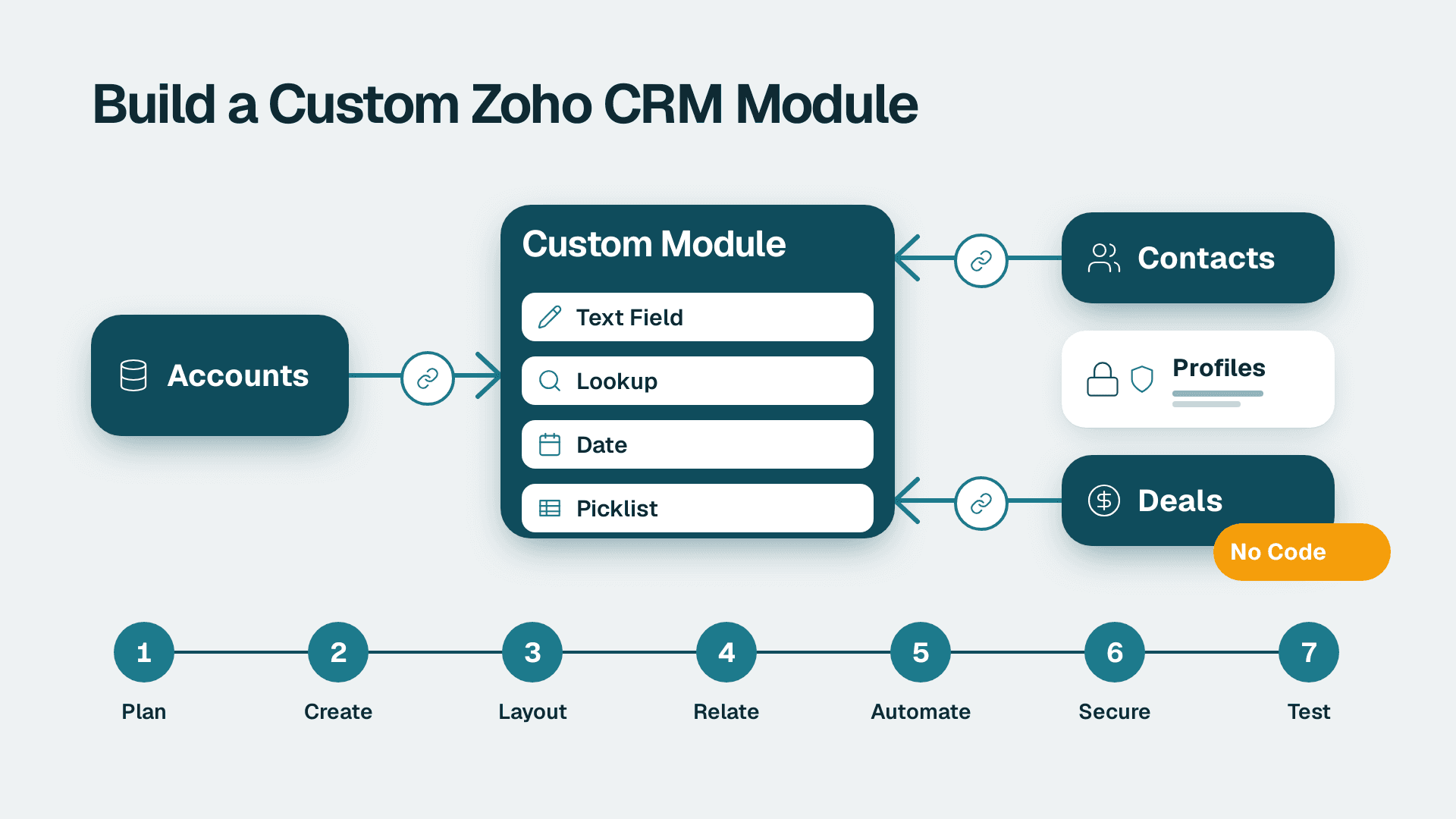
How to Create Custom Modules in Zoho CRM: 7 Steps
Learn how to create custom modules in Zoho CRM, relate them to Accounts and Deals, and lock down access. Allow 2-3 hours for a first module, plus testing time.
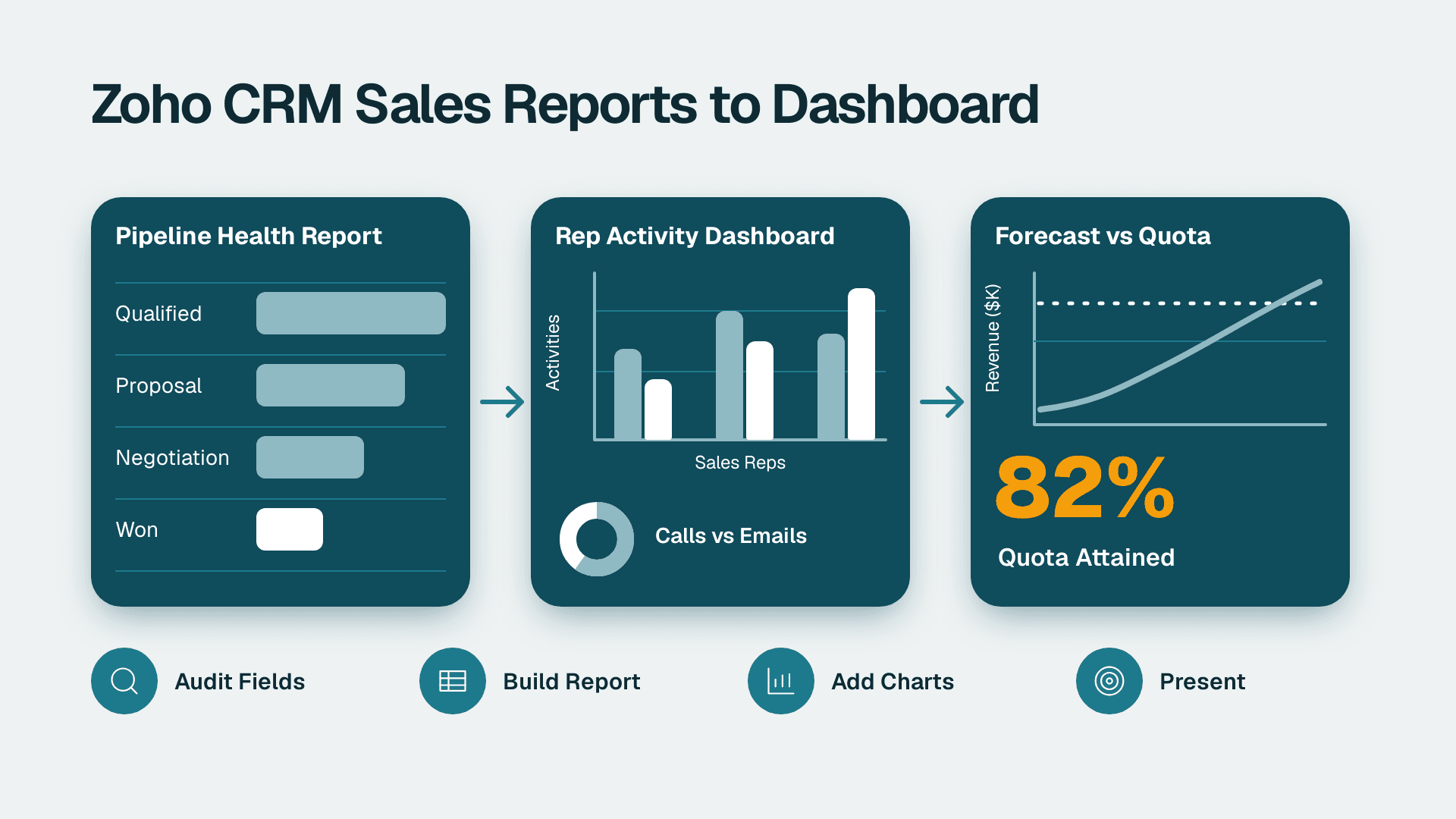
How to Build Zoho CRM Reports and Dashboards for Sales
Follow this Zoho CRM reports and dashboards tutorial to build pipeline, rep activity and forecast views for leadership. Plan on about half a day.