Zoho Workflow Automation
We configure Zoho Flow, Zoho Blueprint, and Zoho CRM Workflow Rules for Zoho One and CRM customers. Automate your sales-to-ops handoffs without leaving the Zoho ecosystem. Certified Zoho partner -- we know all three tools and when to use which. Free automation audit.
Trusted by teams across 15+ countries
Zoho automation results from real engagements
Driving measurable success through data. We help our clients achieve improved KPIs, operational efficiency, and tangible business outcomes.
3 tools
Flow + Blueprint + Workflow Rules
7
automations every Zoho CRM should have
1-2 days
CRM workflow rescue turnaround
5.0 Star
rating from 15 reviews
The Zoho Automation Stack Explained
Zoho CRM Workflow Rules -- the first automation layer
Zoho CRM Workflow Rules trigger on record events inside Zoho CRM: a lead is created, a deal changes stage, a field value is updated, or a time condition is met (e.g., 3 days before a follow-up date). What Workflow Rules can do: auto-assign leads to reps by territory or source, send automated emails when a deal reaches a stage, update field values based on conditions, create tasks or events on record changes, notify managers when deal value crosses a threshold, push records to another CRM module. What Workflow Rules cannot do: connect to external apps, trigger on events outside Zoho CRM, enforce that certain fields are filled before a stage transition (that is Blueprint). Workflow Rules have no task count limits in Zoho CRM -- they run as many times as records trigger them. Every Zoho CRM customer should have at least 5-7 active workflow rules configured.
Zoho Blueprint -- process enforcement before stage transitions
Blueprint is Zoho CRM's process management tool. It defines what MUST happen before a deal can move from one stage to the next. Blueprint is not just automation -- it is process enforcement. A Blueprint process has: Stages (matching your pipeline stages), Transitions (the action that moves a record between stages), Entry criteria (conditions that must be true before a transition is allowed), Field requirements (fields that must be filled before a transition), Actions (what happens automatically when a transition fires: send email, create task, update field, notify manager). Example: before a deal can move from 'Proposal Sent' to 'Negotiation', Blueprint requires the rep to fill in 'Proposal Value', 'Decision Maker Contact', and 'Expected Close Date' -- and automatically creates a follow-up task. Sales teams cannot skip steps without a manager override. Blueprint is the right tool when you have a defined, repeatable sales or ops process with mandatory steps. It is wrong for ad hoc or highly variable processes.
Zoho Flow -- cross-app automation across the Zoho ecosystem
Zoho Flow is Zoho's iPaaS (integration platform as a service) -- similar to Zapier or Make.com but Zoho-native and included in Zoho One. Zoho Flow can connect: Zoho CRM to Zoho Books (deal closed > invoice created), Zoho CRM to Zoho Projects (deal won > project created with template), Zoho CRM to Zoho Campaigns (new contact > add to onboarding sequence), Zoho CRM to Slack, Gmail, Google Sheets, Stripe, and 800+ other services. Zoho Flow runs on a task-based pricing model: 1,500 tasks/month on the standard Zoho One plan. A multi-step flow that fires 100 times/month on a 5-step sequence consumes 500 tasks. High-volume automation (>5,000 tasks/month) needs either the Zoho Flow paid tier or Make.com. We configure Zoho Flow flows, set up error handling, and build monitoring so you know when a flow fails before your team notices the downstream effect.
Deluge custom functions -- when the visual builders hit their limit
Deluge is Zoho's scripting language, used in custom functions within Zoho CRM Workflow Rules, Blueprints, and standalone scripts. Deluge is the right tool when: you need conditional routing logic that a visual builder cannot express (nested if/else, complex date arithmetic, multi-record lookups), you need to call an external API from inside a Zoho CRM workflow (REST API call within a custom function), you need to transform data before it is pushed to another Zoho app (format a date, concatenate fields, calculate a derived value). Deluge functions are attached to Workflow Rules or Blueprint transitions. We write Deluge only when a no-code or low-code approach cannot achieve the requirement -- and we document every function so your team can maintain it without us.
The 7 automations every Zoho CRM customer should have
1. Lead assignment by territory or source (CRM Workflow Rule) -- route new leads to the right rep automatically, no manual assignment. 2. Stage-gated deal progression with mandatory field validation (Blueprint) -- ensure reps fill required fields before moving deals forward. 3. Deal closed-won to automatic invoice creation in Zoho Books (Zoho Flow) -- eliminate the manual handoff from sales to finance. 4. New deal or contact to onboarding task sequence (CRM Workflow Rule + Blueprint) -- trigger the right follow-up tasks automatically. 5. Lost deal to automated win-back campaign in Zoho Campaigns (Zoho Flow) -- keep lost deals in a nurture sequence without manual effort. 6. High-value deal threshold to sales manager notification (CRM Workflow Rule) -- managers know about high-value deals in real time. 7. Monthly close to Zoho Analytics report refresh and email distribution (Zoho Flow) -- replace the manual Monday morning report ritual.
When to leave Zoho for Make.com or n8n
Zoho Flow is the right default for Zoho-heavy customers. It is included in your Zoho One license and keeps automation inside the Zoho ecosystem. Recommend switching to Make.com when: your automation connects Zoho to non-Zoho apps at volume (>5,000 tasks/month on Zoho Flow gets expensive), or you need multi-path branching logic that Zoho Flow's visual builder handles awkwardly. Recommend switching to n8n when: your engineering team wants self-hosted, Git-versioned, Docker-deployed automation with full code access, or you have data sovereignty requirements that prevent using any SaaS automation platform. We configure all three and recommend based on your stack and volume -- not our preferred tool. See our /services/ai-automation-consultant/ page for non-Zoho automation builds.
We configure all three Zoho automation layers -- most partners only know one
Most Zoho resellers configure Zoho CRM Workflow Rules and call it automation. Zoho Blueprint and Zoho Flow require a different implementation skill set. We are certified across all three and recommend the right layer for each use case -- including when to leave the Zoho ecosystem entirely for Make.com or n8n.
Certified across Zoho Flow, Blueprint, and CRM Workflow Rules
We configure all three Zoho automation layers. Most partners configure Workflow Rules (the UI-only, record-triggered basics). Blueprint requires process design before any configuration. Zoho Flow requires API knowledge and cross-app logic. We scope which layer fits each use case before touching any configuration.
Zoho Flow -- cross-app automation without leaving Zoho
Zoho Flow connects your Zoho apps to each other and to 800+ external services. We configure multi-step flows: deal closed in Zoho CRM triggers invoice in Zoho Books triggers onboarding task in Zoho Projects triggers Slack notification. One flow replaces 4 manual handoffs.
Zoho Blueprint -- process enforcement, not just automation
Blueprint defines what has to happen before a deal can move to the next stage. It is not just automation -- it is process enforcement. We map your sales or ops process, design the stage transitions, set field validation requirements per stage, and assign owners. Sales teams use it correctly because it won't let them skip steps.
Automation audit included -- we find what is broken first
Most Zoho CRM environments we inherit have conflicting workflow rules, duplicate triggers, and orphaned flows that fire on records they should not. We audit before we build. You get a written list of what is broken, what is redundant, and what is missing -- before any remediation starts.
Native Zoho -- no extra tools unless justified
We recommend Zoho Flow first for Zoho-heavy customers. It is included in your Zoho One license and keeps everything inside the Zoho ecosystem. We only recommend Make.com or n8n when your automation requirements genuinely extend outside Zoho at a scale or complexity that Zoho Flow cannot handle.
Deluge (custom functions) for complex logic
When Zoho Flow and Blueprint hit their limits, we write Deluge script -- Zoho's native scripting language. Common use cases: complex conditional routing that a visual builder can't express, API calls from inside Zoho CRM records, data transformations before a workflow fires. We keep Deluge use to a minimum and document every custom function.
Zoho Flow vs Blueprint vs CRM Workflow Rules — the complete comparison
The three-tool comparison no one has published. Use this to decide which tool fits each automation use case.
| What matters | CRM Workflow Rules | RecommendedZoho Blueprint | Zoho Flow | Deluge (custom functions) |
|---|---|---|---|---|
| Trigger type | Record event in Zoho CRM (create, update, date) | User action (stage transition in Zoho CRM pipeline) | Any trigger: CRM event, schedule, webhook, external app event | Called from Workflow Rule, Blueprint transition, or standalone |
| Scope | Inside Zoho CRM only | Inside Zoho CRM pipelines | Zoho apps + 800+ external services | Zoho CRM + external APIs via HTTP calls |
| Code required | No — UI configuration only | No — visual process builder | No — visual flow builder (Deluge for advanced logic) | Yes — Zoho scripting language |
| Cross-app capable | No — Zoho CRM actions only | No — Zoho CRM actions only | Yes — connects Zoho apps to external services | Yes — HTTP calls to any REST API |
| Enforces process steps | No — fires automatically, no user input required | Yes — mandatory fields and conditions before transition | No — fires automatically, no user input required | No — executes logic, no process enforcement |
| Task count limits | None — unlimited rule executions | None — process transitions are unlimited | 1,500 tasks/month (standard Zoho One plan) | None — execution limits per function call |
| Best for | Auto-assign leads, send notifications, update fields, create tasks | Sales process enforcement, mandatory field validation, approval chains | Cross-app automation: CRM → Books → Projects → Slack in one flow | Complex conditional logic, external API calls, data transformations |
| Included in Zoho One | Yes | Yes | Yes (standard plan) | Yes |
Audit, configure, and hand over -- in three stages
We do not start configuring until we know what is already there and what it is supposed to do.
Stage 1 -- Automation audit (1 week)
Review your entire Zoho CRM workflow setup: all active and inactive workflow rules, Blueprint processes, Zoho Flow flows, and any custom functions. Identify conflicts (multiple rules firing on the same event), broken conditions, orphaned flows, and missing automation. Output: prioritized list of 10-15 automation improvements with estimated build time and recommended tool (Workflow Rule vs. Blueprint vs. Zoho Flow).
Stage 2 -- Configure and test (1-4 weeks)
Build or fix automations in priority order. Single workflow builds complete in 1-2 days. Blueprint process design takes 3-5 days (includes process mapping session with your team). Zoho Flow multi-step flows take 2-5 days depending on number of connected apps. We test every automation with real records before hand-off.
Stage 3 -- Documentation and retainer (optional)
Every automation we build is documented: trigger conditions, action sequence, what each step does, and what to check if it breaks. Optional monthly retainer covers ongoing additions (1-2 new automations per month), monitoring for flow failures, and CRM workflow maintenance as your business processes change.
What does Zoho workflow automation cost?
Fixed prices for audits and individual workflow builds. Retainer for ongoing automation additions.
Automation audit
fixed
Review your full Zoho CRM automation setup. Identify what is broken, what is conflicting, and what is missing. Written output with 10–15 prioritized recommendations.
- Inventory of all Workflow Rules (active and inactive)
- Blueprint process review
- Zoho Flow flow audit
- Conflict and duplicate trigger identification
- Prioritized build list with tool recommendation per item
- Delivered in 1 week
Workflow bundle
fixed scope
5–10 automations built and tested. The fastest way to close the gap between your current automation coverage and the 7 automations every Zoho CRM should have.
- 5–10 Workflow Rules, Blueprint processes, or Zoho Flow flows
- Includes audit as first step
- Each automation tested with real records before hand-off
- Documentation for every automation built
- 30-day bug-fix window
Automation retainer
per month
Monthly additions and monitoring. 1–2 new automations per month, flow failure monitoring, and CRM workflow maintenance.
- 1–2 new Workflow Rules, Blueprint, or Flow automations per month
- Zoho Flow failure monitoring
- Workflow conflict rescue (2-business-day SLA)
- Monthly review of automation coverage vs. business process changes
Single workflow builds (1 trigger, 1–3 actions) are $500–1,500 fixed. Zoho CRM rescue engagements (fixing broken existing workflows) are priced after a 1-day audit. All prices in USD.
Wondering what this would cost you?
Answer a few questions and see an honest price range on screen — no email, no call needed.
See it in action
Real engagements. Documented outcomes.
Workforce Data Trapped in a Time-Tracking Tool
Eight Hubstaff entities. Automated daily sync. A failing 6-minute trigger fixed to run in 22 seconds. Project delivery, utilisation, and cost dashboards — rebuilt from scratch.
A CRM That Stored Data but Ran No Process
Lead scoring. Blueprint enforcement. Multi-region nurture. Full-funnel attribution. All wired inside one Zoho ecosystem — for a B2B SaaS security platform operating across 4 countries.
Two CRMs. One Master View. Zero Middleware.
A Google Apps Script pipeline that unified Housecall Pro and GoHighLevel into a single Looker Studio dashboard — 15,149 records synced on first run, 0 SaaS fees added.
Zoho workflow automation -- frequently asked questions
Find answers to common questions about our services and process.
Further reading
Guides and insights to help you make an informed decision.
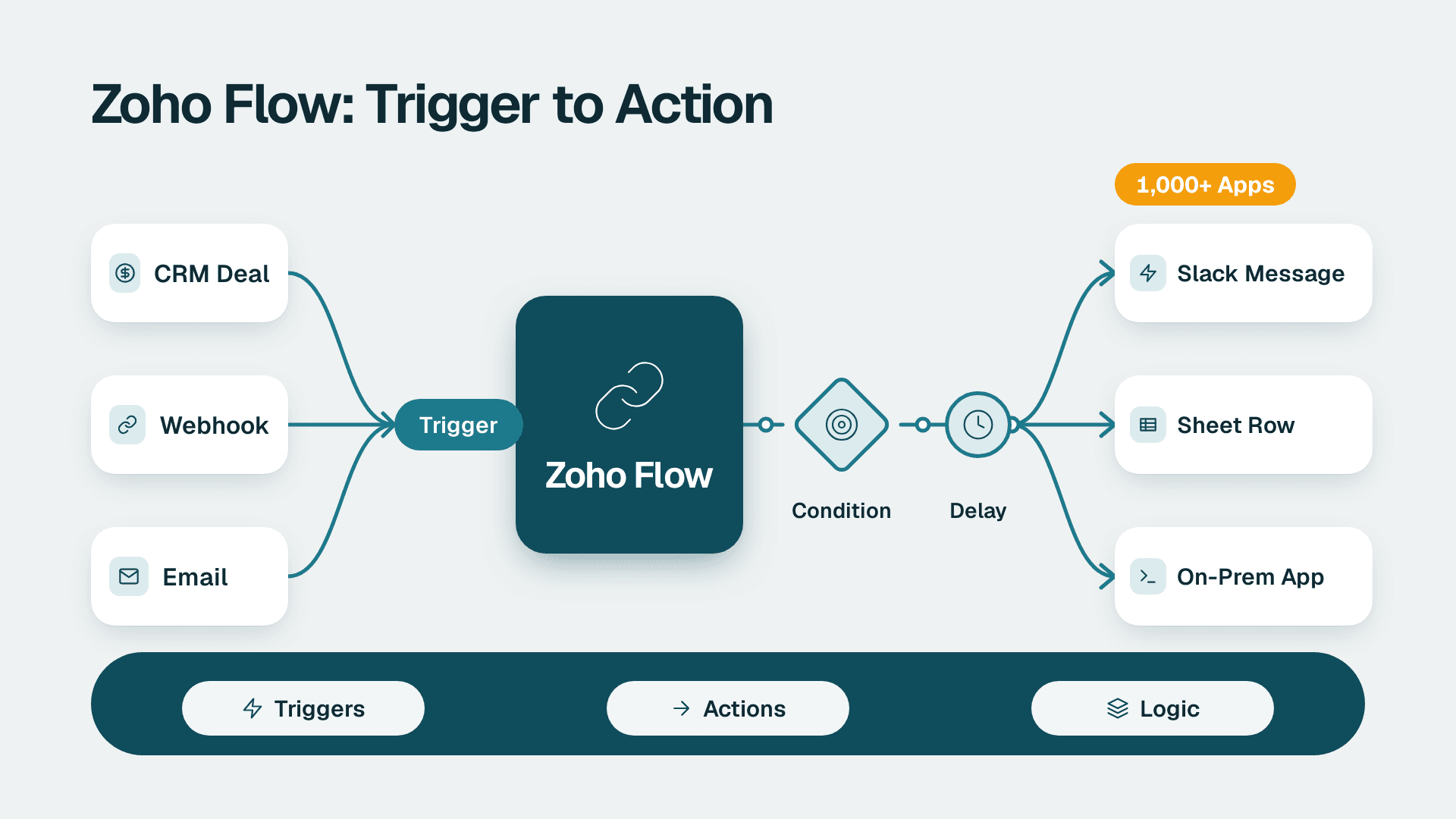
Zoho Flow: How to Automate Work Across Zoho and Other Apps
Zoho Flow connects 1,000+ apps with no-code workflows. Learn what it does, how to build a flow, when Deluge or n8n fits better, and what to check.
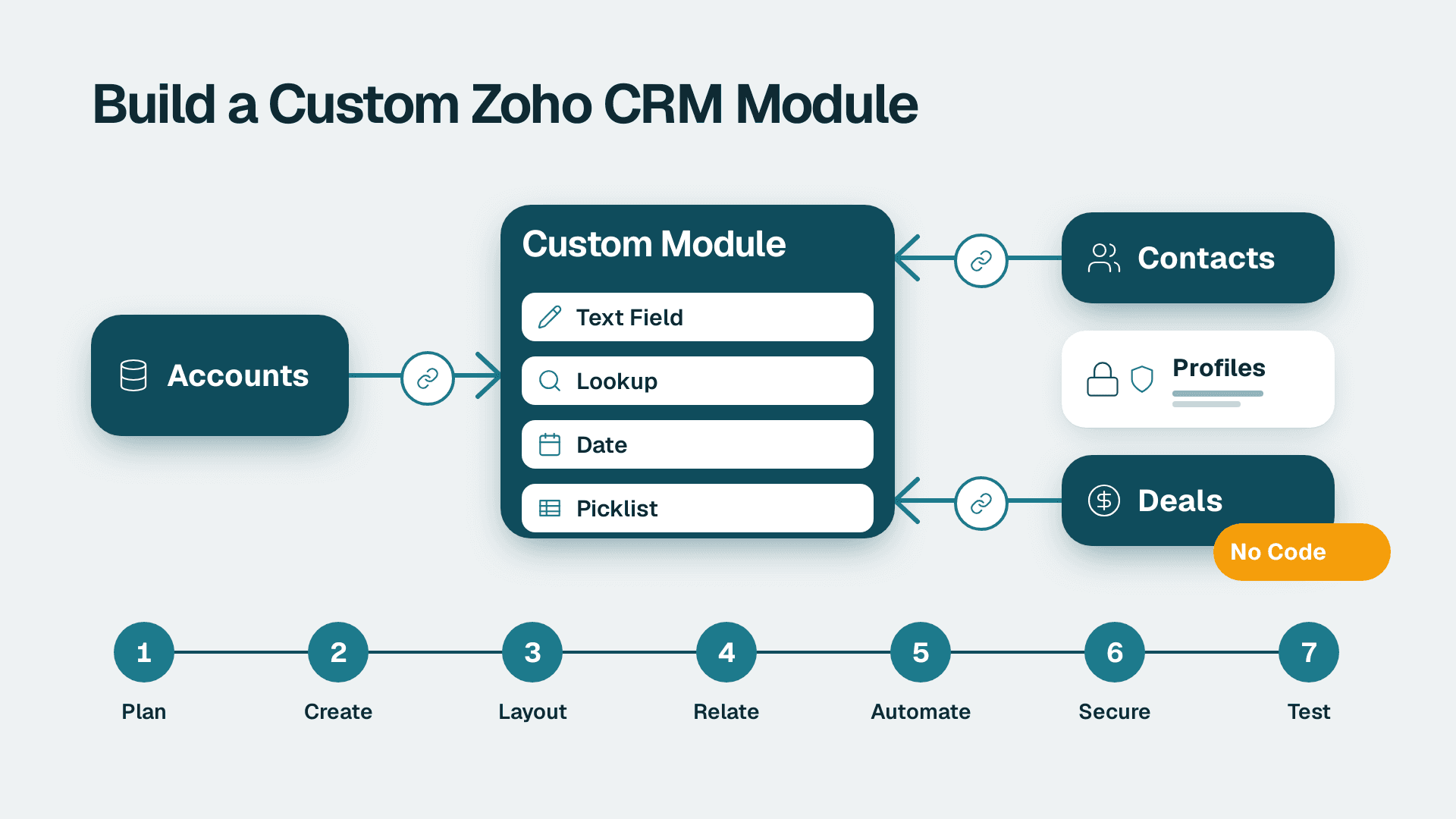
How to Create Custom Modules in Zoho CRM: 7 Steps
Learn how to create custom modules in Zoho CRM, relate them to Accounts and Deals, and lock down access. Allow 2-3 hours for a first module, plus testing time.
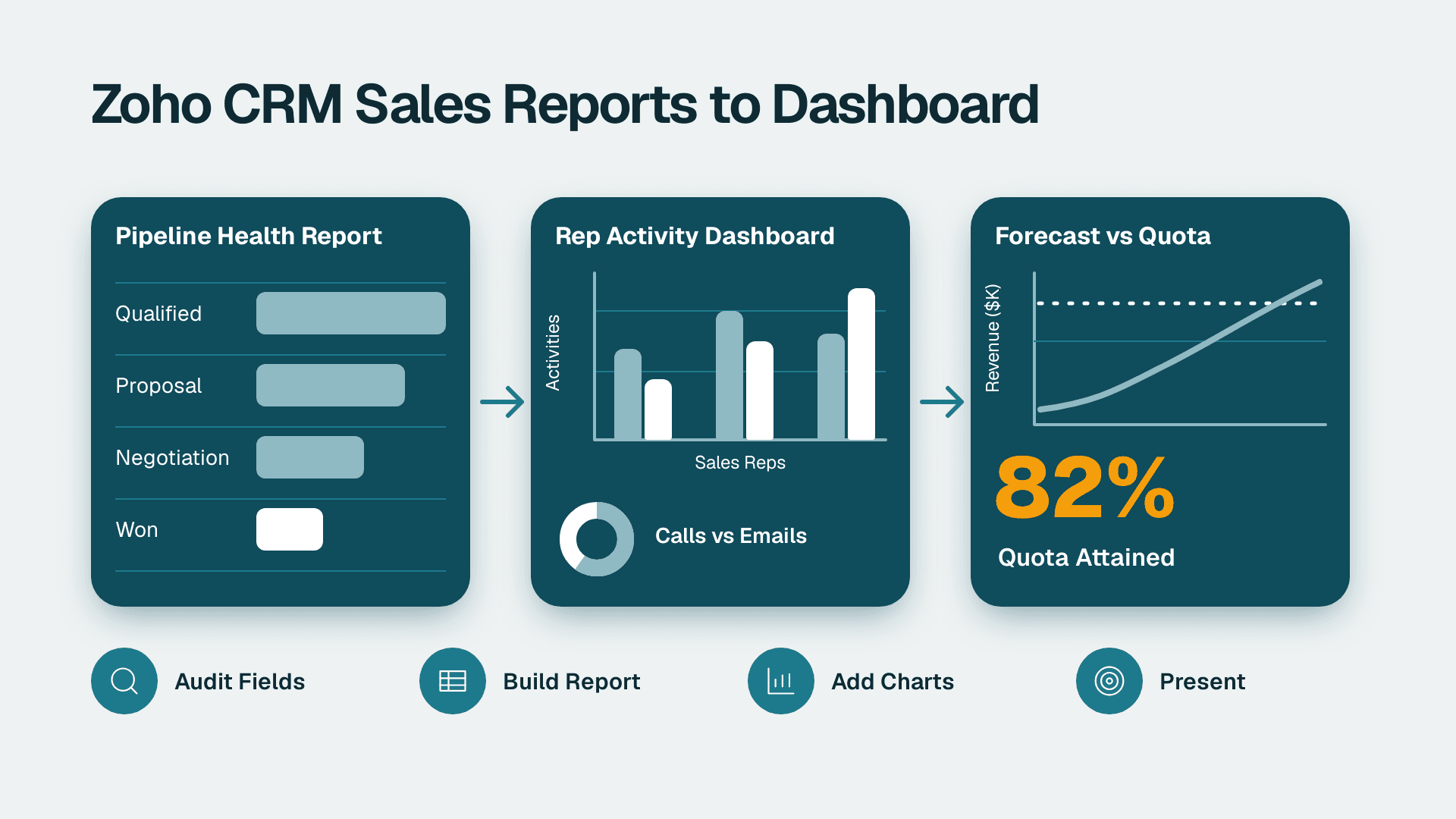
How to Build Zoho CRM Reports and Dashboards for Sales
Follow this Zoho CRM reports and dashboards tutorial to build pipeline, rep activity and forecast views for leadership. Plan on about half a day.