How to Automate Instagram Posts from Trending Hashtags with an N8N Template: AI Images + Captions
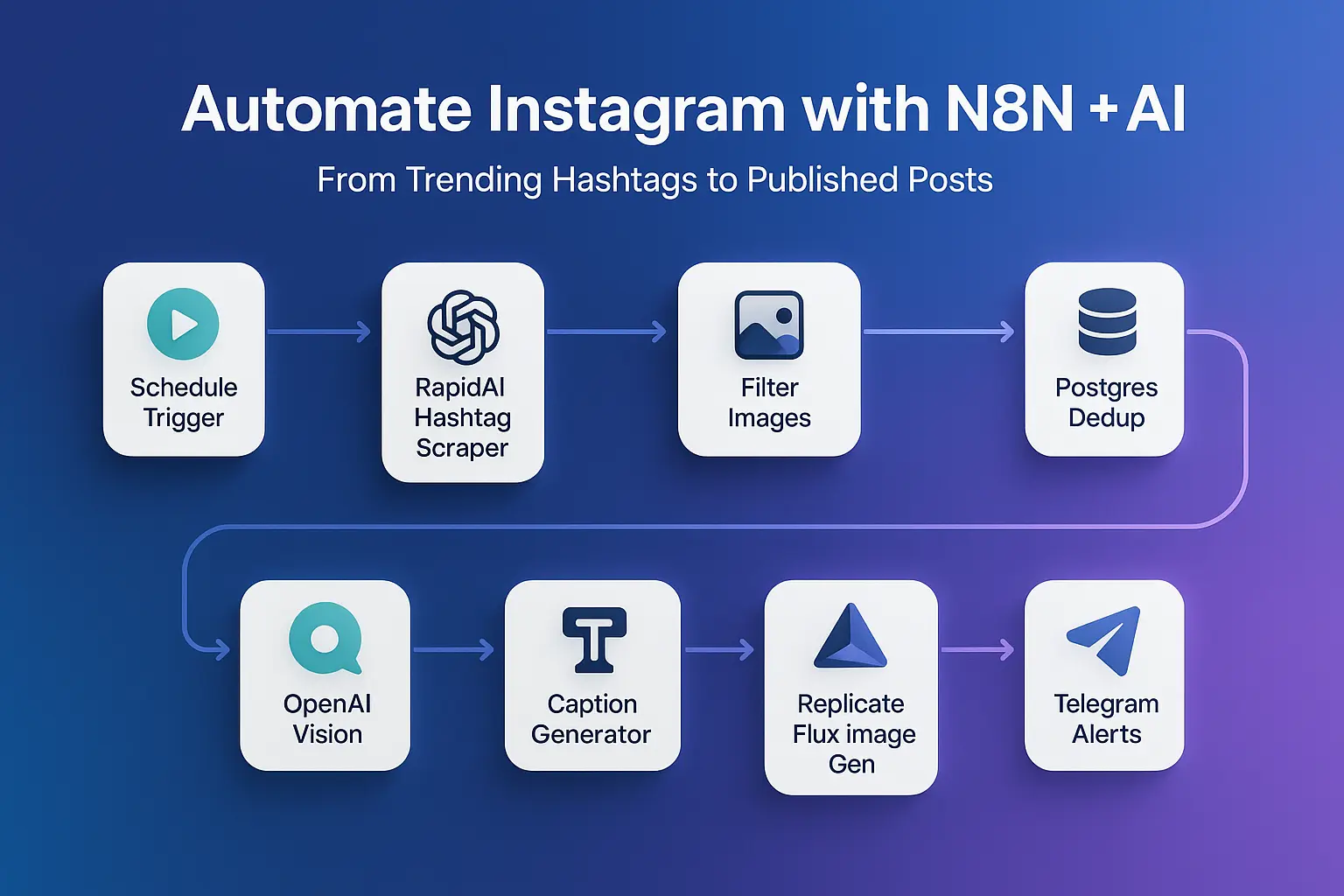
Creating fresh, on-brand Instagram content every day is hard—especially when trends move fast. Teams waste hours scanning hashtags, drafting captions, and designing visuals that keep up with what the audience already loves. This N8N Instagram automation template solves that with a fully automated pipeline: it fetches top-trending posts from specific hashtags, analyzes images with OpenAI Vision, generates original AI artwork with Replicate’s Flux model, writes a social-ready caption, and publishes to your Instagram Business account—on a schedule.
In the first 100 words: this post shows how to deploy an N8N Instagram automation template that turns trending Instagram posts into brand-new AI images and captions, then schedules and publishes them automatically. You’ll learn the business case, technical architecture, setup steps, and best practices for accuracy, safety, and performance. If you’re a CMO, founder, or consultant, this is a repeatable framework to keep feeds active while reducing production time and cost.
The Problem & Opportunity
Most teams face three bottlenecks:
Trend discovery takes time. Manually scanning hashtags and saving posts is tedious and inconsistent.
Creative production is slow. Designing visuals that align with trends but stay original stretches design bandwidth.
Publishing consistency slips. Even with content ready, posting reliably at the right times is tough.
The opportunity is to automate the pipeline end-to-end so you can keep your channel fresh with original, trend-aligned posts that match your brand style—without manual drudgery. With the right controls (database checks, scheduling, notifications), you get scalability and predictability. For marketing leaders, this translates into lower CAC, higher content velocity, and cleaner analytics.
Solution Overview
Platform: N8N (self-hosted or cloud).
What the template does:
Pulls top posts for target hashtags (e.g.,
#blender3d,#isometric) via a RapidAPI Instagram scraper.Filters images (no videos), merges results, and loops through candidates.
Checks a Postgres table to avoid duplicates by media code.
Uses OpenAI Vision (GPT-4o-mini) to analyze the trend image and extract a precise object-focused description.
Generates an Instagram caption (under 150 words) with relevant hashtags.
Calls Replicate (Black Forest Labs: FLUX.1 [schnell]) to produce a new, unique image based on the description (not a copy).
Uploads to Instagram Graph API: creates a media container, polls for status, and publishes when ready.
Sends Telegram alerts on success/failure.
Runs on a cron schedule.
The template uses Instagram’s Content Publishing flow (create media container via
/IG_ID/media, check status, then publish via/IG_ID/media_publish). See Meta’s docs for the full sequence.
Implementation Guide (Prerequisites)
You’ll need:
Instagram Business Account ID (and a connected Facebook Page + Meta app with required scopes). See Meta’s Content Publishing guide.
Facebook (Meta) Graph API credentials with permissions to publish to the Instagram Business account. Reference endpoints and fields in Meta’s API reference.
RapidAPI key for an Instagram scraping API (the template references
instagram-scraper-api2; any reliable hashtag endpoint on RapidAPI will work—verify pricing and limits).OpenAI API key for GPT-4o-mini (vision).
Replicate API token to run FLUX.1 [schnell] (text-to-image). See the model page/api reference.
Telegram bot + Chat ID for notifications.
Postgres database reachable from N8N.
Template Deep Dive (Node-by-Node)
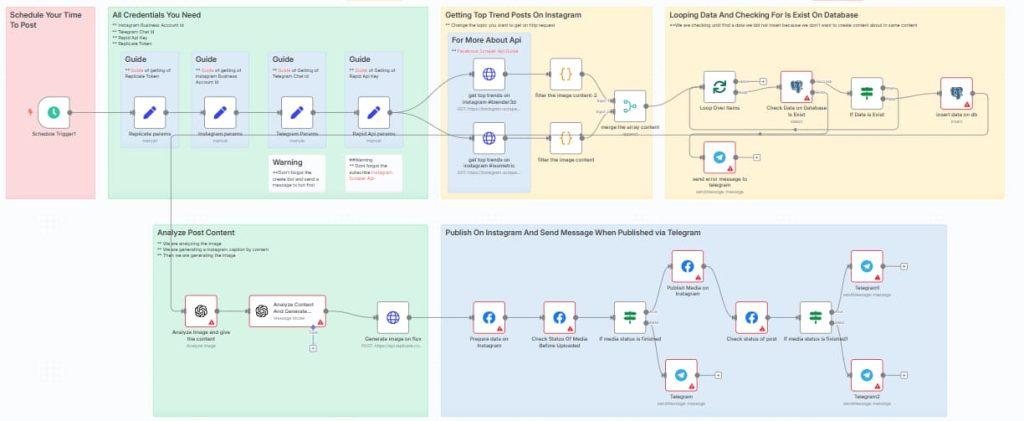
Below is a practical walkthrough of the major nodes and why they exist. The names match the template you provided.
1) Scheduling & Parameters
Schedule Trigger1
Cron:5 13,19 * * *(fires daily at 13:05 and 19:05 server time). Adjust to your audience’s peak engagement windows.Replicate params / Rapid Api params / Instagram params / Telegram Params
Set your secure credentials here:replicate_tokenx-rapid-api-keyinstagram_business_account_idtelegram_chat_id
Tip: Store these in N8N credentials or environment variables, not directly in nodes. Rotate keys regularly.
2) Discovering Trending Content
get top trends on instagram #blender3d
get top trends on instagram #isometric
Both call a RapidAPI Instagram Scraper endpoint (/v1/hashtag,feed_type=top) to pull top posts for each hashtag.filter the image content / filter the image content-2 (Code nodes)
Filters out videos, maps to a clean structure:{
id,
prompt: item.caption.text,
content_code: item.code,
thumbnail_url: item.thumbnail_url,
tag: <hashtag name>
}merge the array content
Combines both hashtag results into one stream.
Why RapidAPI? It centralizes multiple Instagram scraping providers with clear pricing & rate limits. Validate limits for your chosen API and add retry/backoff.
3) De-duplication Against Your Database
Loop Over Items → Check Data on Database Is Exist (Postgres)
For each candidate post, checkstop_trends.code.If Data is Exist
If found, keep looping. If not:insert data on db inserts
{tag, code, prompt, isposted:false, thumbnail_url}intotop_trends.
Table schema reminder (Sticky Note 12)
ProvidedCREATE TABLEDDL ensures you can track what’s already used.
Best practice: add a unique index on
codeto prevent race conditions if you later parallelize.
4) AI Understanding & Copywriting
Analyze Image and give the content (OpenAI Vision)
Sends the image thumbnail URL to GPT-4o-mini with a system prompt to focus on the object’s physical attributes, not the background or lighting. This ensures the content you generate is inspired by themes rather than copying compositions.Analyze Content And Generate Instagram Caption (OpenAI)
Summarizes the description into a friendly, sub-150-word caption with relevant hashtags like#Blender3D,#3DArt,#DigitalArt,#3DModeling,#ArtCommunity.
Compliance tip: avoid reproducing trademarked or copyrighted elements. Keep prompts abstracted to styles and forms, not specific branded assets.
5) AI Image Generation (Original Visual)
Generate image on flux (HTTP Request to Replicate)
Calls Replicate’s FLUX.1 [schnell] model with a detailed prompt (isometric, toy-like scale, shadowless lighting, pure white background). The template asks for 4K JPG, high quality, and consistent ambient lighting.
FLUX.1 [schnell] is designed for fast, high-quality text-to-image synthesis.
Tuning ideas:
Add brand colors or style tokens.
Keep background simple for carousels or add brand-safe gradients.
Avoid using exact celebrity likenesses or protected logos.
6) Instagram Publishing & Status Checks
Prepare data on Instagram (Facebook Graph API)
Creates the media container (edge: media) withimage_url(from Replicate output) andcaption(from OpenAI). Graph API v20.0 is supported; follow Meta’s container → status → publish flow.Check Status Of Media Before Uploaded
Polls the containerstatus/status_code.If media status is finished → Publish Media on Instagram
OnFINISHED, POST tomedia_publishwithcreation_id.Check status of post → If media status is finished1
ConfirmsPUBLISHEDor triggers Telegram error.
Reference endpoints and fields in Meta’s docs: IG User
/media,/media_publish, and the Instagram Media node reference.
7) Notifications
Telegram / Telegram1 / Telegram2 / send error message to telegram
Sends clear status messages:Success: “Instagram Content is shared”
Errors: DB / upload failures
Add run IDs and timestamps in messages so ops teams can trace issues quickly.
Business Benefits
Efficiency Gains
Cut hours of manual discovery and creative production each week.
Keep a reliable posting cadence without constant oversight.
Lower per-post content cost via generative design.
Scalability
Add more hashtags or verticals (architecture, product shots, app UI).
Extend to carousels or Stories/Reels as you evolve your prompts and assets (observe Graph API capabilities per media type).
Time saved per post (e.g., 45–90 minutes).
Content velocity (posts/week) vs. baseline.
Engagement lift from trend alignment (CTR, reach, saves).
Competitive Advantage
Always-on production aligned with what’s trending now.
Distinctive visual style powered by a tuned FLUX prompt strategy.
Best Practices & Tips
Implementation Do’s and Don’ts
Do start with 1–2 hashtags and measure results before scaling.
Do keep prompts style-driven, not copy-driven, to maintain originality.
Don’t repost others’ media. This template creates new works; use it as inspiration, not duplication.
Do add human review for the first weeks; then relax to exception-based checks.
Performance Optimization
Add a rate limiter and retry with exponential backoff for RapidAPI calls (observe provider limits).
Cache hashtag responses for a short TTL if you run multiple times/day.
Push heavy image generations to off-peak hours.
Security Considerations
Store tokens in N8N Credentials vault.
Rotate keys every 60–90 days.
Use least-privilege tokens for Graph API and monitor token expiry/refresh strategies.
Maintenance Requirements
Review RapidAPI plan limits and pricing as volume increases. Some plans advertise free tiers (e.g., monthly request caps) but differ by provider—verify before scaling.
Keep an eye on Meta Graph API versioning (v20.0+). New versions may change fields or behavior.
Track Replicate model updates; newer FLUX variants may improve quality/performance.
This N8N Instagram automation template lets you discover, reinterpret, and publish trend-aligned posts at scale—without burning your design or social teams. You’ll get consistent content, faster iteration, and clear operational signals via Telegram. Ready to put it to work?
Download the template and configure your credentials.
Start with two hashtags and measure results for two weeks.
Need a turnkey setup or brand styling? Book a Call with our expert.
By automating discovery, creation, and publishing in one flow, you’ll keep your Instagram presence fresh, original, and on-brand—with far less effort.
Yes—publishing uses the Instagram Graph API container + publish flow for Business accounts. Ensure your app has correct permissions and you post original media you own
The pattern is similar, but parameters differ. Start with images; then adapt to other media types per Meta’s docs and your app’s permissions.
Yes. Different Instagram scraper providers have different quotas and rate limits—check their pricing pages and add retries/backoff.
No. The model uses the description of the object (not the full composition) to generate a new image in a defined style (e.g., isometric, shadowless). This ensures originality.