Transforming Data with Functions in Make: My Hands-On Guide

When I first started building automation workflows in Make.com, I quickly realized that the real magic isn’t just in connecting apps—it’s in transforming the data between them. Data rarely comes in the exact format you need. That’s where functions come in, and trust me, once you get comfortable with them, you’ll feel like you’ve unlocked cheat codes for automation.
In this blog, I’ll walk you through what functions are in Make, why they matter, and how I’ve used them in different scenarios—from cleaning up messy text to formatting numbers and even playing with dates.
What Do We Mean by Data Transformation?
Let’s start simple: data transformation is the process of changing data from one format to another so it’s easier to use.
Here’s a quick example: imagine you’re collecting names from a form, and someone types their name in all lowercase, like “make academy.” Obviously, that doesn’t look too great in a CRM or email. Using Make’s startcase() function, we can instantly clean that up to read “Make Academy.”
That’s just one small example—but when you scale this across hundreds or thousands of records, these transformations save hours of manual cleanup.
Where Do You Find Functions in Make?
This was a question I had at the beginning. The answer is: functions live inside the mapping window of modules.
Here’s how I usually find them:
Open a module in your scenario (for example, Google Sheets → Add a Row).
Click into a field where you’d normally map data.
On the right-hand side, you’ll see tabs for Items (previous data) and Functions (the tools we’ll use to transform that data).
The functions are grouped into categories: general, math, text, date/time, and array functions. Once you start exploring, you’ll notice how powerful they are.
A Quick Tour of Make’s Function Categories
Here’s how I like to break them down when I explain Make to clients or teammates:
🔹 General Functions
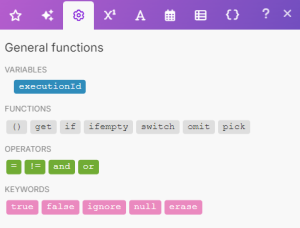
These are your “decision-making” tools. Think of if(), ifempty(), or switch(). They help you add conditional logic inside your scenarios.
One fun example: I built a workflow for checking the weather. Using the if() function, I could tell Make:
if (Status = Rain; Umbrella; No Umbrella)
So the output was literally: “Umbrella” if it was raining, and “No Umbrella” if it wasn’t. It’s like giving your automation the ability to make quick decisions on the fly.
🔹 Math Functions
I’m not going to lie—I used to avoid math functions until I realized how useful they are for business scenarios.
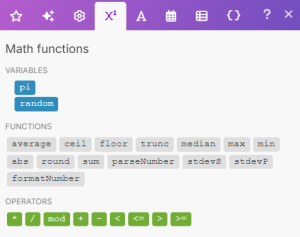
For example, if you want to calculate the average monthly sales from an online store, you can use:
average(10; 24; 35)
Which gives you 23.
Another favorite of mine is formatNumber(). Let’s say you’ve got 1000000 in your dataset. You can format it to 1,000,000 or 1.000.000,00 depending on the standard your team uses. It makes the data way more readable, especially when sending it to clients or reports.
🔹 Text Functions
These are lifesavers when working with messy text inputs (and let’s be honest—there’s always messy text).
Some of my go-tos:
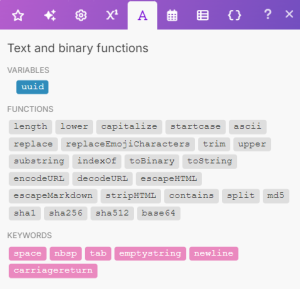
upper()→ Turns “make academy” into “MAKE ACADEMY”lower()→ Perfect for normalizing emails like “J.DOE@MAKE.COM” into “j.doe@make.com”capitalize()→ Converts “make” into “Make”startcase()→ Cleans up “john doe” into “John Doe”
Whenever I build client-facing automations (like lead forms or emails), text functions help keep everything consistent and professional.
🔹 Date and Time Functions
Dates are notorious for being messy in automations. Make often provides dates in long ISO formats like:
2023-03-06T14:08:42.820Z
Useful? Sometimes. Readable? Not really.
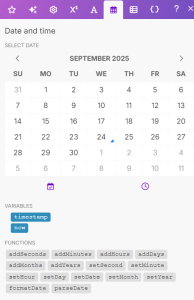
With the formatDate() function, I can transform that into:
03.06.2023 14:08
I even adjust it to different time zones with a single line. This is super useful for businesses working across regions.
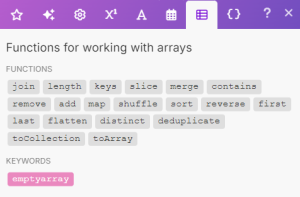
🔹 Array Functions
If you’ve ever dealt with lists of data, you’ll love array functions. A common one is map(), which lets you extract specific values from a list.
For example, I’ve used it to filter book titles by genre or to pull only emails from a batch of user data. It’s a more advanced topic, but once you learn arrays, you’ll wonder how you ever automated without them.
Why Functions Matter in Real Automation
When I look back at my first Make scenarios, they were simple: app A → app B. But as soon as I started using functions, I felt like I went from basic “plumbing” to actually designing smart workflows.
Text functions make my data look clean.
Math functions help me generate insights.
Date functions make scheduling crystal clear.
General functions let me build decision trees right inside a module.
It’s not just about moving data—it’s about shaping it into something useful.
Final Thoughts
If you’re just starting out with Make, my advice is this: don’t get overwhelmed. Start with text functions like capitalize() or lower(). Once you’re comfortable, play around with math and date functions.
The more you experiment, the more you’ll see that functions are the secret sauce that transform Make from a simple connector tool into a true automation powerhouse.
And trust me—once you get the hang of it, you’ll wonder how you ever built automations without them.
Ready to start building? Sign up for Make.com today and discover the power of agentic automation for yourself.
📩 Contact us today to schedule a free consultation and see how automation can help you keep more customers, protect revenue, and grow stronger.
Check out other helpful Power Automate Blogs

If you are looking forward to getting your data pipeline built and setting up the dashboard for business intelligence, book a call now from get in touch with our Make.com experts.
#analytics #data #business #artificialintelligence #machinelearning #startup #deeplearning #deeplearning #datascience #ai #growth #dataanalytics #india #datascientist #powerbi #dataanalysis #businessanalytics #businessanalyst #businessandmanagement #dataanalyst #businessanalysis #analyst #analysis #powerbideveloper #powerbidesktop #letsviz