Looker Studio Function: AVG
 Reviewed by Neetu Singla — Founder, Lets Viz Technologies — AI & Data Consultant. Last reviewed April 10, 2026.
Category: Statistical / Aggregation Function
The
AVGfunction calculates the arithmetic mean of a numeric column by adding all values in the column and dividing the sum by the total number of values, offering insights into the central tendency of the dataset.
Purpose of AVG Function :
Central Tendency Measurement:
AVG provides a single representative value that summarizes the center of a distribution of values.Comparison Across Groups:
It allows for the comparison of different groups by comparing their averages.Data Insights and Trend Analysis:
AVG helps in detecting trends over time, identifying high or low averages, and finding anomalies or patterns.
Type of Calculation:
Arithmetic Mean:
The AVG function performs an arithmetic mean calculation, which is the sum of all values divided by the total number of data points.
Practical Use Cases:
Sales Analysis:
Calculating the average sales per day, week, or month to evaluate performance.Customer Satisfaction Surveys:
Calculating the average satisfaction score to assess overall customer sentiment.Employee Performance:
Determining the average performance score across different teams or departments.
AVG(field_name)
| Parameter | Type | Description |
|---|---|---|
| field_name | Numeric (INTEGER, FLOAT) | The field/column containing numeric data on which the average is calculated. |
How Does AVG Function Work:
The AVG function works by summing all the values in a specified column and then dividing that sum by the number of non-null values in that column. It ignores null values in the dataset.
What Does it Run?
Numeric Data:
It operates on numeric values (e.g., integers or decimals) and calculates their mean. If applied to a non-numeric field, it will either return an error or ignore the data.
When Should We Use It?
When to use AVG:
When you need a summary measure of central tendency for numeric data.
When comparing different groups, categories, or time periods based on their averages.
When you want to detect trends or deviations in data.
Examples
Basic Usage :
AVG(Sales Amount)
Result: X amount
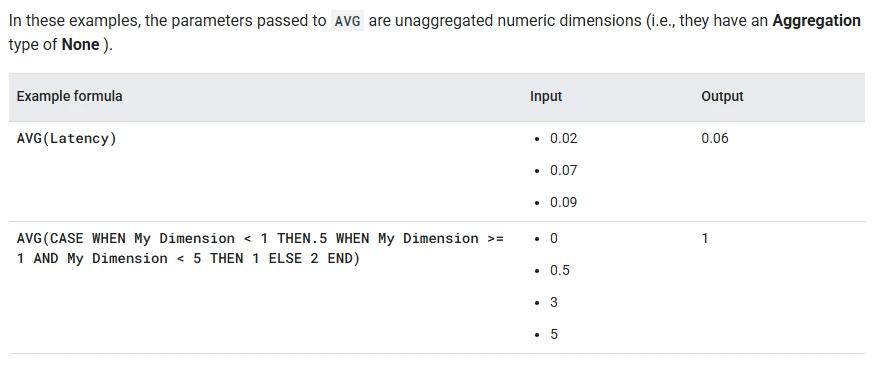
Column Usage:
If you have a column with the name Sales Amount , you get the Average
Tips and Tricks:
Ensure No Nulls:
AVG ignores null values, so make sure your dataset is clean or handle null values explicitly using functions likeCOALESCE()if needed.Group by Appropriate Dimensions:
When calculating averages by categories (e.g., sales by region), always useGROUP BYto segment the data correctly.Check for Skewed Averages:
Averages can be skewed by outliers. Consider using median or other robust statistics when appropriate.
Related Functions You Might Need:
SUM():
To calculate the total sum of a numeric column, often used alongside AVG for further insights.COUNT():
To count the number of records, which is useful for calculating averages manually or with specific conditions.MEDIAN():
If you need a more robust measure of central tendency that is less affected by outliers than the average, use theMEDIAN()function.STDEV() / VARIANCE():
These functions can be useful when you want to understand the spread or variation around the average.
The AVG function in Looker Studio calculates the arithmetic mean (average) of a specified numeric column or field. It sums up all the values in the column and divides the sum by the total number of values, excluding nulls. This gives a central value that represents the data distribution.
The AVG function automatically excludes null values from the calculation. If a row in the numeric field has a null value, it will not contribute to the sum or count when calculating the average. This ensures that only valid numbers are used in the calculation of the average.
Yes, the AVG function can be combined with other aggregate functions like SUM(), COUNT(), and MAX() in a query. For instance, you can calculate the average sales (AVG(sales)) and the total sales (SUM(sales)) in a single query, allowing you to gain more insights from the same dataset.
To calculate averages for different groups or categories, you can use the GROUP BY clause in Looker Studio. This groups the data by a specified dimension (like region, product, or time period), and the AVG function will calculate the average for each group.
Combine it with IFERROR to return a default value for invalid inputs.
Need this built properly in Looker Studio?
We build production Looker Studio dashboards on GA4, Google Ads, CRM and BigQuery. Blended sources, calculated fields that hold up under real data, and refresh that does not quietly break.
Certified partnerGA4 & BigQueryFixed scope
