Headcount
1,248
▲ Active employees by department, location and employment type, with the monthly trend.
Headcount, attrition, hiring and absence in one view, refreshed from your HRIS and applicant tracking system.
Built in Power BI on data from Workday, BambooHR, Zoho People, SAP SuccessFactors, your ATS and payroll.
Trusted by teams across 15+ countries
A workforce view for HR leadership and a recruiting view for talent acquisition.
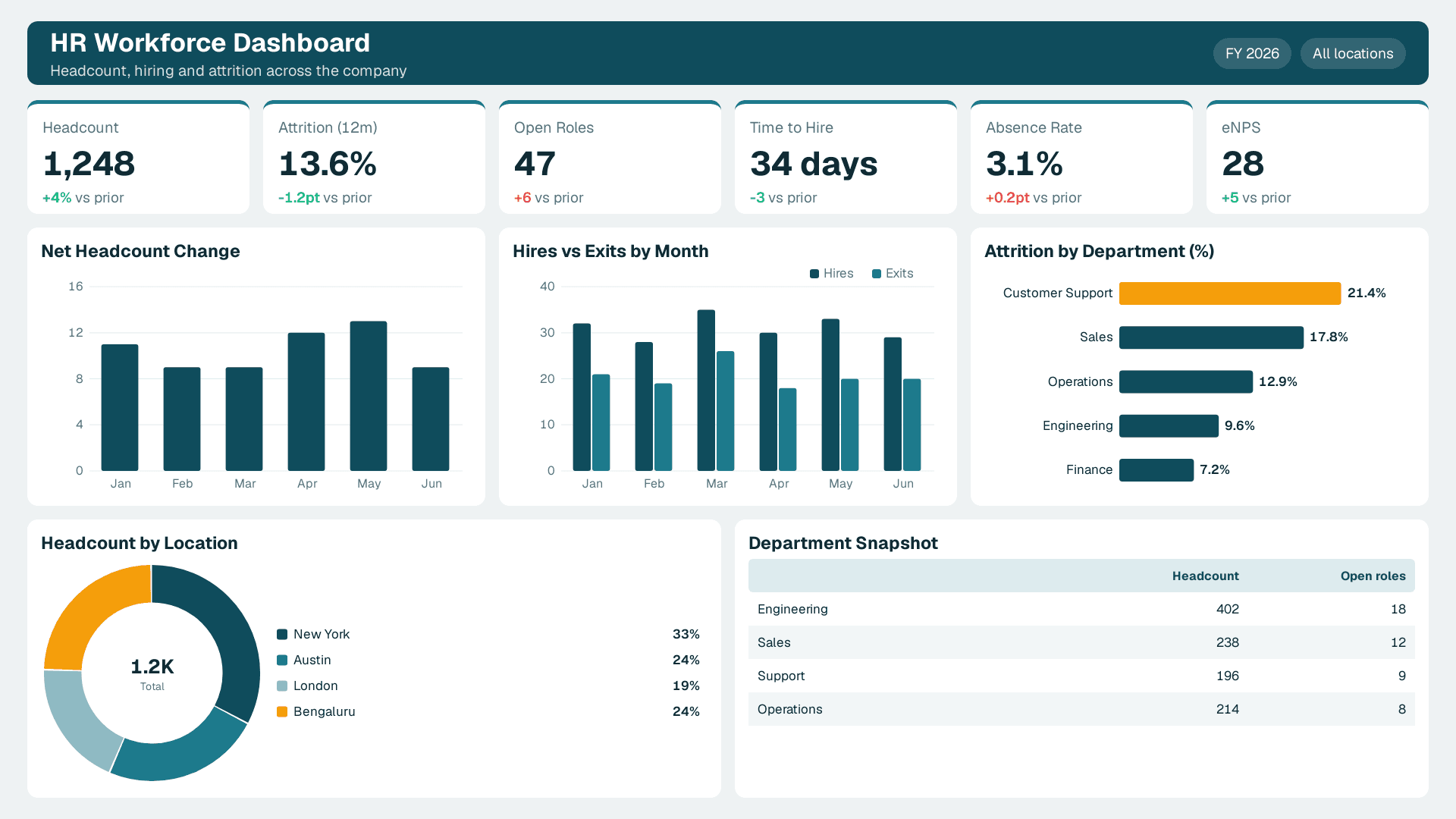
Headcount, attrition, open roles, time to hire, absence and eNPS, with attrition by department.
Start with the workforce numbers leadership asks about; each needs one definition across locations and systems.
1,248
▲ Active employees by department, location and employment type, with the monthly trend.
13.6%
▲ Leavers over the last 12 months as a share of average headcount; lower is better.
34 days
▲ Days from requisition opened to offer accepted, by role and team.
47
▲ Approved roles not yet filled, by department and age.
3.1%
▲ Unplanned absence as a share of scheduled working time.
28
▲ How likely employees are to recommend the company as a place to work.
The people-reporting problems HR teams bring to us most often.
HR, finance and payroll each count differently. One governed definition ends the argument.
Attrition by team and manager shows a problem while there is still time to act.
The hiring funnel shows where candidates drop out and which sources hire best.
Monthly people reports refresh from the HRIS instead of manual exports.
HRIS, ATS, payroll and survey data are joined into one model.
Row-level security limits each manager to their own team.
Each HR dashboard follows your org structure, definitions, privacy rules and reporting cycle.
What Can Be Customized
Headcount, attrition and FTE definitions
Data sources (HRIS, ATS, payroll, engagement surveys)
Row-level security by manager, region or business unit
Views for HR leaders, recruiters and line managers
Common questions about hr dashboards.
An HR dashboard is one view of workforce data: headcount, attrition, hiring, absence and engagement, refreshed from your HR systems so HR and leadership can spot trends early.
From Lets Viz
We connect your HR and recruiting systems, agree definitions and access rules, and ship a first version in one to two weeks.
NDA-safe · No obligation · Clear next steps