How to Overcome Adjust Data Integration Challenges with Looker Studio For Free
Introduction
In today’s Fast- Forwarding era, visualizing analytics and performance metrics is crucial for businesses to make informed decisions. Adjust stands out as a leading platform for tracking user behavior and campaign performance. However, many organizations encounter challenges when attempting to integrate Adjust’s rich data into visualization tools like Looker Studio. The native Looker Studio connector for Adjust often lacks support for essential dimensions, hindering the creation of comprehensive dashboards. This article explores a robust solution leveraging Adjust’s API and Google Apps Script to bridge this gap, enabling seamless data flow and insightful visualizations.
The Problem: Limited Adjust Data Integration with Looker Studio
Many businesses rely on Looker Studio, a leading business intelligence and data visualization tool, to gain insights from various data sources. Its other way round, adjust provides integration with Looker studio .
Without the full range of data, teams are unable to visualize critical information like user acquisition details, retention rates, lifetime value, and campaign performance accurately. This limitation prevents organizations from making informed decisions based on comprehensive analytics.
The Solution: Integrating Adjust API with Looker Studio via Google Apps Script
To overcome this integration hurdle, we propose a solution that utilizes Adjust’s API in conjunction with Google Apps Script. This approach facilitates the extraction of comprehensive data from Adjust, which can then be imported into Looker for advanced visualization and analysis.
These are example of Few Dimensions that is not avaiable when we are using Pre-built Looker Studio Connector for Adjust : 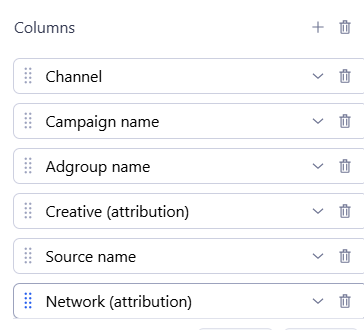
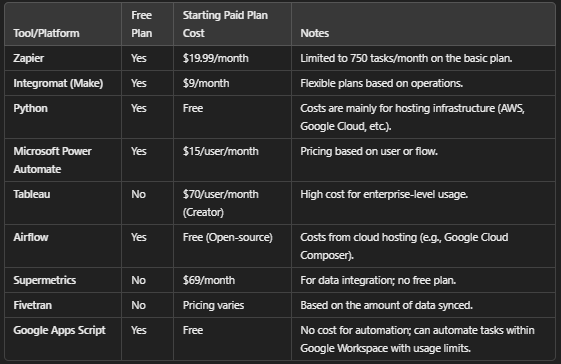
Here are some options available for connecting to the Adjust API and working with the data:
1.Supermetrics is a data integration platform that specializes in pulling data from various sources (including Adjust) into Google Sheets, Excel, Google Data Studio, or other BI tools.
How it works:
- Pre-built Connectors: Supermetrics has a pre-built Adjust connector that allows you to easily pull data from Adjust into your chosen platform, such as Google Sheets or Google Data Studio.
- Cost:
- Supermetrics for Google Sheets/Excel: Starts at $69/month for the Basic Plan.
- Supermetrics for Google Data Studio: Starts at $39/month for the Connector for Data Studio.
- Supermetrics for BI Tools (e.g., Power BI, Tableau): Prices start at $99/month for basic connectors.
- Power Automate (formerly Microsoft Flow) is another powerful automation tool for automating tasks and integrating with APIs. It’s ideal if you’re already in the Microsoft ecosystem.
How it works:
- Custom Connectors: You can create a custom connector to make API requests to Adjust and store data in services like Excel, Microsoft Power BI, or SharePoint.
- Scheduled Workflows: Power Automate allows you to set up scheduled workflows to fetch Adjust data regularly.
- Cost:
- Free Plan: Available for personal use, with limited functionality.
- Paid Plans: Start at $15/user/month for Power Automate per user and can go up to $40/user/month for Power Automate per flow.
3. Zapier is a popular automation tool that allows you to connect different web apps and automate workflows without writing any code.
How it works:
- Pre-built Integrations: Zapier has built-in integrations with many tools, and even if it doesn’t have a native integration with Adjust, you can use Zapier’s Webhooks feature to call the Adjust API.
- Create “Zaps”: You can set up workflows where data from Adjust (via its API) is fetched at regular intervals and sent to your chosen destination, like Google Sheets, Airtable, or other visualization tools.
- Cost:
- Free Plan: 100 tasks per month, 5 Zaps (automations).
- Paid Plans: Start at $19.99/month for Starter (750 tasks/month) and go up to $73.99/month for Professional (up to 2,000 tasks/month).
- Google Apps Script is a cloud-based scripting platform from Google that allows you to automate tasks and connect Google Workspace apps (like Google Sheets, Google Drive, etc.) with external services and APIs, including Adjust.
How It Works:
- Pre-built API Integration:
- Google Apps Script allows you to connect to external APIs such as the Adjust API using simple HTTP requests. You can write JavaScript code within Google Sheets (or other Google apps) to call Adjust’s API and fetch the data you need (like installs, events, campaigns, etc.).
- Custom Scripts:
- You can write custom JavaScript code in the Google Apps Script editor to interact with the Adjust API, process the data, and display it within Google Sheets. Once the data is fetched from Adjust, it can be automatically populated into a spreadsheet or used for further analysis.
- Automation and Scheduling:
- Google Apps Script lets you schedule your scripts to run at regular intervals (e.g., daily, weekly). This ensures that your Adjust data is automatically fetched and updated at the time you specify, with no manual intervention required.
- Cost: Free – Google Apps Script offers lifetime free automation within the usage limits of Google Workspace (Google Sheets, Docs, etc.).
Detail Solution to intergrate Google Looker Studio with Adjust For Free
using Google App Script
Step 1: Accessing Adjust Data through the API
Adjust provides an extensive API that allows developers to programmatically access all the data it collects — from installs, sessions, in-app events and more. However, the native Looker Studio connector doesn’t expose every dimension available through the Adjust API, which limits the scope of data you can work with.
API Authentication: To start, you need to authenticate the Adjust API by using an API key (Token) provided by Adjust. This API key is used to securely access your account data.
Step 1 : Obtain an API Access Token
To connect to the Adjust API, you need an API access token. This token authenticates your application to Adjust, ensuring that your requests are coming from an authorized source.
How to Get the API Token:
- Log in to Adjust:
- Go to the Adjust Dashboard.
- Log in to your account.
- Navigate to the API Section:
- Once logged in, navigate to the “Account Settings” section in the Adjust dashboard.
- Here, you will find the API Access option.
- Generate an API Token:
- In the API Access section, you can generate a new API Token.
- The API Token is a string of characters (usually alphanumeric) that’s unique to your Adjust account.
- Keep this token secure — it will be used in the authorization header of your requests.
- Log in to Adjust:
- Defining the Data: Once authenticated, you can define the specific data you want to pull. The Adjust API provides endpoints for retrieving data .
- Fetching Data: By calling specific endpoints in the Adjust API, you can pull detailed data, including the dimensions that Looker’s Adjust connector cannot access.
Adjust API : https://dev.adjust.com/en/api/rs-api/csv
Step 2: Automating Data Extraction with Google Apps Script
Google Apps Script serves as an effective tool for automating the data extraction process. By writing a script that interfaces with Adjust’s API, we can schedule regular data pulls into Google Sheets. This automation ensures that the data remains current and reduces the manual effort involved in data collection.
Explore more about Google App Script
- Storing Data: Each type of data pulled from Adjust (e.g., installs, sessions, revenue) can be stored in separate tabs or columns in the Google Sheet, making it easy to organize and manage.
- Real-Time Data Updates: Since the script runs on a schedule, Google Sheets is always updated with the latest data from Adjust, allowing for real-time tracking and analysis.
- Data Manipulation: Once the data is in Google Sheets, it can be manipulated as needed for reporting purposes. This could include:
- Data Cleaning: Removing duplicates, correcting errors, or filtering data.
- Aggregating Metrics: Calculating totals, averages, or other metrics such as user retention rates, cost-per-install (CPI), or lifetime value (LTV).
Step 3: Importing Data into Looker Studio
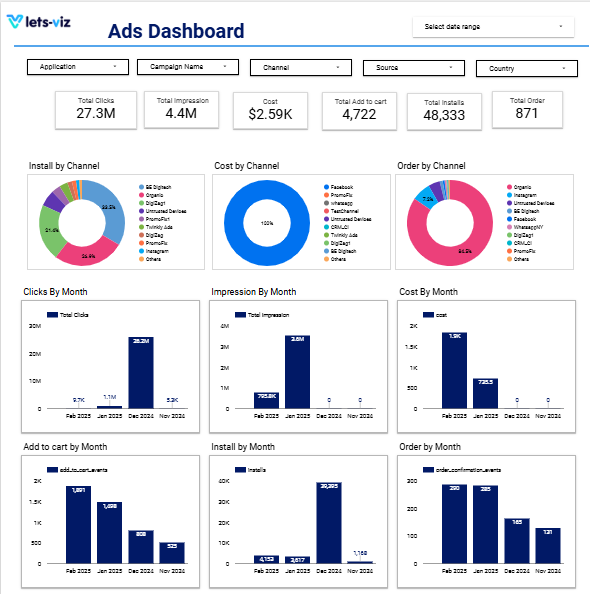
Once the data resides in Google Sheets, Looker Studio can seamlessly connect to these sheets, allowing for the creation of dynamic dashboards. This integration empowers businesses to visualize and analyze their mobile analytics data comprehensively, leading to more informed decision-making.
With the data in Google Sheets, the next step is to visualize it using powerful visualization tools like Google Data Studio, or Power BI . These tools can pull data directly from Google Sheets using connectors or APIs, making it easy to create dashboards.
- Looker Integration: If you use Looker, you can set up Looker to connect to Google Sheets as a data source. Once the connection is established, Looker will pull in the adjusted data from Google Sheets to create custom reports and dashboards.
Explore More Google Looker Studio Dashboard
Sample Dashboard
Conclusion
This solution addresses the key limitations of the default Adjust-Looker integration by providing full control over the data. By leveraging the Adjust API and Google Apps Script, you can ensure that all relevant data dimensions are included, which empowers your team to create actionable insights with Looker.
Key benefits include:
- Complete Data Access: Get all dimensions and metrics, even the ones missing from Looker’s Studio native Adjust connector.
- Automation: Automate the data extraction process, saving time and reducing human error.
- Custom Dashboards: Build tailored dashboards that cater specifically to your business needs.
- Scalability: This solution can scale to accommodate large datasets and frequent updates.
Need Help with Data Integration? We’re Here to Assist!
Integrating Adjust API with Looker via Google Apps Script can be a complex process, but you don’t have to tackle it alone. Our team of experts is ready to help you seamlessly connect your data sources and build customized dashboards that provide valuable insights for your business. Whether you need assistance with setting up the Adjust API, automating data pulls, or integrating everything into Looker, we offer comprehensive support tailored to your needs.
Connect with us today, and let’s unlock the full potential of your data together!av
Frequently Asked Questions
The Adjust API allows businesses to access their user behavior, campaign performance, and acquisition metrics directly from the Adjust platform, enabling custom data integration and deeper insights.
The native Adjust-Looker Studio integration lacks support for key dimensions and metrics, limiting the depth of insights businesses can gather from their data.
Google Apps Script automates the process of pulling data from Adjust’s API and importing it into Google Sheets, saving time and reducing manual effort for data updates.
Yes, Google Apps Script can be configured to run on a schedule, ensuring your data is always up-to-date with minimal effort.
By writing a Google Apps Script that interfaces with Adjust’s API, you can automate data extraction, reducing the need for manual data entry and ensuring accuracy.
Google Apps Script and Looker Studio follow strict security protocols to ensure your data is secure during extraction and visualization, protecting sensitive information.
You’ll need to obtain your Adjust API credentials, write a script in Google Apps Script to query the Adjust API, and automate data pulls into Google Sheets.