AI Agents in Make.com: The Future of Business Automation
Technical Definition & Purpose
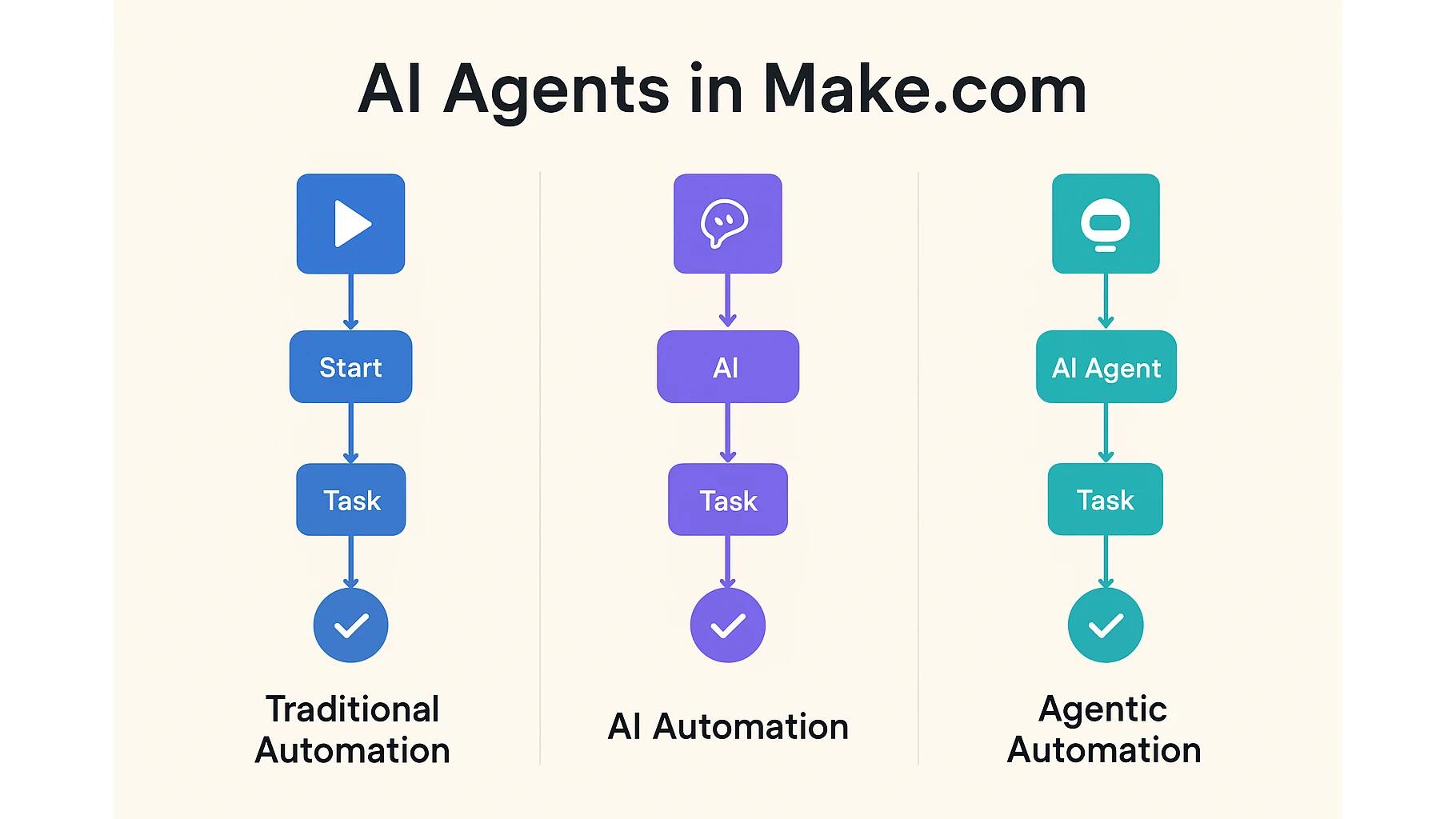
AI Agents in Make.com represent a new generation of automation that goes beyond traditional workflows and AI-enhanced tasks. Unlike predefined step-by-step rules, agentic automation empowers AI agents to dynamically decide the best course of action to achieve a business goal. This enables businesses to handle complex, unpredictable processes with greater efficiency.
In practical terms, AI agents in Make.com allow organizations to automate workflows that adapt to changing data, user inputs, and business contexts. Instead of relying solely on Boolean logic and static conditions, AI agents use fuzzy logic, reasoning, and real-time decision-making. As a result, teams achieve faster turnaround times, reduced manual oversight, and scalable processes capable of handling uncertainty.
Practical Applications & Use Cases
Primary Use Cases
Customer Support: AI agents triage and route inquiries dynamically based on urgency, tone, and intent.
Recruitment: Automating candidate sourcing, screening, and communication without step-by-step instructions.
Marketing Intelligence: Monitoring social media sentiment, adapting campaigns, and generating actionable insights.
Sales Research: Prioritizing leads based on relevance across multiple unstructured data sources.
Industry Applications
E-commerce: Personalized product recommendations and dynamic supply chain monitoring.
Healthcare: Patient intake automation, symptom triage, and adaptive care follow-ups.
Financial Services: Fraud detection and adaptive customer onboarding.
Business Process Categories
Operations: Workflow automation across logistics and compliance.
Marketing: Dynamic campaign optimization.
Sales: Lead research and prioritization.
Service: Real-time customer support automation.
Scalability Scenarios
Small Businesses: Streamline repetitive admin work without adding staff.
Enterprises: Enable adaptive, intelligent workflows across multiple departments.
Technical Architecture Overview
AI automation in Make.com scenarios consists of three pillars: trigger modules, processing, and agentic decision-making.
Trigger Module: The workflow starts with an event (e.g., “New lead in CRM” or “New email received”).
Core Processing: AI modules interpret unstructured data, extract insights, and apply fuzzy logic.
Integration Points: Scenarios connect to CRMs, support systems, email, and social channels.
Output/Actions: The agent autonomously decides the best next action (e.g., route lead to sales, generate personalized reply, update dashboards).
Advanced Features: Filters, routers, and error handling still play a role, but the AI agent introduces a layer of independence by determining logic paths dynamically.
Detailed Module Breakdown
Module 1: Trigger (e.g., “New Support Ticket in Zendesk”)
Function: Starts the workflow when a customer submits a ticket.
Configuration: Requires Zendesk API authentication, mapped fields (subject, description, urgency).
Best Practices: Use structured ticket categories for higher accuracy in AI routing.
Module 2: AI Text Analysis (Make AI/LLM)
Function: Extracts intent, sentiment, and priority from text.
Input/Output: Text input (customer message) → structured output (intent: billing issue, sentiment: frustrated).
Best Practices: Train prompts with historical support tickets for accuracy.
Error Handling: Add fallback route if AI confidence score < 70%.
Module 3: AI Agent (Agentic Automation)
Function: Makes decisions dynamically on how to handle the ticket.
Configuration: Define goal (“Resolve support request with least manual effort”).
Logic: Uses fuzzy logic to adapt based on urgency, past history, and available knowledge base.
Best Practices: Give agents access to structured context (FAQs, CRM data).
Error Handling: Escalate to human if resolution path unavailable.
Module 4: Action Module (e.g., Slack, CRM, or Email)
Function: Executes the agent’s decision (e.g., notify sales team, send resolution email, update CRM).
Configuration: Mapped fields from AI agent decision → Slack message template.
Best Practices: Keep templates flexible for different outputs.
Error Handling: Retry delivery or notify admin if API timeout occurs.
Module 5: Data Storage (Google Sheets, Database)
Function: Logs decision-making for compliance and optimization.
Best Practices: Store agent reasoning for transparency.
Real-World Implementation Example
Business Context: A SaaS company receives hundreds of support tickets daily. Traditional automation can route based on keywords but fails when customers express nuanced issues.
Before AI Agents:
Tickets routed by simple keyword filters.
Many misclassifications (billing vs. technical issues).
High manual intervention.
With AI Agents in Make.com:
Agent reviews ticket intent + sentiment.
Agent decides: auto-reply (FAQ), escalate (critical issue), or route (specific team).
Real-time adaptation as customer tone changes during interaction.
Results:
40% faster ticket resolution.
60% fewer escalations to humans.
Higher CSAT scores due to personalized replies.
Troubleshooting Tip: When AI agent misroutes, analyze stored decision logs → retrain prompts with more context.
Business Impact & ROI Analysis
Time Savings: Automating adaptive workflows saves 10–20 hours/week per team.
Cost Reduction: Eliminates 1–2 FTEs worth of repetitive tasks per department.
Accuracy: Reduces routing errors by up to 70% compared to Boolean-only workflows.
Scalability: Handles unpredictable spikes (e.g., seasonal support volume).
ROI: A $1,500/month Make.com setup + AI agent reduces manual workload worth $8,000+/month in labor.
(Source: McKinsey, 2023 – AI-driven automation increases productivity by 20–30% across industries.)
Troubleshooting & Professional Tips
Common Issues & Fixes
Configuration Errors: Ensure API connections authenticated correctly.
Data Issues: For unstructured data, apply preprocessing (cleaning text, converting formats).
API Limitations: Watch out for LLM rate limits—implement retries.
Performance Optimization: Break down complex workflows into modular sub-scenarios for speed.
Pro Tip: Always log agent decisions. This transparency helps refine performance and builds trust with stakeholders.
Related Scenarios & Extensions
Complementary Automations:
Use AI agents for lead qualification before syncing data to CRM.
Deploy AI-based content generation for marketing campaigns.
Integration Expansion:
Combine with dashboards for insights (/marketing-dashboard-examples/).
Connect with ERP for adaptive inventory management.
Further Learning: Explore our [/ai-automation-for-small-businesses/] guide or book a strategy call with our [/custom-ai-automation-agency/].
Ready to start building? Sign up for Make.com today and discover the power of agentic automation for yourself.
📩 Contact us today to schedule a free consultation and see how automation can help you keep more customers, protect revenue, and grow stronger.
Check out other helpful Make.com Workflow Automate Blogs
- Understanding Execution and Cycles in Make.com: A Hands-On Guide
- Connections, Webhooks, and Filters in Make.com: A Practical Guide
- Transforming Data in Make.com: A Professional Guide to Using Functions for Business Automation
- An Introduction to Aggregators in Make: How I Learned to Group, Combine, and Simplify Data
- Mastering Dates and Time in Make.com: A Practical Guide for Automation Builders
- How to Use HTTP Module in Make.com: My Complete Guide to Custom API Magic
AI automation enhances workflows with smart tasks but still follows fixed steps. Agentic automation lets AI agents decide steps dynamically.
Use traditional automation for repetitive, rule-based tasks (e.g., saving attachments to Drive). It’s faster and simpler to maintain.
Yes, they excel at analyzing emails, PDFs, and images—tasks where traditional automation struggles.
They use fuzzy logic, probabilities, and reasoning, allowing flexible, context-aware responses.
Not entirely—they reduce repetitive workloads so humans can focus on strategic, high-value activities.
Yes, provided you configure secure connections and follow compliance guidelines. Always log and audit AI actions.
Begin with a small scenario (e.g., AI-driven lead routing), test thoroughly, then scale to more complex processes.

If you are looking forward to getting your data pipeline built and setting up the dashboard for business intelligence, book a call now from here.
#analytics #data #business #artificialintelligence #machinelearning #startup #deeplearning #deeplearning #datascience #ai #growth #dataanalytics #india #datascientist #powerbi #dataanalysis #businessanalytics #businessanalyst #businessandmanagement #dataanalyst #businessanalysis #analyst #analysis #powerbideveloper #powerbidesktop #letsviz